Finding the best free note-taking app sounds easy until you actually try to do it. One app is great for quick grocery lists but collapses the moment you ask it to organize a semester’s worth of class notes. Another has beautiful folders, but it treats tasks, links, drafts, and databases like they are suspicious strangers at a dinner party. Then there is Notion, the app I kept opening “just to test” and somehow ended up using for notes, planning, research, habit tracking, content calendars, personal dashboards, and the occasional wildly optimistic Monday to-do list.
After trying many digital note-taking apps, Notion stands out because it does more than store words. It helps turn scattered ideas into a system. For free personal use, it gives solo users a flexible workspace where notes can become checklists, pages can become mini websites, and a simple reading list can grow into a searchable research database. That is why, for my own workflow, Notion is the best free note-taking app I have used.
Why Notion Feels Different From Regular Note Apps
Most note-taking apps start with the same basic promise: open a blank page, type something, save it, and hope your future self remembers where it went. Notion begins with that same blank page, but the page is not just a page. It can hold text, headings, images, checkboxes, tables, databases, toggles, callouts, code blocks, embedded links, bookmarks, files, calendars, and more. In Notion language, these pieces are called blocks, and blocks are the secret sauce.
Because every piece of content is movable, a messy note can be reorganized without wrestling the formatting monster. A meeting note can start as a quick outline, then become a task list. A class note can become a database entry tagged by subject, exam date, and priority. A blog idea can grow into a full content brief with sources, status, keywords, and deadlines. Instead of forcing every thought into a rigid notebook structure, Notion lets the structure grow around the thought.
The Free Plan Is Actually Useful
“Free” can mean many things in software. Sometimes it means “usable until you blink.” Notion’s free personal plan is much more generous for individual users. For someone building a personal note-taking system, the free plan offers enough room to create a serious workspace without immediately running into a paywall.
That matters because note-taking is not a one-day experiment. A useful notes app has to survive real life: random ideas at midnight, article research, work tasks, receipts, book notes, project plans, travel checklists, and the strange little reminders we all write like “buy tape” with absolutely no context. Notion’s free version is strong enough to handle that daily chaos, which makes it more than a trial. It is a practical long-term option for many solo users.
Notion Works as a Second Brain, Not Just a Notebook
The phrase “second brain” gets thrown around a lot in productivity circles, but Notion genuinely earns it when set up well. A traditional notebook stores information. Notion connects it. You can create a main dashboard with links to projects, notes, goals, reading lists, finances, recipes, or study materials. You can build a personal wiki where related pages link to each other. You can keep a task database that connects to projects and meeting notes.
This is where Notion becomes powerful for students, writers, freelancers, creators, managers, and anyone whose brain has too many browser tabs open. Instead of keeping notes in one app, tasks in another, bookmarks in another, and plans in another, Notion can bring them into one organized workspace. It is not always the fastest app for capturing a two-word thought, but it is excellent for turning that thought into something useful later.
Databases Are the Feature That Changed Everything
Notion databases are one of the biggest reasons I prefer it over simpler note-taking apps. At first, a database may sound intimidating, like something that requires a spreadsheet, a strong coffee, and emotional support. In practice, a Notion database can be as simple as a table of notes with tags.
For example, a reading database can include the article title, source, topic, status, date saved, and key takeaway. A student can create a lecture notes database with course, professor, exam relevance, and review status. A content writer can create a blog pipeline with idea, outline, draft, editing, published date, SEO keyword, and internal links. The same database can be viewed as a table, board, calendar, gallery, or list depending on what you need to see.
This flexibility makes Notion feel less like a storage cabinet and more like a command center. You are not just collecting notes; you are building systems that help you find, filter, and act on them.
Templates Make Starting Easier
One reason people bounce off Notion is that a blank workspace can feel too blank. The freedom is wonderful, but it can also whisper, “Congratulations, you now have to design your entire life.” Thankfully, Notion templates help solve that problem.
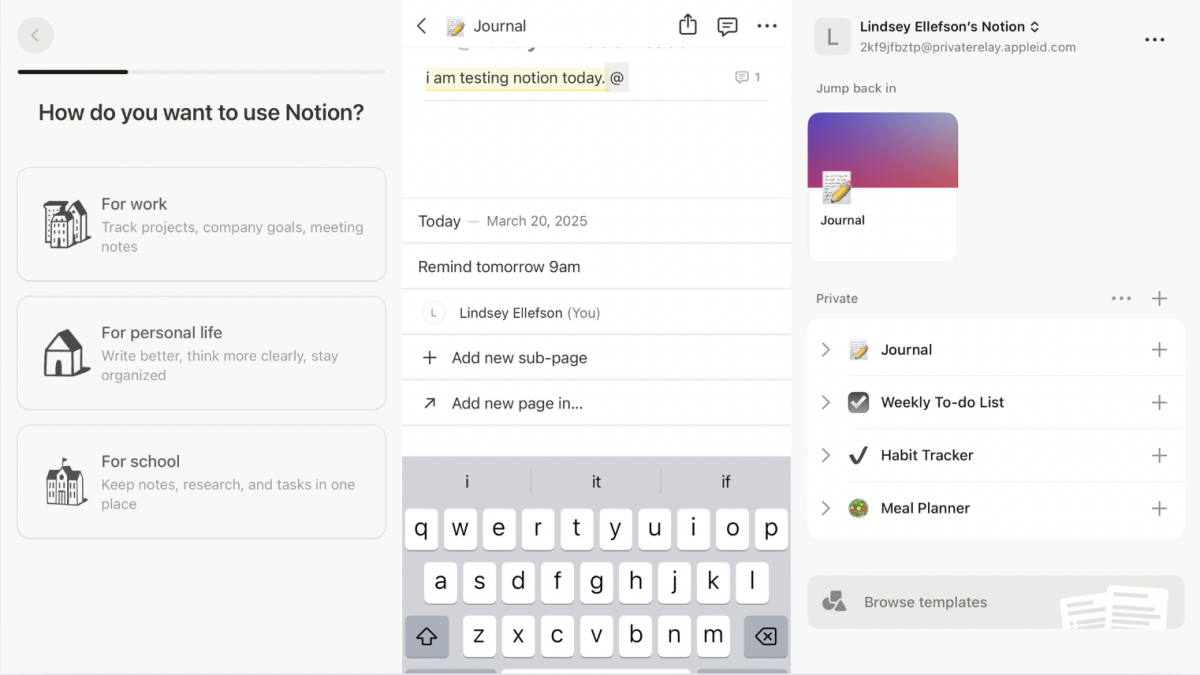
The Notion template ecosystem is huge, covering everything from class notes and project trackers to personal finance dashboards, content calendars, habit trackers, meal planners, CRM systems, and travel planners. Some templates are simple and free; others are advanced and paid. For beginners, free templates are the fastest way to understand what Notion can do. You can duplicate a template, adjust it, delete what you do not need, and learn by experimenting.
My advice is to start with one simple template, not twelve. A clean notes dashboard, a basic task list, or a reading tracker is enough. The goal is not to build a productivity spaceship on day one. The goal is to create a workspace you will actually use after the novelty wears off.
It Handles Notes, Tasks, and Projects in One Place
The best note-taking app should not only capture information; it should help you use that information. Notion shines because notes and tasks can live together naturally. If you take meeting notes and discover three follow-up tasks, you can add checkboxes right there. If a research note becomes a project idea, you can move it into a project database. If a blog outline needs editing, you can assign it a status and due date.
This is especially helpful for people who think in layers. A simple note might become a checklist. A checklist might become a project. A project might need a calendar view. Notion allows that evolution without forcing you to copy and paste across multiple apps. That saves time, reduces friction, and prevents the classic productivity tragedy: spending more energy managing the system than doing the work.
The Web Clipper Is Great for Research
If you do research online, Notion’s web clipper is one of its most useful tools. You can save articles, references, inspiration, tutorials, recipes, competitor pages, or reading material directly into your workspace. On mobile, saving content to Notion through the share menu makes it easy to capture useful links before they vanish into the browser abyss.
For writers and students, this is a major advantage. Instead of keeping twenty tabs open and pretending that is a “research strategy,” you can save sources into a database, tag them by topic, and add notes about why they matter. Later, when it is time to write, study, or plan, everything is waiting in one place. Your browser gets to breathe again. Everybody wins.
Collaboration Is Built In
Even if you use Notion as a personal note-taking app, collaboration is a nice bonus. You can share a page with another person, invite collaborators, leave comments, mention people, and control permissions. This makes Notion useful for group projects, freelance clients, family planning, editorial workflows, and team documentation.
For example, a freelance writer can share a content calendar with a client. A student group can organize project notes and assign sections. A small team can keep meeting notes, tasks, and reference documents in one workspace. Unlike sending a document back and forth by email, Notion keeps the latest version visible and organized.
It Looks Clean Without Being Boring
Design matters more than productivity experts sometimes admit. If an app looks like it was assembled in a basement in 2007, I am less likely to use it every day. Notion has a clean, modern interface with enough customization to make pages feel personal without turning them into a glitter explosion.
You can add icons, cover images, columns, callout boxes, dividers, toggles, and headings. A notes page can look tidy and readable. A dashboard can feel inviting. A project page can be organized without looking like a spreadsheet from a tax audit. This visual flexibility makes Notion pleasant to return to, which is important because the best note-taking system is the one you keep using.
Notion vs. Other Free Note-Taking Apps
Notion vs. Google Keep
Google Keep is excellent for fast, lightweight notes. It is great for quick lists, reminders, voice notes, and color-coded thoughts. But for long-term organization, Notion has more depth. Keep feels like sticky notes on a wall; Notion feels like the whole office, including the filing cabinet, whiteboard, and project board.
Notion vs. Apple Notes
Apple Notes is simple, fast, and deeply convenient for Apple users. It is a strong choice for personal notes, scans, handwriting, and everyday capture. Notion, however, is better for structured information, databases, templates, dashboards, and cross-platform planning. If your notes need to become workflows, Notion has the advantage.
Notion vs. Microsoft OneNote
OneNote is powerful, free, and flexible, especially for people who like a notebook-style layout. It also works well for handwritten notes. Notion feels more structured and modern for databases, project organization, and connected workspaces. OneNote is great for freeform note-taking; Notion is better for building an organized system around your notes.
Notion vs. Evernote
Evernote has long been a major name in digital note-taking, especially for clipping, tagging, and storing information. Notion feels more adaptable because it combines notes with databases, tasks, wikis, and page design. For users who want a flexible free workspace rather than a traditional notes archive, Notion is hard to beat.
Where Notion Is Not Perfect
No app deserves a crown without a few honest complaints. Notion has a learning curve. New users can feel overwhelmed because there are so many possibilities. It is also not always as instant as simpler apps when you only need to jot down one tiny thought. If you want a plain, lightning-fast scratchpad, Google Keep or Apple Notes may feel quicker.
Offline access has improved, but users still need to understand how offline pages work, especially when using multiple devices. Notion is also cloud-based, which may not be ideal for people who want a local-first note-taking app where everything lives primarily on their own device. And while Notion AI and advanced business features can be impressive, they are not the main reason the free personal plan is valuable.
Still, these drawbacks do not cancel out Notion’s strengths. They simply mean Notion works best for people who want structure, organization, and flexibility rather than only a digital napkin for quick thoughts.
Best Ways to Use Notion as a Free Note-Taking App
1. Create a Home Dashboard
Start with one page called “Home.” Add links to your most important areas: Notes, Tasks, Projects, Reading List, Goals, and Archive. This gives your workspace a front door instead of making every page feel like a random hallway.
2. Build a Master Notes Database
Create one database for general notes. Add properties such as topic, type, date, status, and related project. This makes it easy to filter notes by category and prevents your workspace from becoming a digital junk drawer.
3. Use Templates for Repeated Notes
If you take meeting notes, class notes, book notes, or client notes regularly, create a template. A simple structure saves time and keeps notes consistent. Future you will be grateful, and future you is notoriously hard to impress.
4. Save Research With the Web Clipper
Use the web clipper to save articles into a reading or research database. Add tags and a short summary. Do not rely on your memory to remember why you saved something. Your memory is busy remembering old song lyrics from 2009.
5. Keep It Simple at First
The biggest beginner mistake is overbuilding. Start with a few pages and one or two databases. Add complexity only when you actually need it. A simple Notion workspace used daily is better than a beautiful dashboard you avoid because it feels like homework.
Personal Experience: Why I Keep Coming Back to Notion
My experience with Notion started the way many productivity experiments begin: with optimism, three open tutorials, and the dangerous belief that I was about to become a completely different person by Tuesday. I had tried basic note apps before. Some were fast but too shallow. Some were powerful but felt like operating a small aircraft. Notion landed in the middle: flexible enough to grow with me, but friendly enough that I could start with a blank page and figure things out as I went.
The first thing that hooked me was the ability to organize different kinds of information in one place. I did not have to decide whether something was a note, a task, a bookmark, or a project. In real life, ideas are often all four. A random article can become a research source. A research source can become a blog outline. A blog outline can become a deadline. Notion lets that chain happen naturally.
One of my favorite uses is creating a content planning database. Each idea gets its own page. Inside that page, I can add an outline, target keywords, reference notes, internal link ideas, draft sections, and final editing reminders. In table view, I can see every article by status. In calendar view, I can see publication dates. In board view, I can drag posts from “Idea” to “Writing” to “Editing” to “Published.” It feels satisfying in the way only moving a card across a board can feel. Tiny dopamine, neatly organized.
I also use Notion for personal planning. A weekly page helps me list priorities, appointments, errands, and small reminders. I like using toggles for details because they keep the page clean. For example, “Meal plan” can hide a list of dinners, ingredients, and grocery notes. “Writing tasks” can hide outlines and links. The page stays calm, even when life is doing its usual circus routine in the background.
Another practical benefit is that Notion helps me review instead of just collect. Many note apps make it easy to capture information but hard to revisit it. In Notion, I can create a review status, add a “last reviewed” date, or filter notes that still need action. That changes the purpose of note-taking. Notes stop being a graveyard for good intentions and become a working library.
That said, my best Notion setup came after I stopped trying to make it perfect. At first, I downloaded too many templates and created too many categories. My workspace looked impressive but felt heavy. Eventually, I simplified it: one dashboard, one notes database, one task database, one projects database, and a few focused pages. That was when Notion became useful every day.
For me, Notion is the best free note-taking app because it respects the messy way real thinking works. Ideas do not arrive in neat folders. They arrive while reading, working, planning, scrolling, cooking, or suddenly remembering something at the worst possible moment. Notion gives those ideas a place to land and a way to become organized later. It is not perfect, but it is powerful, flexible, and surprisingly fun once it clicks.
Conclusion
Notion is not just another note-taking app with a nice interface. It is a flexible workspace that can start as a simple notebook and grow into a personal knowledge base, task manager, research hub, content calendar, study system, or life dashboard. Its free personal plan gives solo users enough power to build a serious productivity system without paying upfront, and its databases, templates, sharing tools, web clipper, and clean design make it more useful than many traditional note apps.
If you only need quick sticky notes, Notion may be more than you need. But if you want a free note-taking app that can organize ideas, connect information, manage projects, and adapt to your workflow, Notion is the one I would recommend first. It is the rare productivity app that can be as simple or as advanced as you want, which is exactly why it has earned a permanent spot in my digital toolbox.