If your television’s built-in smart platform feels slower than a Monday morning without coffee, the new Apple TV experience is here to rescue your living room. Apple TV has evolved from a simple streaming box into a polished entertainment hub that blends 4K video, premium audio, smart home control, gaming, FaceTime, Apple Music Sing, live sports, and one of the cleanest interfaces in the streaming world.
There is one important detail to clear up right away: when people say “the new Apple TV,” they may mean three different things. They may be talking about the Apple TV 4K device, the Apple TV app, or the Apple TV streaming subscription. Apple, because apparently one name was not enough fun, uses “Apple TV” across hardware, software, and services. This guide explains all of it in plain English, with a focus on the current Apple TV 4K, the latest tvOS experience, and what makes Apple’s living-room strategy worth watching.
What Is the New Apple TV?
The current Apple TV 4K is Apple’s premium streaming media player. It connects to your TV through HDMI and gives you access to apps like Apple TV, Netflix, Disney+, Max, Hulu, YouTube, Prime Video, Peacock, ESPN, music apps, fitness apps, games, and more. Unlike many built-in smart TV systems, Apple TV 4K is designed to feel fast, clean, and privacy-focused.
The latest Apple TV 4K hardware, introduced as the third generation, is powered by the A15 Bionic chip. That chip is not just there for bragging rights. It helps the device launch apps quickly, handle 4K HDR video smoothly, and support Apple Arcade games with less lag. In daily use, this means less staring at loading screens and more watching the show you opened the app for in the first place.
Apple TV 4K Models: Wi-Fi vs. Wi-Fi + Ethernet
Apple sells Apple TV 4K in two main versions. The Wi-Fi model includes 64GB of storage and is a good fit for most streaming households. The Wi-Fi + Ethernet model includes 128GB of storage, Gigabit Ethernet, and Thread networking support for compatible smart home accessories. If your Apple TV will sit near your router, or if you care about smart home reliability, the Ethernet model is the better long-term buy.
Both versions come with the Siri Remote, which now charges with USB-C. That may sound like a tiny change, but anyone who has spent 20 minutes searching for one random Lightning cable in a drawer full of mystery cords will appreciate it.
Design: Small Box, Big Personality
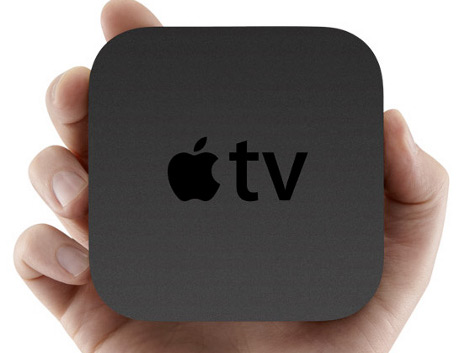
The Apple TV 4K is physically simple: a compact black square that disappears into an entertainment center. It does not scream for attention. It does not glow like a spaceship. It quietly does its job, which is exactly what a living-room device should do. The real design story is not the box itself; it is the interface.
With tvOS 26, Apple introduced a more modern visual style built around Liquid Glass, giving menus, controls, and the Apple TV app a fresher, lighter, more dimensional feel. The goal is to keep the video content front and center while still making navigation feel premium. When you fast-forward, adjust audio, change profiles, or open Control Center, the design aims to stay elegant instead of throwing a giant menu in your face like a pop-up ad from 2007.
Picture Quality: 4K HDR Without the Drama
The new Apple TV 4K supports up to 4K resolution at 60 frames per second and works with major HDR formats, including Dolby Vision, HDR10+, HDR10, and HLG. In normal human terms, that means brighter highlights, deeper shadows, richer colors, and better detail in scenes where everything is either exploding, glowing, or dramatically lit by one tiny candle.
Support for both Dolby Vision and HDR10+ matters because TV brands do not all support the same premium HDR formats. LG and Sony owners often benefit from Dolby Vision, while many Samsung TVs lean into HDR10+. Apple TV 4K covering both makes it more flexible than many cheaper streaming devices.
Match Content Makes a Difference
One of Apple TV 4K’s most useful features is the ability to match dynamic range and frame rate. When enabled, Apple TV can switch output settings based on the movie, show, or sports event you are watching. This helps avoid the overly smooth “soap opera effect” and prevents standard content from being forced into fake HDR. It is a small setting that can make your expensive TV look the way it was supposed to look.
Sound Quality: Dolby Atmos and Home Theater Flexibility
Apple TV 4K supports immersive audio formats such as Dolby Atmos when used with compatible content, apps, speakers, soundbars, or AV receivers. If your home theater setup supports it, Atmos can create a more spacious sound field, making rain feel like it is falling around you and action scenes feel less like they are trapped inside the TV speakers.
Apple TV 4K also works well with HomePod speakers and AirPods. Pairing AirPods for private listening is especially useful at night. You can watch a loud movie without waking the entire house, the dog, and possibly the neighbor who already has opinions about your subwoofer.
The Siri Remote: Better Than It Used to Be
The Siri Remote has improved a lot from earlier versions. The current design is more comfortable, more precise, and less likely to create accidental swipes across the screen. It includes a clickpad with touch support, a dedicated power button, volume controls, and Siri access for voice search.
You can ask Siri to find movies, open apps, replay dialogue, check sports scores, or search by actor, genre, and title. Voice search is not perfect, but it is extremely convenient when typing with an on-screen keyboard feels like trying to write a novel using a calculator.
Finding a Lost Remote
One underrated Apple TV feature is the ability to use an iPhone to help locate a misplaced Siri Remote, as long as the required software and compatible remote are in place. This is a small quality-of-life feature, but it solves a problem nearly every living room has: the remote somehow teleporting into the couch dimension.
tvOS 26: The Software That Makes Apple TV Feel New
Hardware is only half the Apple TV story. tvOS 26 brings major interface and experience improvements that make the platform feel more modern. The redesigned Apple TV app uses richer poster art and shows more content at once, helping users discover what to watch without endlessly hopping from app to app.
Profiles are also more useful. Apple TV can display user profiles when it wakes, making it easier for each person in the household to access their own Watchlist, recommendations, and Apple Music preferences. This is especially helpful in families where one person watches prestige dramas, another watches cartoons, and someone else keeps recommending 14-hour documentaries about ancient plumbing.
Apple Music Sing Turns the Living Room Into Karaoke Night
Apple Music Sing on Apple TV is one of the most entertaining software features. With tvOS 26, iPhone can work as a microphone for Apple TV, allowing users to sing along with lyrics on the big screen. Friends can join with their own iPhones, queue songs, and react with onscreen emoji. It is fun, social, and potentially dangerous if your group believes every gathering needs a dramatic performance of an 80s power ballad.
Apple TV App: One Place for Shows, Movies, Sports, and Rentals
The Apple TV app is designed as a central entertainment hub. It brings together Apple Originals, movies to rent or buy, premium channels, sports, and recommendations from supported streaming apps. It is available not only on Apple TV 4K but also on iPhone, iPad, Mac, Apple Vision Pro, smart TVs, gaming consoles, Roku, Fire TV, Google TV, PlayStation, Xbox, Android, and PC.
That wide availability matters because Apple is no longer treating the living room as a single-device experience. You can start a show on Apple TV 4K, continue on an iPad, rent a movie from a Mac, or watch on a smart TV in another room. For users already in the Apple ecosystem, the handoff between devices feels natural.
Apple TV Subscription: More Than Just Original Shows
The Apple TV streaming subscription has become more valuable as Apple adds live sports and expands its original programming. The service includes Apple Original series, films, documentaries, kids’ content, and live sports such as Friday Night Baseball, Formula 1 races in the United States, and Major League Soccer coverage.
Starting with the 2026 MLS season, all MLS matches are included for Apple TV subscribers at no additional cost, replacing the separate MLS Season Pass model. This makes the service more attractive for soccer fans, especially with global attention on North American soccer during the 2026 FIFA World Cup year.
Smart Home Features: Apple TV as a Home Hub
The new Apple TV 4K is not just for watching shows. It can also serve as a home hub for Apple Home, allowing remote access, automation, and control of compatible smart home devices. The Wi-Fi + Ethernet model supports Thread networking, which can improve responsiveness and reliability for compatible Matter and HomeKit accessories.
If you have smart lights, locks, thermostats, sensors, or blinds, Apple TV can become the quiet coordinator behind the scenes. It helps your smart home work when you are away and supports automations like turning off lights at bedtime or setting a “Movie Night” scene from Control Center. This is where Apple TV starts to feel less like a streaming stick and more like the brain of the living room.
Gaming on Apple TV 4K
Apple TV 4K is not a PlayStation 5 or Xbox Series X replacement, and it should not pretend to be. However, it is surprisingly capable for casual gaming, Apple Arcade titles, family games, fitness experiences, and controller-friendly apps. The A15 Bionic chip gives it enough power for smooth gameplay in many titles, and support for popular wireless controllers makes the experience more console-like.
For families, Apple Arcade on Apple TV can be a big win. Games are easy to access, there are no traditional ads inside Apple Arcade titles, and many games work well on the couch. It is not for hardcore competitive gaming, but for quick fun after dinner, it does the job nicely.
Who Should Buy the New Apple TV?
Apple TV 4K is best for people who want a fast, polished, ad-light, privacy-minded streaming experience. It is especially appealing if you already own an iPhone, iPad, Mac, AirPods, HomePods, or Apple Watch. The deeper you are in Apple’s ecosystem, the more useful Apple TV becomes.
It is also a strong choice for people who care about picture quality and audio support. If you own a good 4K TV and a soundbar or home theater system, Apple TV 4K helps you get more from that investment. Cheap streaming sticks are fine for basic viewing, but they often feel slower, push more ads, or offer weaker long-term performance.
Who Might Skip It?
If you only watch one or two apps and your smart TV already handles them smoothly, Apple TV 4K may be more device than you need. Budget buyers may also prefer Roku, Fire TV, or Google TV options that cost less. Apple TV 4K is not the cheapest way to stream; it is the premium way to stream.
What About a Future Apple TV Model?
As of May 2026, Apple has not officially announced a newer Apple TV 4K hardware generation beyond the current third-generation model. However, industry discussion around a future Apple TV often focuses on a faster chip, better wireless performance, deeper Apple Intelligence integration, stronger smart home features, and possibly more advanced gaming support.
For buyers, the practical question is simple: should you buy now or wait? If your current streaming setup is painfully slow, Apple TV 4K is still one of the best devices available. If your existing setup works fine and you enjoy waiting for the next Apple announcement like it is a sporting event, then waiting may make sense. Either way, the current model remains fast, capable, and well-supported.
Real-World Experience: Living With the New Apple TV
Using Apple TV 4K every day feels less like using a gadget and more like removing friction from the living room. That may sound dramatic, but the difference becomes obvious after a week. Apps open quickly. Menus do not feel buried under banner ads. The remote is simple. The interface does not constantly beg you to try random free channels you never asked for. It is the kind of device that becomes invisible because it works.
The best experience starts with setup. If you have an iPhone, Apple TV setup is fast. You bring the phone nearby, follow the prompts, and much of the account work is handled automatically. Compared with typing long passwords into a TV app using arrow keys, this feels like modern civilization. App sign-ins are still not perfect across every service, but Apple has clearly been working to reduce the pain.
Picture quality is another everyday advantage. On a good 4K TV, Apple TV 4K makes streaming look consistent. Dolby Vision content has excellent contrast, HDR10+ support helps on compatible displays, and match frame rate can make movies feel more natural. Sports also benefit from the device’s smooth performance, especially when switching between live events, highlights, and replays.
The Apple ecosystem features are where the device quietly becomes addictive. AirPods pairing is excellent for private listening. AirPlay makes it easy to throw photos, videos, or presentations onto the big screen. Apple Fitness+ users can follow workouts on the TV, while Apple Music users can turn the room into a karaoke lounge with Apple Music Sing. FaceTime on Apple TV, using an iPhone or iPad camera, also makes video calls feel more relaxed because everyone can sit on the couch instead of crowding around a laptop.
The smart home side is just as practical. If you use Apple Home, Apple TV as a home hub can make automations feel more dependable. A “Movie Night” scene might dim lights, close shades, and turn on the TV area. A “Good Night” scene can shut things down when the credits roll and everyone pretends they are not going to watch one more episode. These features are not flashy in a commercial, but they are genuinely useful at home.
The main drawback is price. Apple TV 4K costs more than basic streaming sticks, and not everyone needs its extra polish. But the value becomes clearer over time. Cheaper devices can feel cluttered or slow after a year or two, while Apple TV 4K tends to remain responsive. For anyone who watches TV daily, that difference matters. A streaming device is something you touch every night; saving money upfront is less exciting if you spend the next three years annoyed by lag.
Overall, the new Apple TV experience is best described as premium convenience. It does not reinvent television, but it makes streaming, sound, smart home control, and Apple services feel more connected. It is fast, refined, and surprisingly versatile. In a world where many smart TV menus feel like digital yard sales, Apple TV 4K feels like a clean, organized living room where everything has a place.
Conclusion: Is the New Apple TV Worth It?
The new Apple TV experience is worth it for viewers who want speed, simplicity, excellent 4K HDR support, strong audio features, smart home integration, and deep Apple ecosystem benefits. Apple TV 4K may not be the cheapest streaming device, but it is one of the most polished. It turns an ordinary TV into a smarter entertainment center without making the interface feel like a crowded shopping mall.
If you are an Apple user, the answer is easy: Apple TV 4K fits beautifully into your digital life. If you are not already in Apple’s ecosystem, it still stands out for performance, privacy, design, and long-term reliability. The new Apple TV is not just a box under your television. It is Apple’s vision for the modern living room: cinematic, connected, and just a little bit smug about how smoothly it works.
Note: This article is based on current Apple TV 4K hardware details, tvOS 26 features, Apple TV app and subscription updates, and reputable U.S. technology coverage available as of May 2026.