A tiny handheld computer used to sound like something from a spy movie, a cyberpunk novel, or the pocket of that one friend who brings a soldering iron to brunch. But thanks to modern microcontrollers, clever open-source design, and a healthy amount of retro-computing obsession, the idea is now very real. The project behind the phrase “Teensy becomes tiny handheld computer, plays emulators” shows how a powerful Teensy 4.1 board can become a compact portable machine with a keyboard, display, audio, storage, joystick support, and enough processing muscle to run classic emulators.
At first glance, it looks like a gadget built by someone who looked at a laptop, a Game Boy, and a calculator and said, “Yes, but what if it fit in one hand and made retro nerds emotional?” Under the hood, though, this is more than a cute mini console. It is a serious demonstration of how far microcontroller-based computing has come. The Teensy 4.1 is not a Raspberry Pi-style single-board computer running Linux. It is a high-performance microcontroller board designed for real-time control, fast I/O, audio, display projects, embedded systems, and wonderfully unreasonable experiments.
The result is a pocketable DIY handheld computer that can run emulators, connect to external displays, accept keyboard and joystick input, and remind us that old-school computing never really disappeared. It just got smaller, faster, and a lot more likely to live in a 3D-printed case.
What Is the Teensy Handheld Computer?
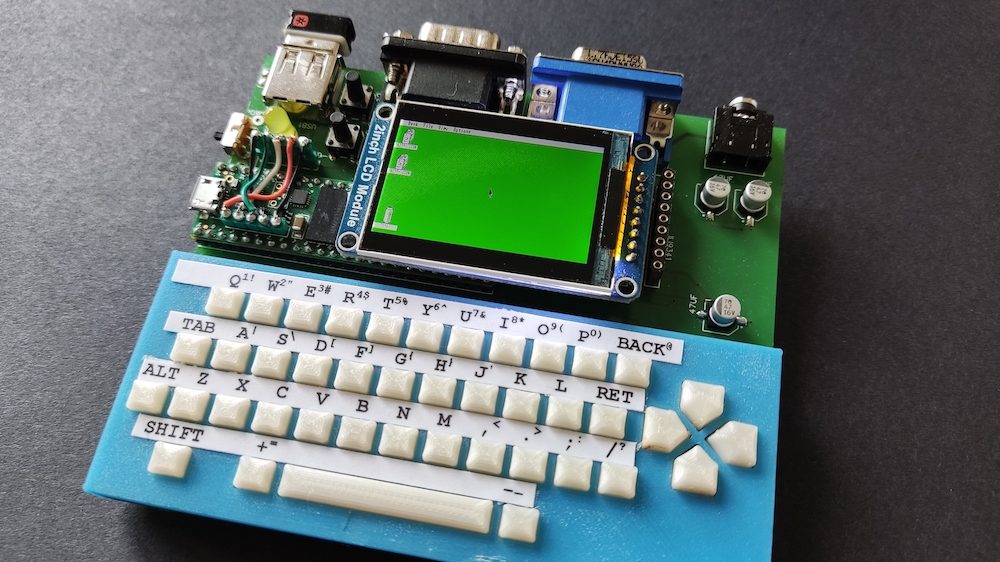
The handheld computer at the center of this story is commonly associated with Jean-Marc Harvengt’s T-COMPUTER project, a Teensy 4.1-based microcomputer platform. It combines a compact 42-key keyboard, directional controls, a built-in 320×240 TFT display, VGA output, 16-bit stereo DAC audio, USB host input, Atari-style DB9 joystick support, general-purpose I/O pins, and SD card storage. That is a lot of capability for a device small enough to make a 1990s palmtop look like it has been eating too many expansion cards.
The idea is simple in spirit but technically ambitious: take a fast Teensy microcontroller, surround it with the pieces a computer needs, and use efficient emulator software to recreate classic machines and arcade systems. Instead of relying on a full operating system, the project leans into the strengths of embedded hardware: fast booting, direct control over peripherals, low overhead, and a satisfyingly hands-on development style.
For retro-computing fans, the magic is that the device is not merely playing “retro-inspired” games. It is designed around emulation work, including projects such as MCUME, which targets old computers and game systems on microcontrollers. That means the handheld can become a tiny portal into classic computing history, from early arcade-style experiences to systems such as the Atari ST and Amiga, depending on the emulator build, memory configuration, and display setup.
Why the Teensy 4.1 Is Perfect for This Kind of Project
The Teensy 4.1 is popular among makers because it sits in a sweet spot between tiny microcontroller board and surprisingly capable computing platform. Officially, the board uses an NXP i.MX RT1062 processor with an ARM Cortex-M7 core running at 600 MHz. It includes 1 MB of RAM, 8 MB of flash memory, a microSD card socket, USB host support, plentiful I/O, multiple serial interfaces, SPI, I2C, PWM, analog inputs, and expansion options for additional memory.
Those numbers matter because emulation is hungry work. To emulate an old system, the device must imitate the original CPU, video hardware, sound hardware, input behavior, timing quirks, and memory layout. That may sound easy when the original machine ran at a few megahertz, but accurate or smooth emulation often requires many times more performance than the original hardware. A classic computer’s CPU may have been slow by modern standards, but it had custom chips, predictable timing, and hardware shortcuts that an emulator has to reproduce in software.
The Teensy 4.1’s Cortex-M7 core helps because it is built for performance. It has a floating-point unit, fast tightly coupled memory, cache, and high-speed interfaces. The board also supports Arduino-style development through Teensyduino, making it approachable for experienced hobbyists who already know C or C++ but do not want to spend their weekend wrestling a toolchain dragon in a cave.
In projects such as the T-COMPUTER, the Teensy may be pushed beyond its standard personality with added RAM, custom display output, audio hardware, and carefully optimized emulator code. The project documentation refers to 800+ MHz operation, while official Teensy 4.1 specifications list 600 MHz as the standard clock. In other words, the handheld is not just using the Teensy casually; it is taking the board to the gym and asking it to lift arcade cabinets.
From Microcontroller to Mini Computer
A microcontroller normally handles focused tasks: reading sensors, controlling motors, driving LEDs, generating audio, or talking to other devices. A computer, by contrast, is expected to handle storage, input, output, programs, graphics, sound, and user interaction. Turning a Teensy into a tiny handheld computer means giving the microcontroller enough surrounding hardware to behave like a complete system.
Display and Video Output
The built-in TFT screen gives the handheld an immediate portable interface. A 320×240 display is modest by modern smartphone standards, but it is right at home for retro systems and arcade-style software. Many classic games were designed for low resolutions, chunky pixels, and limited color palettes. On a small screen, those pixels do not look outdated; they look intentional, like tiny squares of nostalgia wearing sunglasses.
VGA output is especially interesting because it lets the device become more than a pocket toy. Plug it into a monitor, add a keyboard or joystick, and the handheld shifts into desktop mode. That dual personality is part of the appeal: it is portable when you want convenience and expandable when you want the full retro-computing desk setup.
Keyboard, Buttons, and Joystick Input
The 42-key keyboard is a major difference between this project and a typical DIY handheld game console. Many handheld builds include only game buttons, which is fine for arcade games but awkward for old computers that expect keyboard commands. A compact keyboard opens the door to BASIC interpreters, command-driven software, text adventures, configuration menus, and computer emulators that need more than “jump” and “start.”
The directional pad and extra gaming buttons make the system feel console-like, while DB9 joystick input gives it a charming bridge to classic Atari-style controllers. USB host input is another powerful addition, allowing keyboards, mice, MIDI devices, or other peripherals depending on software support. That flexibility is where the Teensy handheld stops being a novelty and starts feeling like a tiny general-purpose retro machine.
Audio That Does More Than Beep
Audio is a big part of emulation. A game without its original sound effects feels like eating cereal without milk: technically possible, emotionally suspicious. The T-COMPUTER design includes 16-bit stereo DAC output, which helps deliver richer sound than a simple buzzer or basic PWM audio. For emulators, better audio output means chiptunes, effects, and old game soundtracks can feel closer to the systems being recreated.
What Emulators Can Run on a Teensy Handheld?
The Teensy emulator ecosystem is tied closely to projects such as MCUME, teensyMAME, and other microcontroller-focused ports. These projects explore emulation of classic computers, consoles, and arcade systems from the late 1970s through the 1980s. Examples associated with Jean-Marc Harvengt’s work include Atari ST experiments, Amiga emulation, and arcade system emulation based on early MAME sources.
This does not mean a Teensy handheld will magically run every retro platform with perfect accuracy. Expectations matter. Microcontroller emulation is a balancing act involving CPU speed, memory limits, storage access, screen resolution, input mapping, and audio timing. Some systems are practical; others are too demanding without heavy compromises. The sweet spot is usually older 8-bit and early 16-bit machines, arcade boards from the golden age, and carefully optimized ports.
Still, that sweet spot is enormous. Space shooters, platformers, text-based software, early computer demos, simple productivity tools, and vintage game environments can all make sense on a small handheld. The experience is less about replacing a modern emulation PC and more about enjoying the elegance of running old systems on hardware that is itself tiny, efficient, and maker-friendly.
Why This Project Matters to Makers and Retro Gamers
The Teensy handheld computer matters because it challenges the assumption that retro emulation needs a full operating system or a powerful single-board computer. Raspberry Pi handhelds are popular for good reason: they are flexible, well-documented, and powerful. But microcontroller handhelds offer a different kind of satisfaction. They are lean. They boot quickly. They give developers direct control. They make every byte and clock cycle feel meaningful.
For makers, this project is a masterclass in system integration. It brings together PCB design, embedded programming, input scanning, display driving, memory management, audio output, file loading, enclosure design, and user experience. That is a lot of disciplines in one little box. If a normal electronics project is a sandwich, this one is the buffet line.
For retro gamers, the project is a reminder that emulation is not only about convenience. It is also about preservation, curiosity, and engineering appreciation. Running an old arcade game on a Teensy-based handheld makes you think about how the original hardware worked. You notice timing, resolution, controls, and sound in a more intimate way than when you launch an emulator on a modern laptop with 30 browser tabs open and a fan preparing for takeoff.
Teensy vs. Raspberry Pi Handhelds
It is natural to compare a Teensy handheld with a Raspberry Pi handheld, but they are not trying to win the same race. A Raspberry Pi is a small computer. It runs Linux, handles multitasking, supports large emulator front ends, and can emulate more powerful systems. A Teensy 4.1 is a microcontroller. It does not run a standard desktop operating system in the usual sense. Instead, it runs firmware directly on the hardware.
The Raspberry Pi approach is easier for users who want a polished game library, save states, shaders, Bluetooth controllers, Wi-Fi scraping, and box art. The Teensy approach is better for those who want deep control, instant response, low-level experimentation, and a closer relationship with the machine. One is like buying a well-equipped camper van. The other is like building a tiny motorcycle that somehow has a keyboard, VGA output, and an attitude.
Neither is universally better. The Teensy handheld wins on embedded elegance, portability of concept, low overhead, and educational value. The Raspberry Pi wins on software ecosystem, raw compatibility, and convenience. For a maker who enjoys the journey as much as the destination, the Teensy version may be more rewarding because every successful boot feels earned.
The Legal Side of Emulators and ROMs
Any serious article about emulators should pause for the “please do not anger the copyright dragons” section. Emulation software itself is generally discussed separately from game files. The emulator is the tool; the ROM or disk image is the copyrighted software content. Downloading unauthorized copies of commercial games is legally risky and often clearly prohibited by rights holders. Nintendo, for example, states that uploading and downloading pirate copies of its games is illegal.
The safest path for hobbyists is to use public-domain software, homebrew games, legally distributed demos, open-source programs, or personal archival copies where permitted by law. Rules vary by country and circumstance, and preservation law in the United States remains complicated. For web publishers and project builders, it is wise to focus on the hardware, the emulator framework, and legally obtained software rather than presenting ROM downloading as part of the build.
Challenges Behind the Build
A tiny Teensy computer may look adorable, but building one is not a beginner’s weekend project unless your weekend has 19 days and your coffee has a debugger built in. Several challenges stand out.
Memory Pressure
Classic emulators often need more memory than expected. The emulator code itself, graphics buffers, audio buffers, ROM data, file handling, and system state all compete for space. The Teensy 4.1 has strong memory options for a microcontroller, but it is still far tighter than a Linux board with hundreds of megabytes or more. Efficient coding matters.
Display Timing
Driving a TFT screen or VGA output while running an emulator is demanding. The processor must keep the virtual system moving while also pushing pixels at the right time. If the video pipeline is inefficient, performance suffers quickly. This is where optimized libraries and clever use of hardware features make a major difference.
Input Mapping
Old systems were wonderfully inconsistent. Some expected joysticks, others expected keyboards, and many used keys in ways that make modern ergonomics cry softly. A good handheld emulator has to map buttons, keys, and external controllers in a way that feels natural without losing important functions.
Power and Heat
Portable devices care about power. A fast microcontroller, display, audio output, storage, and peripherals all draw current. If the Teensy is overclocked, thermal and power considerations become even more important. A good enclosure needs not only to look cool but also to avoid becoming a tiny hand warmer with buttons.
Who Should Build or Follow a Teensy Handheld Project?
This kind of project is ideal for embedded developers, retro-computing fans, electronics hobbyists, emulator enthusiasts, and students who want a serious challenge. It is also a great learning path for anyone who wants to understand how computers actually work beneath the polished surface of modern devices.
If you are new to electronics, starting with a simpler Teensy project may be wiser. Try audio synthesis, display output, button input, SD card reading, or USB host experiments before combining everything into one handheld. That way, when something fails, you will have fewer suspects. Debugging a complete handheld from scratch can feel like solving a murder mystery where every character is named “wiring issue.”
For experienced makers, however, the project is inspiring because it proves that powerful creative computing does not require large hardware. With the right board, efficient code, and careful design, a microcontroller can become a real interactive machine.
What This Says About the Future of DIY Handheld Computers
The Teensy handheld points toward a future where DIY computing becomes more personal and specialized. Instead of one device trying to do everything, makers can build small machines that do exactly what they want. A handheld emulator. A portable synthesizer. A field terminal. A MIDI controller. A tiny coding machine. A custom educational computer for teaching CPU architecture. The same core ideas can branch in many directions.
Modern microcontrollers are now powerful enough to blur categories. They are not just blinking LEDs anymore. They can generate video, process audio, host USB devices, access large storage, run interpreters, and emulate old machines. That does not make traditional computers obsolete, of course. Nobody is editing 4K video on a Teensy handheld unless they have confused ambition with magic. But for focused, creative, portable computing, boards like the Teensy 4.1 are remarkably capable.
Experience Section: What It Feels Like to Use a Teensy-Based Tiny Handheld Computer
Using a Teensy-based handheld computer feels different from using a modern phone, laptop, or even a polished commercial retro handheld. The first difference is the immediacy. There is no bloated operating system greeting you with updates, account prompts, notifications, and a mysterious background process that believes it is the main character. A microcontroller device feels direct. Power it on, and the firmware is there. The machine does not feel like it is negotiating with itself before letting you play.
The small keyboard changes the personality of the device. A game-only handheld encourages quick play sessions, but a keyboard-equipped microcomputer invites tinkering. You start thinking about menus, commands, configuration files, BASIC-like environments, emulator options, and little utilities. It feels closer to the early home computer era, when computers were not sealed entertainment appliances but curious boxes that expected you to participate. The keys may be small, and typing a long essay on them would test both patience and finger geometry, but for commands and shortcuts, they add a lot of charm.
The screen also shapes the experience. A 320×240 TFT display is not luxurious, but it is perfectly suited to many retro systems. Pixel art looks crisp, menus are readable when designed carefully, and classic games feel at home. There is something satisfying about seeing old software on a display that does not over-process it into glossy modern perfection. The image feels close, compact, and honest. When connected to VGA, the experience becomes even more interesting because the same tiny device can suddenly behave like a desktop retro computer. That transformation is part of the fun.
Playing emulated games on such a device is not just about convenience. In fact, convenience is probably not the main selling point. A smartphone can emulate many classic systems more easily. A PC can emulate them with far more power. But the Teensy handheld offers a maker’s kind of joy. Every sound effect, screen refresh, and button press feels like proof that the hardware and code are working together under tight constraints. The limitations become part of the entertainment.
The learning experience is equally valuable. When an emulator stutters, you think about CPU load. When audio crackles, you think about buffering. When controls feel strange, you think about input scanning and mapping. When a game loads from SD card, you appreciate storage handling. The device teaches through friction, but it is productive friction, the kind that makes you smarter instead of merely annoyed.
There is also a strong emotional appeal. Retro computers and arcade systems had personality because their limitations were visible. They had specific colors, sounds, speeds, and quirks. A Teensy handheld captures that spirit in modern form. It is small, handmade, a little eccentric, and deeply personal. It is the kind of gadget that makes people ask, “What is that?” and then immediately regret asking because the answer may include a 20-minute explanation of microcontrollers, VGA timing, and why the Amiga still matters.
For builders, the best experience may come before the device is even finished. Planning the enclosure, choosing the screen, wiring the buttons, compiling emulator firmware, testing audio, and watching the first successful boot are all part of the reward. The finished handheld is cool, but the process is the real treasure chest. And unlike many modern gadgets, this one does not hide its workings. It celebrates them.
Conclusion
The story of how a Teensy becomes a tiny handheld computer and plays emulators is more than a fun maker headline. It is a glimpse into what happens when powerful microcontrollers meet retro-computing passion. The Teensy 4.1 provides enough performance, memory, I/O, and flexibility to support surprisingly capable handheld designs. Add a keyboard, screen, audio, storage, joystick input, and carefully optimized emulator software, and a small development board becomes a pocket-sized computer with serious personality.
This project will not replace every emulation device, and it is not meant to. Its value is in the craft. It shows that computing can still be intimate, understandable, and playful. In a world where many devices are sealed shut and designed to be replaced, a Teensy handheld feels refreshingly open. It invites curiosity. It rewards patience. It makes retro games portable while also teaching modern embedded design. Most importantly, it proves that tiny computers can still create huge excitement.