Note: This article is based on a synthesis of real public information about the DISH Network Sling Adapter, including official setup guidance, contemporary reviews, company history, and independent teardown analysis.
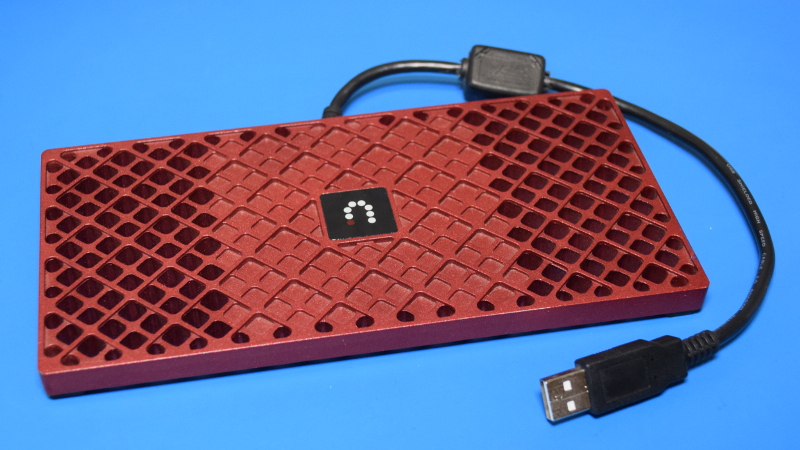
The Sling Adapter is one of those little gadgets that looks almost too simple to be interesting. It has no screen, no buttons, no HDMI port, no Ethernet jack, and absolutely no desire to explain itself. It is basically a red, textured slab with a short USB cable, sitting there like a futuristic coaster that accidentally learned how to stream television.
But once you start a Sling Adapter teardown, the story gets much better. This small DISH Network accessory, also known by the model family SB700-100 or Slingbox 700U, was designed to give compatible DISH DVRs the power of place-shifting. In normal human language, that meant you could watch live TV or recorded DVR content away from home on a computer, smartphone, or tablet. Back in 2010, that felt like magic. Today, when every toaster wants a streaming subscription, it is easy to forget how ambitious that was.
This teardown looks at what the Sling Adapter was, how it worked, what was inside, why it ran warm, and why this odd little device still matters to hardware fans, repair hobbyists, and anyone who enjoys discovering that “just a USB dongle” is secretly doing serious video processing under the hood.
What Was the Sling Adapter?
The DISH Network Sling Adapter was a compact placeshifting accessory released for select DISH HD DVR receivers, especially the ViP 722 and ViP 722k. Instead of replacing the receiver, it plugged into the DVR through USB and added Sling-style remote viewing features. The idea was beautifully simple: keep the big satellite box in the living room, then let the customer watch its live channels and DVR recordings from somewhere else.
At launch, the Sling Adapter was positioned as a low-cost upgrade rather than a whole new set-top box. It sold for around $99 and required a compatible DISH receiver, a broadband connection, and the DISH Remote Access system. Once connected, users could browse programming, schedule recordings, watch live television, view DVR content, and use a mobile device as a remote control. In 2010, that was not just convenient; it was the kind of thing that made tech reviewers use words like “future” without blushing.
External Design: A Red Slab with a Secret
From the outside, the Sling Adapter looks like a piece of consumer electronics designed by someone who loved ventilation grids and red plastic in equal measure. The top shell has a patterned, perforated look, while the body is thin enough to sit on or near the DVR without taking over the entertainment center. There is a short attached USB cable, a small illuminated Sling logo, and not much else.
That lack of visible connectivity is the first clue. A traditional Slingbox had video inputs, audio inputs, networking, infrared blasters, and power. The Sling Adapter does not. It depends on the DISH receiver for almost everything: content source, network access, user interface, and remote control logic. The adapter is not a standalone streaming box. It is more like a specialized hardware assistant that says, “You handle the paperwork; I’ll crunch the video.”
Why the Case Matters
The case is not just decorative. Teardown analysis shows that the enclosure helps manage heat. Inside, thermal compound connects the hot-running components to the metal grid-like case, turning the outer body into a passive heatsink. That explains why the adapter can feel warm in use. It was not being dramatic. It was doing real-time video transcoding, which is a sweaty job for a small device with no fan.
Opening the Sling Adapter
The Sling Adapter is refreshingly friendly to open compared with many modern gadgets that arrive sealed like they are guarding state secrets. Remove the screws, separate the housing, and the internal board becomes accessible without destroying the device. Inside, the printed circuit board is compact, roughly the size of a small notepad page, and the USB pigtail is not permanently soldered in the way many people might expect.
One of the more interesting discoveries is that the external USB cable connects internally to a Mini-B style jack. That means the “fixed” cable is not as fixed as it appears from the outside. For repair-minded users, that is a tiny gift from the hardware gods. Cable failure is common in old accessories, and a replaceable internal connection is far better than a molded cable that turns the whole unit into e-waste when it fails.
The Main Board: Small, Focused, and Surprisingly Powerful
The Sling Adapter’s board is not crowded with random extras. There is no Wi-Fi radio, no Ethernet controller, and no large collection of consumer I/O ports. Instead, the design focuses on USB communication, video processing, memory, and heat transfer. This makes sense once the device’s job is understood: it receives video data from the DVR, transforms it into a mobile-friendly stream, and hands it back to the receiver for delivery over the network.
That focused architecture is part of what makes the Sling Adapter teardown so interesting. It is not a general-purpose computer pretending to be an accessory. It is a dedicated accelerator for a specific video workflow. Think of it as a tiny gym coach for the DVR: “Come on, buddy, you can stream to an iPhone. Give me that MPEG-2 and I’ll turn it into something lighter.”
The USB Brain: Cypress EZ-USB FX2
One key chip identified in teardown work is the Cypress CY7C68013 EZ-USB FX2. This chip combines a high-speed USB 2.0 interface with an 8051-based microcontroller. That combination was widely used in devices needing fast USB data transfer and flexible firmware behavior.
Here is the fascinating part: when connected to a regular computer, the adapter can initially appear like a Cypress development kit. That suggests the device may rely on firmware being loaded from the host system, in this case the DISH DVR, after startup. The chip can then re-enumerate as a different USB device once the proper firmware is loaded. In practical terms, the DVR likely wakes the adapter up, gives it instructions, and turns it into the specialized hardware partner needed for Sling streaming.
This is also why the Sling Adapter is not very useful as a simple plug-and-play PC device. The hardware may respond over USB, but without the right firmware, host software, and video pipeline, it is like finding a talented musician with no sheet music and no instrument case. There is potential, but you must do a lot of work before the concert starts.
The Video Muscle: Magnum DX6225 Transcoder
The real star of the teardown is the Magnum DX6225-LHG00-A3 video transcoding chip. Its job was to convert MPEG-2 video, commonly used in DVR and broadcast workflows of the era, into a lower-resolution H.264 stream suitable for early smartphones, tablets, and web playback.
This is the part that explains the whole product. The DISH DVR already had the television content. What it did not necessarily have was enough spare horsepower to transcode that content efficiently for mobile devices while still behaving like a DVR. The Sling Adapter solved that by adding dedicated silicon for the heavy lifting.
The workflow likely went something like this: the DVR sent MPEG-2 video data to the Sling Adapter over USB; the Magnum chip transcoded that video into H.264 in real time; the adapter sent the processed stream back; and the DVR or DISH service interface handled remote access and distribution. It was a clever division of labor. The DVR stayed in charge, while the adapter did the computationally expensive part.
Why H.264 Was a Big Deal
Today, H.264 feels ordinary because it is everywhere. In 2010, it was the practical bridge between traditional TV sources and mobile streaming. Phones and tablets had limited processing power, mobile data connections were inconsistent, and nobody wanted to watch a giant raw broadcast stream crawl across the internet like a sleepy elephant. H.264 made video smaller, more efficient, and easier to deliver to portable screens.
The Sling Adapter existed at exactly that transition point. It belonged to the era when homes still revolved around satellite receivers and DVRs, but viewers were beginning to expect their shows to follow them outside the living room. In that sense, the adapter was not just a product; it was a signpost pointing toward the streaming habits we now take for granted.
Memory, Heat, and the Cost of Real-Time Video
Near the transcoding chip are external memory chips, likely used to buffer video data during processing. Real-time transcoding needs memory because video frames have to be temporarily stored, analyzed, compressed, and moved quickly. Even if the adapter’s board looks modest, the job is demanding.
The thermal design confirms that demand. The thick thermal compound and metal enclosure are not overengineering for fun. They are there because video conversion produces heat. Unlike a modern streaming stick that may rely on newer, more efficient chips, the Sling Adapter came from a period when hardware transcoding was powerful but not especially cool-running. The result is a device that feels simple outside but works hard inside.
How the Sling Adapter Worked with DISH Receivers
The Sling Adapter did not work alone. It required a compatible DISH receiver, such as the ViP 722 or ViP 722k, and a home network connection. The official setup process was designed to be easy: confirm that the receiver was active, make sure it was connected to broadband, plug the Sling Adapter into a USB port, and use DISH Remote Access to watch live TV or DVR recordings.
For users, the appeal was obvious. There was no separate power brick, no extra video wiring, and no complicated stack of boxes behind the TV. Plug in USB, wait for the receiver to recognize the device, and start using remote viewing features. In the world of home theater accessories, where one wrong cable can turn a Saturday afternoon into a spiritual crisis, that was a big win.
One Stream at a Time
The Sling Adapter was powerful for its size, but it was not a magic portal for unlimited viewers. Official guidance indicated that only one viewer could connect to a Sling Adapter at a given time. That limitation makes sense. The adapter was built around a single transcoding pipeline, and the home broadband connections of the era were not exactly begging to serve multiple live video streams.
Performance in the Real World
Contemporary reviews generally praised the Sling Adapter for easy setup and surprisingly good quality, especially when the connection was strong. Users could choose quality levels, and reviewers found that midrange settings often offered the best balance between image quality and stability. Higher-quality modes could look better, but they were also more vulnerable to buffering, audio hiccups, and the usual gremlins of early mobile streaming.
That should not be held against the device too harshly. In 2010, streaming live TV from a home DVR to a phone was still impressive. Many people were using early smartphones, public Wi-Fi, slow hotel connections, and home upload speeds that would make a modern cloud backup laugh nervously. The Sling Adapter was working in a rough neighborhood and still managed to be useful.
Repairability and Reuse Potential
As a teardown subject, the Sling Adapter earns points for being easy to open and logically assembled. Screws are better than glue, removable boards are better than sealed modules, and an internal USB connector is better than a permanently bonded cable. From a hardware curiosity perspective, it is a pleasant little device.
As a practical repair project, however, expectations should stay realistic. The Sling Adapter depended heavily on DISH receiver support, account infrastructure, compatible apps, and service-side systems. As the broader Slingbox ecosystem aged and streaming services changed, the adapter became less useful for normal TV viewing. Today, it is more valuable as a teardown specimen, parts donor, or experimental USB platform than as a reliable everyday streaming accessory.
Can It Be Repurposed?
The Cypress USB controller gives the Sling Adapter some experimental appeal. Hobbyists may be able to load code into the USB controller and explore the board at a low level. However, the device has no buttons, no display, no built-in networking, and a video transcoder that was designed for a very specific pipeline. That makes repurposing possible in theory but challenging in practice.
In other words, this is not a $5 miracle computer. It is a specialized accessory with one very interesting skill. If you are hoping to turn it into a tiny media server over the weekend, prepare snacks and emotional resilience. If you enjoy reverse engineering, USB firmware experiments, and learning from old hardware, it is a much better match.
Why the Sling Adapter Still Matters
The Sling Adapter matters because it captured a moment when television was changing fast. Before every network had an app and before cloud DVR became normal, people still wanted their home TV outside the home. Sling’s answer was place-shifting: take the signal you already paid for and make it available wherever you were.
The DISH Sling Adapter made that idea more elegant by removing much of the cable clutter. Instead of routing component video and infrared control through a separate Slingbox, the adapter used the existing DVR relationship. It trusted the receiver to provide the source and network connection, while it focused on transcoding. That is smart product design: do one difficult thing well, then let the bigger system handle the rest.
It also foreshadowed later integrated products. As chip technology improved, DISH could build Sling capability directly into receivers such as Hopper with Sling. The external adapter became unnecessary, but the concept survived. The little red slab was a bridge between the old set-top box world and the modern expectation that video should be available on any screen.
What a Sling Adapter Teardown Teaches Us
A Sling Adapter teardown teaches several useful lessons about consumer electronics design. First, simple products are not always simple inside. A device with one cable can still contain a sophisticated video-processing pipeline. Second, heat tells a story. If an enclosure is built like a heatsink, something inside is working hard. Third, accessories often reveal the limitations of the host device. The Sling Adapter existed because the DVR needed help with real-time mobile video conversion.
It also shows how quickly “cutting-edge” can become “curious old hardware.” In 2010, the ability to stream your DVR to a phone felt amazing. Today, used Sling Adapters often appear online for very little money because the service environment around them has moved on. That does not make the device worthless. It makes it educational. And sometimes, educational is better than practical, especially when the practical thing already lives in every smart TV app menu.
Experience Notes: Working Around a Used Sling Adapter
If you pick up a used Sling Adapter today, the first experience is usually surprise at how small and stylish it still looks. The red patterned case has aged better than many black plastic TV accessories from the same era. It does not scream “obsolete satellite gadget” at first glance. It whispers it politely, like a retired magician who still keeps a deck of cards in his jacket.
The second experience is realizing that this is not a normal Slingbox. Many people see the Sling name and expect a standalone box with inputs and networking. The Sling Adapter is different. Without the right DISH receiver and software support, it will not behave like a consumer-ready streamer. Plugging it into a laptop may show USB activity, but that does not mean it will suddenly stream video. The adapter expects a host that knows how to speak its language.
For a safe inspection, start with the basics. Do not open electronics while connected to a receiver or power source. Work on a clean table, keep track of screws, and avoid pulling the USB cable like you are starting a lawn mower. Once opened, the board layout is simple enough to understand visually: USB interface, video transcoder, memory, and thermal contact points. The old thermal compound may look messy, but it is part of the original cooling strategy. If you remove it for cleaning or photography, remember that the device relied on that thermal path when operating.
One practical tip is to document everything before removing parts. Take photos of the board, screw positions, cable routing, and thermal pad or compound contact areas. Old electronics love to punish confidence. Five minutes after saying “I’ll remember where that goes,” you may find yourself staring at a screw like it was delivered from another dimension.
Another useful observation is that the Sling Adapter is more fun as a learning object than as a daily-use device. It can teach you about USB enumeration, hardware video transcoding, thermal design, and the evolution of TV Everywhere services. It is also a good reminder that many consumer devices become obsolete not because their circuits fail, but because the ecosystem around them disappears. The chips may still work. The case may still look sharp. The USB controller may still answer. But the service, apps, receiver support, and authentication path may no longer be there.
That is the bittersweet charm of tearing down a Sling Adapter. You are not just opening a gadget. You are opening a small chapter in streaming history. Inside the red shell is a very specific answer to a very specific problem: how to make a satellite DVR send video to early mobile devices without melting the receiver or making users wire up half the living room. It was clever, compact, and slightly ahead of its time. Like many good gadgets, it eventually became unnecessary. But unnecessary does not mean uninteresting. Sometimes the obsolete devices are the ones with the best stories.
Conclusion
The Sling Adapter is a perfect teardown subject because it hides a serious job inside a deceptively simple shell. What looks like a red USB accessory is actually a dedicated video transcoding module built to help DISH DVRs deliver live and recorded TV to remote screens. Its Cypress USB controller, Magnum transcoding chip, memory, thermal compound, and heatsink-like enclosure all point to a device designed with a clear purpose: make MPEG-2 television content mobile-friendly through H.264 conversion.
As a product, it belonged to a changing era. As a teardown, it remains a neat example of focused engineering. The Sling Adapter may no longer be the easiest way to watch TV anywhere, but it still deserves attention from anyone who enjoys hardware design, streaming history, and gadgets that quietly did more than their tiny cases suggested.