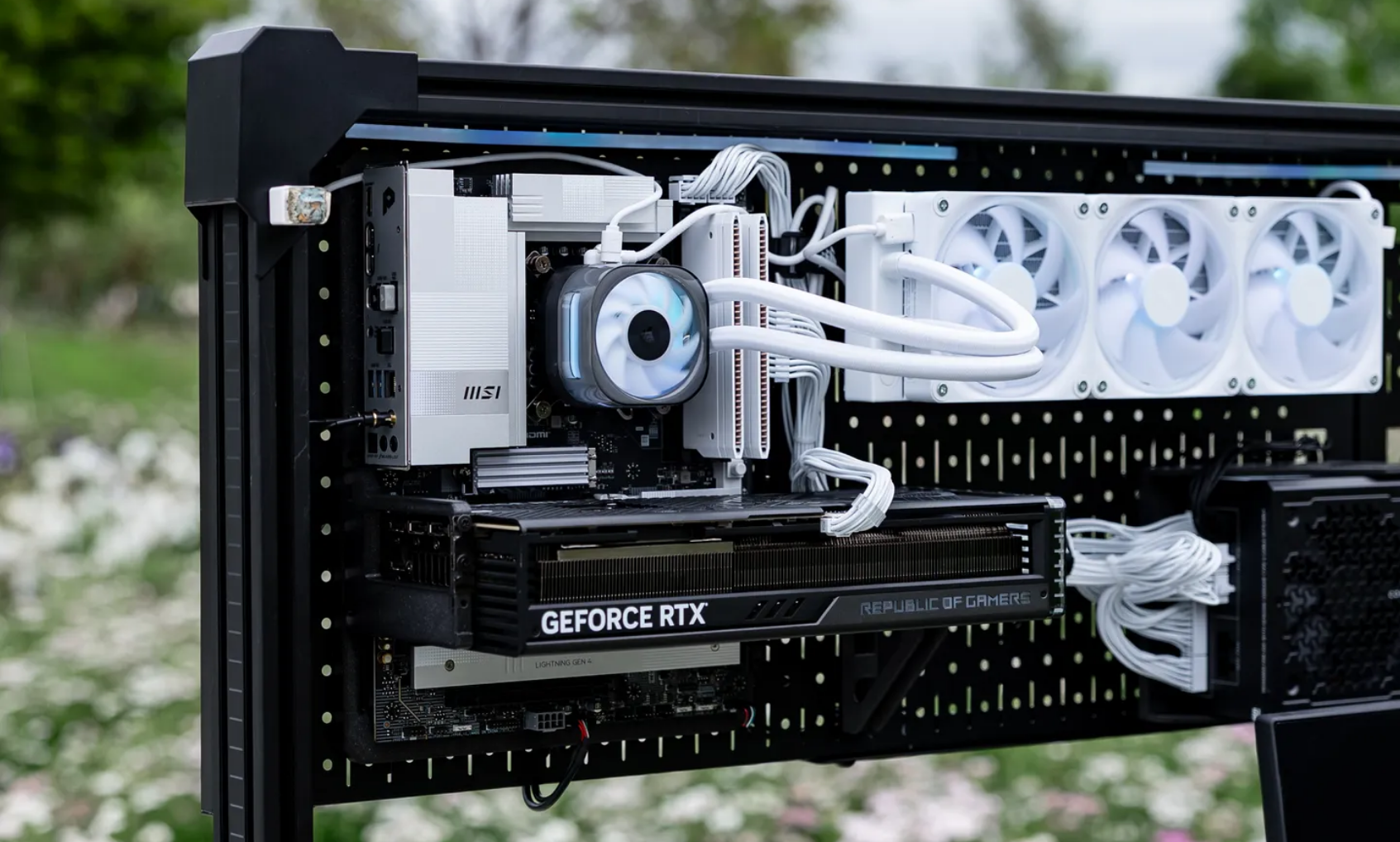
There are two kinds of PC builders in this world: the ones who hide their hardware inside a sensible black box, and the ones who look at a glowing graphics card and think, “Why would I ever put that masterpiece behind a solid panel?” The printable pegboard PC belongs very firmly to team number two.
This kind of build flips the usual desktop formula on its head. Instead of stuffing premium parts into a steel rectangle and hoping the tempered glass side panel will do all the visual heavy lifting, a pegboard-mounted, printable open-frame setup treats the computer like wall art. The motherboard, graphics card, cooling hardware, and RGB lighting become the whole point. It is part custom case, part display piece, part engineering flex, and yes, part excuse to turn your desk into a cyberpunk showroom.
What makes this concept so fun is that it is not just flashy for the sake of flashy. A well-planned printable pegboard PC can actually solve a few problems traditional cases create. It can open up airflow, free desk space, simplify upgrades, and make cable routing more intentional. Of course, it also introduces new tradeoffsdust, noise, exposure, and the very real possibility that your cat will suddenly develop a passionate interest in PCIe hardware.
That tension is exactly why this idea is so interesting. A printable pegboard PC shows off the RGB, sure, but it also shows off the builder’s priorities. It says, “I want my PC to perform, but I also want it to look like it escaped from a design lab.” And honestly? That is a respectable vibe.
Why the Pegboard PC Idea Hits So Hard
The appeal starts with visibility. Modern PC parts are designed to be seen. Graphics cards have illuminated logos. RAM sticks pulse in synchronized color waves. AIO coolers double as tiny light sculptures. Even motherboards have become showpieces with metallic heatsinks, sleek shrouds, and angular accents. When all of that gets tucked into a standard tower, some of the drama gets muted.
A printable pegboard PC fixes that by putting components front and center. Instead of peeking through one side window, you get an open layout where the entire system is on display. The RGB is no longer a side feature. It becomes part of the architecture. Lighting spills onto the pegboard, reflects off the wall, and turns ordinary hardware into something closer to a gallery installation.
There is also a customization factor that normal cases struggle to match. With printable mounts, brackets, supports, cable bars, and fan mounts, builders can tweak the layout to fit their desk, their color theme, and their hardware. That flexibility matters because not every builder wants the same story. Some want a full ATX beast with a giant GPU and a 360 mm radiator. Others want a compact ITX setup that looks clean, bright, and minimal. A printable system lets the builder shape the frame around the components, not the other way around.
It Feels More Like a Build Project Than a Purchase
A traditional case is something you buy. A printable pegboard PC feels more like something you assemble into existence. That difference matters. It turns the build from a shopping exercise into a maker project.
You are not just choosing parts. You are choosing print material, mount placement, spacing, cable routes, color coordination, and how much of the hardware you want to expose. You might print in black for a stealth look, white for a cleaner studio aesthetic, or even a color that matches your lighting theme. That alone gives the build more personality before the system is even powered on.
And when the lights finally come on, the result can look spectacular. RGB in a normal tower says, “Nice build.” RGB on a pegboard says, “Please admire my questionable but beautiful life choices.”
Why RGB Looks Better in an Open-Frame Layout
Let’s be honest: RGB works best when it has room to breathe. In cramped cases, lighting can feel trapped. The fans glow, the RAM glows, the cooler glows, and somehow the overall effect is still a little crowdedlike a nightclub in a coat closet.
An open pegboard layout changes the lighting game. With fewer opaque surfaces blocking the view, the glow spreads naturally across the build. Fan rings, light strips, pump caps, and motherboard accents all become visible from more angles. The pegboard itself acts like a design backdrop, helping the colors pop without overwhelming the eye.
This is especially effective when the builder uses RGB with some restraint. A printable pegboard PC does not need every component set to maximum rainbow chaos at all times. In fact, it often looks better with a focused palette: icy blue and white for a clean sci-fi setup, amber and purple for a retro-futurist vibe, or soft pink and teal for something playful without turning into a gaming cliché.
The RGB Becomes Part of the Room
That is the secret sauce. In a case, the lighting mostly stays inside the case. On a pegboard, the lighting affects the whole desk area. It bounces onto the wall, adds atmosphere to the workspace, and makes the PC feel integrated into the room instead of parked beside it.
For streamers, content creators, and anyone who cares about background aesthetics, that is a huge advantage. The PC becomes set design. It is no longer just the machine running the show. It is part of the show.
Airflow, Thermals, and the “Pretty Can Be Practical” Argument
One reason this concept got attention is simple: modern components need serious cooling, and traditional enclosures are always balancing airflow against size, noise, dust control, and looks. An open-frame pegboard design sidesteps some of that tension.
With fewer barriers around the motherboard, GPU, and radiator, components can get more direct access to ambient air. That is great for visibility and potentially helpful for heat management, especially when the layout gives fans a clean path to move air without panels, cages, or clutter interrupting the flow.
But this is where builders need to stay realistic. Open does not automatically mean perfect. Good thermals still depend on fan placement, cable routing, cooler choice, and the path hot air takes as it leaves the setup. If the build looks amazing but the cables are hanging in front of intake fans like party streamers, performance will suffer and the whole thing starts to look less “custom masterpiece” and more “electronic spaghetti exhibit.”
Cable Management Is Still the Main Character
A printable pegboard PC might remove some case limitations, but it does not magically eliminate cable problems. If anything, cable management matters more because there is nowhere to hide. Every fan lead, RGB connector, front-panel cable, and power run becomes part of the visible design.
The best-looking pegboard builds treat cables like part of the composition. They are routed in straight lines, grouped neatly, secured with ties or bars, and kept out of the airflow path. A modular or semi-modular power supply can help a lot here, because unused cables are the fastest way to turn a sleek open build into visual chaos.
Fan Choice Still Matters
Not every fan does the same job. For open areas, airflow-focused fans can work beautifully. For denser obstacles such as radiators or filters, higher static-pressure fans are usually the smarter pick. That means a pegboard PC is not just a lighting project. It is still a cooling project. Builders who understand that difference usually end up with systems that look good and run well, which is the dream.
The Real Tradeoffs Before You Print Anything
Now for the grown-up section of the article: a printable pegboard PC is cool, but it is not universally practical.
First, dust. A more exposed build is easier to clean in some ways, but it also collects dust more openly. Second, noise. Without the buffering effect of panels and enclosed chambers, fan sound can feel more direct. Third, exposure. Pets, kids, accidental bumps, and clumsy human elbows all become more concerning when expensive parts are sitting out in the open.
There is also the question of portability. A conventional mid-tower might be bulky, but it keeps everything consolidated. A pegboard-mounted build is more of an installation. Once you have tuned the cable routes and mounted the hardware, you are less likely to want to move it around every weekend.
Open Frame Is Not the Same as Zero Maintenance
Some people hear “open frame” and imagine temperatures dropping, cable stress disappearing, and life suddenly becoming easier. Reality is a little less cinematic. Open-frame systems still need cleaning, planning, and careful assembly. In some environments, the extra exposure can even be a downside if the room is dusty or the setup lives near the floor.
Builders also need to take basic anti-static precautions seriously while assembling the system. Open visibility does not make hardware less delicate. A careful workspace, grounded handling habits, and thoughtful mounting are still essential.
Who This Build Is Perfect For
A printable pegboard PC makes the most sense for people who value aesthetics, experimentation, and easy access to components. It is ideal for builders who upgrade often, like to tinker with layouts, or want a setup that stands out instantly in photos and video.
It is also a smart idea for niche builds: a streaming rig, a secondary workstation, a home lab system, or a themed battlestation where the PC is meant to be part of the visual identity. If your goal is to make the computer disappear under the desk, this is not the move. If your goal is to make people ask, “Wait, is that your PC on a pegboard?” then congratulationsyou are exactly the target audience.
On the other hand, if you want maximum dust protection, minimal noise leakage, and zero temptation for curious pets, a more traditional airflow case may still be the better choice. Not every good idea is the right idea for every room.
How to Make a Printable Pegboard PC Look Intentional
The difference between a stunning pegboard build and a confusing pile of premium parts is intention. Great builds usually commit to a visual direction. They choose a limited color palette, consistent cable sleeving, and a layout that creates balance between the GPU, motherboard, cooling hardware, and lighting.
That can mean pairing black components with warm amber lighting for a moody industrial feel. It can mean a white-and-silver layout with cool blue light for a cleaner futuristic look. It can mean leaning into contrast by printing dark mounts behind bright RGB parts so the lighting appears even stronger.
The pegboard itself can also carry the design. Accessories, tools, controllers, headphones, and even display elements can live beside the PC instead of around it. Done right, the whole board becomes a composition rather than just a mounting surface. It feels organized, expressive, and slightly overachievingin the best possible way.
Final Thoughts
The printable pegboard PC is one of those ideas that instantly makes sense once you see it. Modern computer parts are too stylish, too illuminated, and too expensive to spend their entire lives hidden in a plain metal rectangle. An open printable layout gives them the spotlight they clearly believe they deserve.
More importantly, it proves that PC building is still full of creative energy. Even in a market packed with fish-tank cases, mesh towers, and RGB-everything, there is still room for a concept that feels fresh. A printable pegboard PC does not just show off the RGB. It shows off the builder’s taste, patience, and willingness to make a desktop feel personal.
That is what makes the idea memorable. It is not merely a computer mounted on a board. It is a reminder that a PC can be functional hardware, decorative object, and conversation starter all at the same time. Also, yes, it looks ridiculously cool with the lights on. We should not pretend otherwise.
Builder Experience: What Living With a Printable Pegboard PC Actually Feels Like
The experience of using a printable pegboard PC is very different from using a normal desktop tower, and that difference shows up immediately. The first thing you notice is that the machine feels less like an appliance and more like part of the room. A regular PC sits there and does its job. A pegboard PC announces itself. Even when it is idle, it looks like something is happening. The motherboard lines, the GPU shroud, the fan rings, and the soft glow from the lighting all give the setup a kind of visual energy that a standard case rarely matches.
Then there is the satisfaction of access. If you have ever opened a traditional case just to plug in one stubborn cable and then spent twenty minutes removing panels, moving wires, and questioning your life choices, a pegboard build feels refreshingly straightforward. Components are easier to reach. Troubleshooting is less annoying. Swapping storage, changing a fan, adjusting cable paths, or adding a light strip can feel more like tweaking a display than performing surgery in a metal box.
That said, the openness changes your relationship with maintenance. Dust is no longer some mysterious problem hiding behind glass. You see it. Immediately. The build invites you to stay on top of cleaning because any buildup becomes part of the visual story, and not in a charming way. A spotless pegboard PC looks intentional and premium. A dusty one looks like a science fair project that has been abandoned since midterms.
Noise is another part of the experience. Some builders love the raw, mechanical honesty of an exposed system. You hear the fans ramp, you hear the airflow shift under load, and the machine feels alive. Other people will absolutely decide that this is too much personality from a computer before their morning coffee. The point is not that it is bad. It is that it is present. A pegboard PC feels more connected to the user because fewer barriers exist between the hardware and the room.
There is also a subtle emotional payoff that is hard to ignore: pride. Printable projects tend to feel earned. When you print the brackets, choose the layout, mount the board, route the cables, and tune the lighting, the final build does not feel off-the-shelf. It feels authored. That makes a difference every time you sit down at the desk. You are not just using a PC. You are using your PC, in a way that is visible from across the room.
And maybe that is the biggest reason this idea resonates. The printable pegboard PC turns performance hardware into personal design. It gives the builder a setup that works hard while still being fun to look at. In a world full of generic rectangles, that kind of experience feels rare. It is practical enough to run real workloads, flashy enough to make RGB worthwhile, and weird enough to stay memorable. Honestly, that is a pretty great combination.