Editor’s note: Instagram features change often, and half-swiping is not an official privacy tool. This guide explains how the gesture usually works, where it fails, and which built-in Instagram privacy settings are more reliable.
Ever opened an Instagram DM and instantly regretted it because the dreaded “Seen” receipt appeared faster than your brain could form a reply? Welcome to the modern social dilemma: you want to read the message, process your emotions, consult three friends, make a snack, and respond later like a calm adult. That is where the famous Instagram “half-swipe” comes in.
Half-swiping on Instagram is a popular trick people use to preview Direct Messages or peek at Stories without fully opening them. It is not a magic invisibility cloak, and it is definitely not an official Instagram feature. Think of it more like balancing a spoon on your nose: impressive when it works, mildly embarrassing when it does not.
In this guide, you will learn how to half-swipe on Instagram Direct Messages and Stories, what happens with read receipts, why the trick may not work on every phone, and what safer privacy options Instagram already gives you. Whether you are trying to avoid accidental “Seen” drama or simply want to understand the gesture everyone keeps talking about, this article breaks it down in clear, practical steps.
What Does Half-Swipe Mean on Instagram?
A half-swipe is when you slowly slide into a message or Story just enough to preview part of the content, but not enough to fully open it. On Instagram Direct Messages, users try this to read a message without triggering the read receipt. On Instagram Stories, users try it to peek at the next Story without appearing in that person’s viewer list.
The key word here is “try.” Instagram does not advertise half-swiping as a feature. It is more of a user-discovered gesture based on how app transitions work. If the screen loads too far, the message or Story may still count as opened. If your thumb slips, congratulations: you are now emotionally committed to replying.
Important: Half-Swiping Is Not Guaranteed
Before trying the technique, understand one thing clearly: half-swiping is not as reliable as using Instagram’s built-in privacy settings. Instagram already allows users to manage read receipts for chats, and the app may behave differently depending on your device, operating system, connection speed, and app version.
On some phones, the preview gesture feels smooth and controlled. On others, especially if the app loads quickly or the screen sensitivity is high, a tiny movement can fully open the message. Instagram also updates its interface regularly, so a method that worked last month may feel completely different after an update.
Use half-swiping as a light convenience trick, not as a serious privacy strategy. For true privacy, use read receipt settings, restrict unwanted accounts, manage message requests, or simply wait until you are ready to open the conversation.
How to Half-Swipe on Instagram Direct Messages
Half-swiping DMs is the most talked-about version of this trick. The goal is to preview the conversation without opening it fully and without sending a “Seen” receipt. Here is the common method people use.
Step 1: Open Instagram Direct Messages
Open Instagram and tap the message icon in the top-right corner. This takes you to your Direct inbox, where your conversations are listed.
Step 2: Find the Conversation You Want to Preview
Do not tap the chat directly. Tapping usually opens the thread immediately, and if the message is unread, Instagram may mark it as seen. Instead, place your finger near the conversation and prepare to swipe carefully.
Step 3: Slowly Swipe Toward the Chat Screen
Swipe gently from the right side toward the left, or begin entering the conversation slowly depending on how your app layout responds. The exact motion may vary by phone. The idea is to drag the chat screen into view just enough to read part of the newest message.
Step 4: Do Not Release Your Finger
This is the most important part. Keep your finger pressed on the screen. If you release too late or let the screen snap fully open, the chat may load as opened. Hold the partial view, read what you can, then slide back out carefully.
Step 5: Swipe Back to the Inbox
Without lifting your finger, move back toward the inbox. Once the inbox is fully visible again, you can release your finger. If done correctly, the chat should remain unopened.
How to Half-Swipe on Instagram Stories
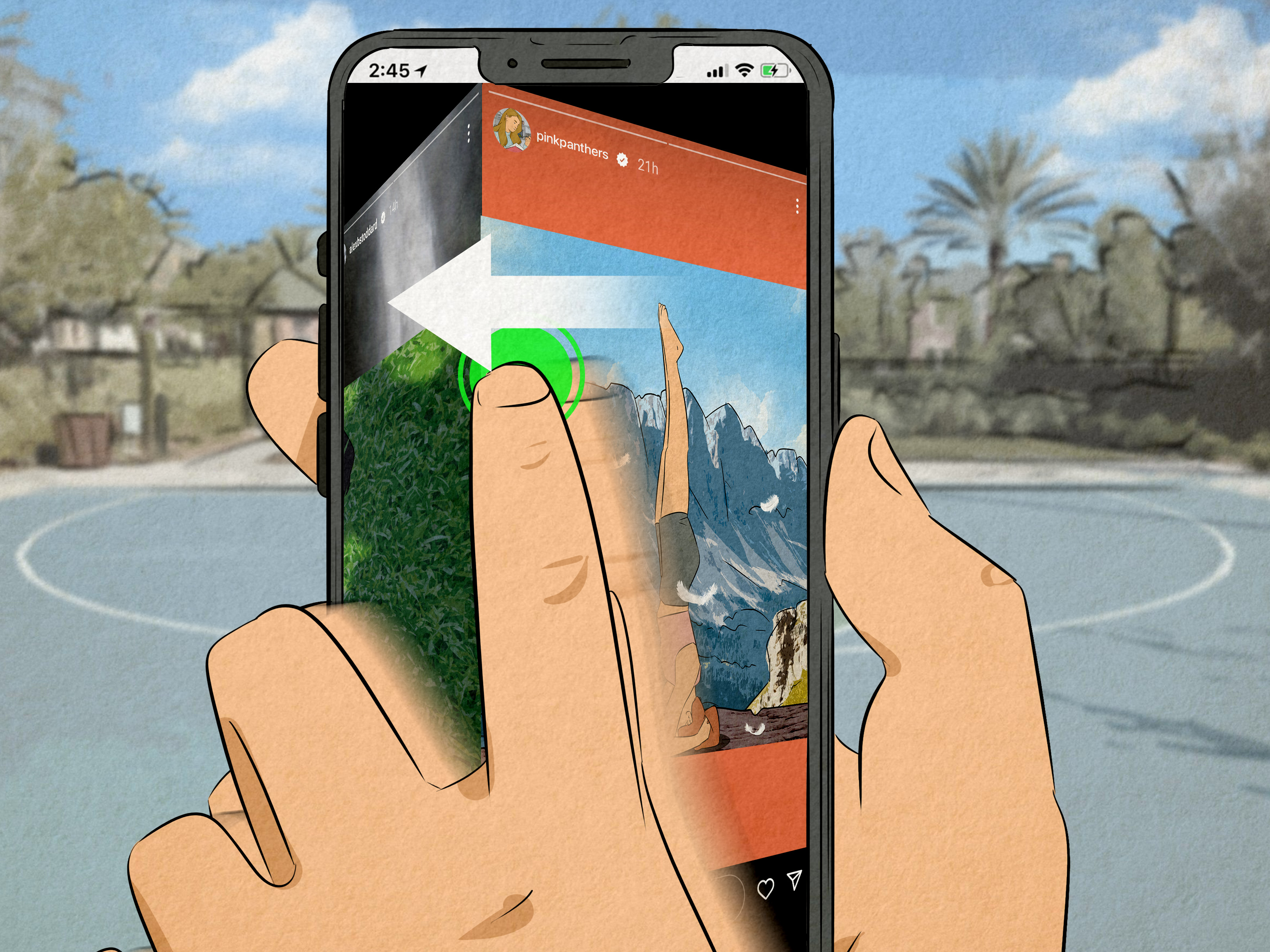
Half-swiping Stories works differently from half-swiping DMs. When you view someone’s Instagram Story normally, your account can appear in their viewer list. The half-swipe method attempts to preview the next Story while you are still technically viewing the current Story.
Step 1: Open the Story Before the One You Want to Peek At
Start by opening a Story from the account immediately before the account you want to preview. For example, if your Stories tray shows Account A, Account B, and Account C, and you want to peek at Account B, open Account A first.
Step 2: Press and Hold the Current Story
Hold your finger on the screen to pause the Story. This gives you more control and prevents the Story from automatically moving forward while you are trying to swipe.
Step 3: Slowly Drag Toward the Next Story
Gently swipe toward the next Story, but do not complete the swipe. You should see part of the next Story appear on the edge of the screen. Stop before it fully takes over the display.
Step 4: Peek Without Letting Go
Keep holding the screen while you preview what is visible. You will usually only see part of the Story, not the full thing. If you swipe too far, Instagram may count it as a view.
Step 5: Return to the Previous Story
Slide your finger back to the original Story and release only after you are safely back. If your thumb launches forward like it is auditioning for a superhero movie, the Story may open fully.
Does Half-Swiping Really Avoid “Seen” on Instagram?
Sometimes, but not always. For DMs, half-swiping may help you preview a message without opening the full thread. However, Instagram’s read receipt behavior can change, and some message types may load differently. Voice messages, photos, videos, disappearing content, and longer conversations are harder to preview safely.
For Stories, half-swiping is even less dependable. Instagram tracks Story views when a Story is actually opened, but the line between “previewed” and “opened” can feel blurry when you are dragging between Stories. If you need certainty, do not rely on half-swiping to view Stories anonymously.
Why Half-Swipe May Not Work on Your Phone
If half-swiping does not work for you, your thumb is not necessarily the villain. Several factors can affect the trick.
Your App Version Changed
Instagram frequently updates navigation, gestures, Direct Messages, and Stories. A small interface change can make half-swiping harder or remove the behavior entirely.
Your Phone Loads Too Quickly
A fast connection and a newer phone can load chats instantly. Great for convenience, terrible for sneaky preview missions.
Your Screen Sensitivity Is High
Some screens respond aggressively to tiny movements. If your phone treats a feather tap like a firm command, half-swiping becomes risky.
You Released Too Early
Half-swiping depends on keeping your finger down until you return to the previous screen. Releasing while the message or Story is partially open may allow Instagram to complete the action.
Better Alternatives to Half-Swiping Instagram DMs
Half-swiping is fun, but Instagram’s built-in tools are usually safer and less stressful. Here are better options.
Turn Off Read Receipts
Instagram lets users manage read receipts for chats. In many versions of the app, you can open a conversation, tap the chat name at the top, go to Privacy & Safety, and turn off read receipts for that chat. Some users may also see broader read receipt controls under settings related to messages and story replies.
This is the cleanest option if you do not want people to know exactly when you read their messages. No thumb gymnastics required.
Use Message Requests
Messages from people you do not follow often appear in message requests. Opening a request can give you more control before accepting the chat. This is useful for spam, unknown accounts, or people who begin conversations with “hey” and no context, which is legally not a crime but emotionally suspicious.
Restrict an Account
Restricting someone on Instagram can limit what they see about your activity. A restricted person generally cannot see when you are active or whether you have read their messages. This is helpful when you need distance without the drama of blocking.
Mute Conversations
Muting does not hide read receipts, but it helps reduce pressure. If a chat makes your phone buzz like a caffeinated bee, muting can help you respond on your own schedule.
Better Alternatives for Viewing Stories Privately
Instagram Stories are designed to show creators who viewed them. If you open a Story directly, assume your view may be visible. Instead of relying on risky tricks, consider these options.
Do Not Open the Story Until You Are Comfortable Being Seen
This is the simplest and most reliable method. It is not glamorous, but neither is accidentally appearing at the top of someone’s viewer list after claiming you were “busy all day.”
Mute Stories You Do Not Want to Watch
If certain Stories tempt you into checking too often, muting can keep them out of your main Stories tray. You can still visit the profile later if you choose.
Manage Your Own Story Privacy
If your concern is mutual visibility, review your own Story settings too. Instagram allows users to control who can reply to Stories, hide Stories from specific people, and use Close Friends for a smaller audience.
Common Mistakes When Half-Swiping
The biggest mistake is treating half-swiping as guaranteed. It is not. The second biggest mistake is rushing. Half-swiping requires slow movement, steady pressure, and enough patience to make you question your life choices.
Another common mistake is trying to preview media-heavy messages. Text is easier to glimpse. Photos, videos, reels, voice notes, and disappearing messages are much harder to preview without opening. If the unread message is a reel, you may only see enough to know someone has sent you another raccoon video. Valuable? Yes. Fully readable? No.
People also forget that Instagram notifications may already show part of a message. Before attempting a half-swipe, check your lock screen or notification shade. Sometimes the preview is sitting right there, politely doing the job your thumb was preparing to risk everything for.
Is Half-Swiping Ethical?
Half-swiping is not illegal or inherently harmful, but it does raise a small etiquette question. Social apps create pressure because people can see when messages are read, when Stories are viewed, and when someone is active. Wanting breathing room is normal. Everyone deserves time to reply thoughtfully.
At the same time, if you constantly need to hide from a conversation, the real solution may not be a swipe trick. It may be setting boundaries, muting the chat, turning off read receipts, restricting the person, or simply saying, “I’ll reply when I have time.” Terrifying? Yes. Healthy? Also yes.
Practical Examples
Example 1: Previewing a Short DM
Suppose someone sends, “Are we still meeting at 6?” A careful half-swipe may let you read enough to know the topic without opening the conversation. Still, if the message is important, it is better to reply quickly than to play digital hide-and-seek.
Example 2: Checking a Story Before Viewing
You are watching one friend’s Story and want to peek at the next person’s Story. You press and hold, drag slightly, see a corner of the next Story, and slide back. This may work for a quick preview, but it will not let you watch the full Story safely.
Example 3: Avoiding Pressure From a Chat
If someone expects instant replies, half-swiping may only delay the stress. Turning off read receipts or muting the conversation is a better long-term fix.
Tips to Make Half-Swiping Work More Smoothly
Use one hand to hold the phone steady and the other to swipe if needed. Move slowly, especially when previewing DMs. Keep your finger on the screen until you return to the inbox or previous Story. Avoid trying it when you are tired, distracted, or walking. Sidewalk half-swiping is how people end up sending accidental emoji reactions to their boss.
Also, practice on a low-stakes chat first. Ask a friend to send a simple message and test how your phone responds. Different devices handle gestures differently, so muscle memory matters.
Experience Section: What It Feels Like to Half-Swipe on Instagram
Half-swiping sounds simple until you actually try it. The first experience usually feels like defusing a tiny social bomb with your thumb. You open Instagram, see an unread DM, and suddenly your finger becomes a precision instrument. You tell yourself, “Just a little swipe.” Then the screen moves too far, your heart jumps, and you yank your finger back like the phone is hot.
With Direct Messages, the trick feels most useful for short texts. If someone sends a quick question, you may be able to preview enough of it to understand what they want. The experience is less satisfying with longer messages because you can only see part of the thread. If the message is a paragraph, half-swiping gives you the emotional equivalent of reading the first sentence of a mystery novel and then closing the book forever.
On iPhone, many users find the gesture smoother because screen transitions often feel more fluid. On Android, the experience depends heavily on the phone model and Instagram version. Some Android devices make the gesture feel natural. Others make it feel like trying to park a shopping cart on a hill. One tiny movement, and the chat opens fully.
Stories are even trickier. Half-swiping a Story can give you a small preview of the next slide, but it rarely gives the full picture. You might see someone’s coffee cup, a blurry caption, or half of a dog’s face. Is that useful? Sometimes. Is it detective-level intelligence? Absolutely not. The moment you swipe too far, the Story may open, and your name may appear in the viewer list.
The biggest lesson from using half-swipe is that it works best when expectations are low. It is not a privacy system. It is a quick peek. If you need to read an entire message without pressure, turning off read receipts is far better. If you need to avoid someone’s Stories, muting is cleaner. If a conversation makes you anxious every time it appears, boundaries will help more than any gesture trick.
Still, half-swiping remains popular because it solves a real social problem: people want time. Time to think, time to respond well, time to avoid sending “lol” to something that absolutely did not deserve “lol.” Used carefully, it can reduce small moments of pressure. Used carelessly, it can create the exact awkwardness you were trying to avoid.
The best experience comes from combining the trick with smart habits. Preview when it is harmless, use read receipt controls when privacy matters, and do not rely on half-swiping for anything sensitive. Instagram is a social app, not a secret agent dashboard. Your thumb can only do so much.
Conclusion
Half-swiping on Instagram Direct Messages and Stories is a clever, unofficial way to preview content without fully opening it. For DMs, it may help you glance at a message before triggering “Seen.” For Stories, it may let you peek at the next Story without completely entering it. But the method is not guaranteed, and it can fail depending on your device, app version, connection speed, and how steady your swipe is.
The smartest approach is to treat half-swiping as a backup trick, not your main privacy plan. If you want more control over DMs, use Instagram’s read receipt settings, restrict accounts when necessary, manage message requests, and mute conversations that create pressure. If you want privacy around Stories, avoid opening them directly unless you are comfortable being listed as a viewer.
In short: half-swipe when the stakes are low, use privacy settings when the stakes are high, and never trust a nervous thumb with your entire social reputation.