Becoming an Apple product tester sounds like the dream job of every tech-loving human with a pulse: open a box, touch a shiny new iPhone, nod thoughtfully, and get paid in money, glory, and possibly a mountain of Apple stickers. The reality is less magicalbut still exciting. Apple does offer several legitimate ways to test software, apps, enterprise features, developer tools, accessibility behavior, and even security systems. What Apple does not usually offer is a public “click here and receive a free unreleased iPhone tomorrow” program. That is usually where the internet puts on a fake mustache and tries to steal your information.
If you want to become an Apple product tester, the best path is to understand what “testing” really means. For most people, it means joining the Apple Beta Software Program and testing pre-release versions of iOS, iPadOS, macOS, watchOS, tvOS, or visionOS. For developers, it may mean testing apps through TestFlight or using beta versions of Xcode and Apple operating systems. For IT professionals, AppleSeed for IT allows organizations to evaluate upcoming software in real-world business or school environments. For experienced engineers, Apple Careers may include roles in quality assurance, validation, automation, hardware testing, software testing, or product reliability. For security researchers, Apple’s Security Research and Bug Bounty programs provide another advanced route.
This guide breaks it all down into 12 practical steps, minus the fairy dust and fake “Congratulations, you were selected!” pop-ups.
What Does an Apple Product Tester Actually Do?
An Apple product tester evaluates how Apple software, apps, tools, services, or systems behave before or during wider release. A tester may install beta software, check whether features work correctly, report bugs, test compatibility with apps or accessories, compare performance across devices, or document problems in a way that helps engineers reproduce them.
That last part matters. Great testing is not just saying, “My iPhone did a weird thing.” It is saying, “On an iPhone 15 Pro running iOS beta software, the Settings app froze after I switched Bluetooth off, opened Control Center, and connected AirPods again. It happened three times, and here are the steps.” That is the difference between a useful tester and someone who merely yells at cloudsbut with better screen brightness.
How to Become an Apple Product Tester: 12 Steps
1. Understand the Legitimate Apple Testing Paths
The first step is knowing which opportunities are real. The main legitimate Apple testing routes include the Apple Beta Software Program, Apple Developer Program, TestFlight app testing, AppleSeed for IT, Apple Security Research programs, and official Apple jobs in testing or quality assurance.
If your goal is to test Apple software as a regular user, start with Apple’s public beta program. If you build apps, use the developer route. If you manage Apple devices for a company, school, or institution, AppleSeed for IT is more relevant. If you want a paid role, search Apple Careers for quality assurance, test engineering, validation, automation, hardware, software, or reliability roles.
2. Create or Update Your Apple Account
You need an Apple Account to participate in most Apple testing programs. Make sure your account uses a secure password, has two-factor authentication enabled, and is connected to an email address you actually check. Beta testing often involves alerts, release notes, feedback updates, and account confirmations. If your inbox is a digital swamp full of coupon ghosts, clean it up first.
Use your real information. Apple testing programs and developer services rely on account trust, legal agreements, and device enrollment. A fake profile may seem harmless, but it can prevent you from accessing the right features or recovering your account later.
3. Join the Apple Beta Software Program
The Apple Beta Software Program is the easiest entry point for everyday users who want to test Apple software before the general public. After enrolling, you can access public beta versions of Apple operating systems when they are available and send feedback directly through Apple’s Feedback Assistant.
This is the most realistic answer for someone asking how to become an Apple product tester without being a developer or Apple employee. You are not testing secret hardware in a laser-guarded basement. You are helping Apple find issues in pre-release software by using it in normal life: messaging, browsing, taking photos, pairing accessories, using apps, and noticing when something behaves strangely.
4. Back Up Your Device Before Installing Beta Software
Before installing beta software, back up your iPhone, iPad, or Mac. Beta software may contain bugs, battery drain, app crashes, performance issues, or compatibility problems. It can be fun, but it is still unfinished software. Treat it like cookie dough: promising, delicious-looking, but not fully baked.
Use iCloud Backup, Finder, or Apple’s recommended backup method for your device. If possible, install beta software on a secondary device rather than your main phone or work computer. Your daily driver is where your bank app, family photos, two-factor codes, and “please do not break today” energy live.
5. Install Beta Software Carefully
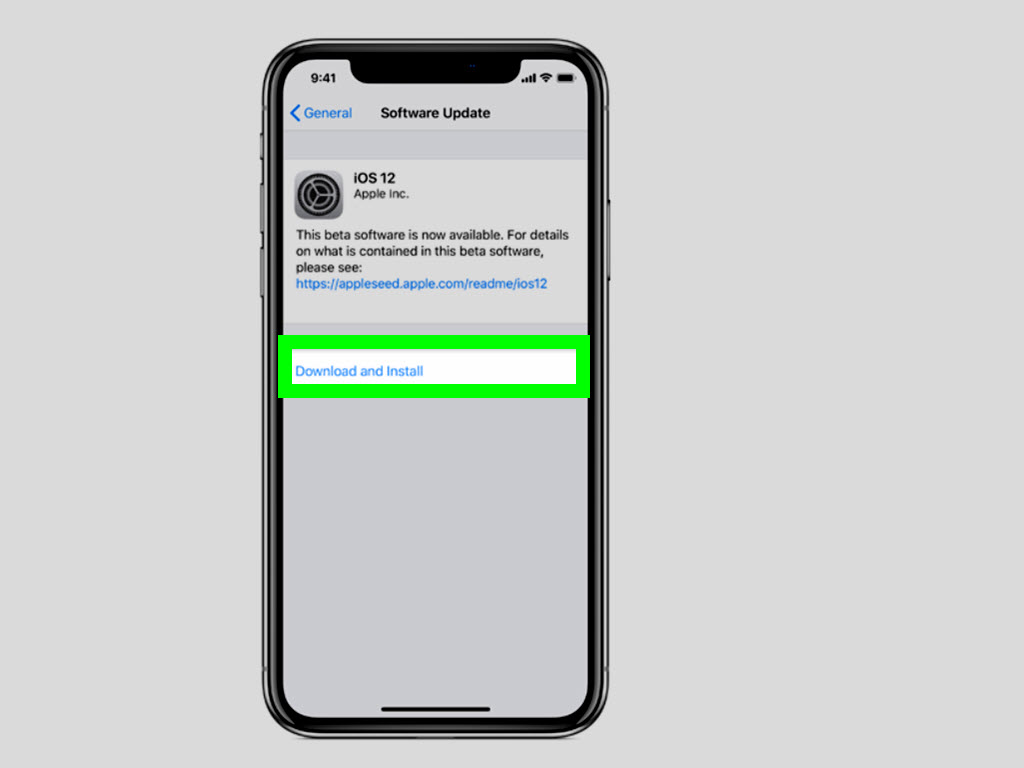
Once enrolled, follow Apple’s official instructions for your device. On modern Apple systems, beta updates are usually managed through Software Update settings after your account is eligible. Read the release notes before installing. They often mention known issues, supported devices, and changes that may affect apps or accessories.
Do not download beta profiles, firmware files, or “special Apple tester packages” from random websites. If a site looks like it was designed by a casino banner ad and asks for your Apple ID password, run away. Official Apple testing starts through Apple-controlled pages, developer tools, TestFlight links, managed organization access, or Apple employment channels.
6. Use Feedback Assistant Like a Professional
Feedback Assistant is the main tool for reporting issues in Apple beta software. A strong bug report should include the device model, operating system version, app or feature affected, steps to reproduce the issue, what you expected to happen, what actually happened, and screenshots or screen recordings when useful.
Good feedback is specific. “Battery bad” is not helpful. “Battery dropped from 82% to 45% in two hours while the device was idle, with Bluetooth and Wi-Fi enabled, after installing the latest beta” is much better. The more clearly you describe the problem, the easier it is for Apple’s teams to investigate.
7. Test Apps Through TestFlight
TestFlight is Apple’s official platform that lets developers invite people to test beta versions of apps before those apps are released or updated on the App Store. You may receive a TestFlight invitation by email, through a public link, from a developer community, or from a company whose app you use.
As a TestFlight tester, your job is to use the app normally and report bugs, crashes, confusing screens, missing features, or performance problems. For example, if a budgeting app freezes when you add a receipt photo, or a fitness app loses workout data after syncing with Apple Watch, that is valuable feedback. TestFlight is not just about tapping buttons randomly. It is about behaving like a real user and noticing where the experience breaks.
8. Register as an Apple Developer If You Build or Test Apps
If you are interested in app development, register as an Apple developer. A free developer account gives access to tools, documentation, forums, beta versions of Xcode and operating systems, and feedback channels. A paid Apple Developer Program membership unlocks broader app distribution and TestFlight management features.
This path is especially useful if you want to test how apps behave on new versions of iOS, iPadOS, macOS, watchOS, tvOS, or visionOS. Developers often test layout changes, APIs, notifications, in-app purchases, widgets, privacy permissions, and compatibility with new hardware or system features.
9. Explore AppleSeed for IT If You Work in Business or Education
AppleSeed for IT is designed for IT professionals and technology managers in organizations such as businesses, schools, and institutions. It allows teams to test pre-release Apple software in their own environments before major updates roll out widely.
This matters because a software update can behave differently in a managed organization than it does on a personal device. An IT tester may check device management settings, Wi-Fi compatibility, VPN behavior, enterprise apps, classroom tools, identity systems, printers, shared devices, and security policies. In other words, AppleSeed for IT is where “Will this update break our Monday morning?” gets answered before Monday morning arrives wearing steel-toed boots.
10. Build a Tester’s Skill Set
To become a better Apple product tester, develop practical testing skills. Learn how to write clear bug reports, capture screenshots and logs, compare behavior across versions, record repeatable steps, and separate personal preference from actual defects.
Useful skills include basic troubleshooting, attention to detail, technical writing, device management, app development basics, accessibility awareness, privacy knowledge, and patience. Lots of patience. Testing can mean repeating the same action 20 times to confirm whether a bug is random or reproducible. Glamorous? Not always. Important? Absolutely.
11. Apply for Official Apple Testing and QA Jobs
If you want to get paid to test Apple products directly, search Apple Careers for roles related to quality assurance, software QA, test engineering, automation, validation, hardware testing, product reliability, systems integration, or software developer in test. These jobs may involve building automated tests, validating hardware and software, debugging failures, testing performance, writing reports, and working with engineering teams.
Apple testing jobs are competitive, so prepare a focused resume. Highlight experience with Apple platforms, programming languages, automation tools, bug tracking, technical documentation, hardware diagnostics, app testing, accessibility testing, or enterprise device management. If you have tested apps through TestFlight, participated in beta programs, contributed to open-source projects, or built your own iOS app, include that experience.
12. Avoid Apple Product Tester Scams
This step deserves flashing lights and maybe a tiny emergency siren. Be cautious of websites, emails, or social media posts promising free iPhones, paid Apple tester kits, unreleased MacBooks, or guaranteed Apple product testing jobs in exchange for a fee, survey, shipping payment, gift card, or personal information.
Legitimate testing opportunities do not require you to pay a “processing fee” to receive a free Apple device. Do not share your Apple ID password. Do not install unknown profiles from strangers. Do not sign in to an Apple Account provided by someone else. Do not buy products in exchange for fake reviews. Real testing is based on feedback, not manipulation.
What Apple Product Testing Is Not
Apple product testing is not usually a shortcut to free hardware. Most public testers evaluate software they install on devices they already own. TestFlight testers evaluate apps from developers, not secret iPhones from Apple. AppleSeed for IT focuses on organizational readiness. Apple QA jobs are real jobs requiring real skills. Security research requires advanced technical ability and responsible disclosure.
That may sound less exciting than “Apple sent me a prototype in a velvet box,” but it is far more usefuland far less likely to end with your personal data being sold to someone named “Support Team Official 839.”
How to Write Better Apple Testing Feedback
Strong feedback should be short, detailed, and reproducible. Start with a clear title: “Photos app crashes when editing portrait image after latest iOS beta update.” Then describe your environment: device model, software version, app version, network condition, connected accessories, and whether the issue happens every time or only sometimes.
Next, list the steps. For example: open Photos, select a portrait image, tap Edit, adjust exposure, tap Done, then reopen the image. Explain what you expected and what happened instead. Attach a screenshot, screen recording, crash log, or sysdiagnose if the feedback tool requests it. The goal is to help Apple or an app developer reproduce the issue without needing telepathy, a crystal ball, or your cousin’s “it happened once” memory.
Experience Section: What It Feels Like to Be an Apple Product Tester
The first thing most new testers learn is that beta testing changes how you use technology. Instead of simply enjoying a feature, you begin noticing the tiny details: whether animations stutter, whether Face ID unlocks a little slower, whether a widget refreshes correctly, whether an app asks for permission twice, or whether your AirPods connect after switching between devices. You become the person who says, “Interesting,” while staring at a settings screen. Congratulations. You are now officially fun at parties.
A realistic Apple product testing experience often starts with excitement. You install a new iOS or macOS beta because you want the latest features early. At first, everything feels fresh. New menus! New icons! New settings! Then the real work begins. Maybe your favorite banking app refuses to open. Maybe your battery drains faster than expected. Maybe a shortcut that worked yesterday now behaves like it drank three espressos and forgot its purpose. That is when testing becomes useful.
The best testers keep notes. A simple testing journal can make a big difference. Write down the date, device, beta version, issue, and whether it happened again. If you test across multiple devices, compare them. Does the bug happen on iPhone but not iPad? Does it happen only on Wi-Fi? Only with Bluetooth enabled? Only after restarting? This kind of detail turns ordinary frustration into valuable feedback.
Another important experience is learning when not to install a beta. If you rely on your iPhone for work, travel, banking, medical alerts, two-factor authentication, or business calls, think carefully before putting beta software on it. A secondary device is ideal. Many experienced testers keep their main device stable and use an older iPhone, iPad, or Mac for experiments. That way, if the beta misbehaves, your entire day does not collapse like a folding chair at a barbecue.
Testing apps through TestFlight feels different. Instead of checking the whole operating system, you focus on one app. You may test onboarding, account creation, payments, notifications, dark mode, accessibility labels, Apple Watch syncing, widgets, or offline behavior. Developers appreciate testers who explain not only what broke, but why it matters. “The save button is hidden behind the keyboard on smaller iPhones” is more helpful than “bad layout.”
For IT professionals, the testing experience is more strategic. The question is not “Do I like this feature?” but “Will this work for 500 employees or 2,000 students?” That means testing device management, app deployment, security settings, network connections, printers, classroom tools, and support workflows. A successful test may prevent a messy rollout later, which is the IT version of finding treasure.
Over time, Apple product testing builds discipline. You learn to slow down, observe carefully, and report clearly. You also learn humility, because sometimes the “bug” is actually a setting you forgot you changed. It happens. The device is smart, but humans are creative chaos machines.
The biggest reward is not always money or free products. It is the satisfaction of helping improve software that millions of people may eventually use. When a bug you reported disappears in a later beta, it feels like a tiny private victory. No parade arrives, but you know. And sometimes that is enough.
Final Thoughts
Learning how to become an Apple product tester starts with realistic expectations. The most accessible path is Apple’s public beta software program. Developers can go deeper with Apple Developer tools and TestFlight. IT professionals can test organization-wide readiness through AppleSeed for IT. Security researchers can pursue specialized programs and responsible vulnerability reporting. Job seekers can apply for official Apple QA, validation, automation, and test engineering roles.
The golden rule is simple: use official channels, protect your data, write useful feedback, and be skeptical of anyone promising free Apple products in exchange for money or sensitive information. Real testing is careful, patient, and occasionally weirdbut for Apple fans who enjoy solving problems, it can be genuinely rewarding.