There are keyboards that shout for attention with rainbow lighting, spaceship angles, and software dashboards that look like they need a pilot’s license. Then there is the Bare. Essential Keyboard: calm, tactile, minimal, and almost suspiciously tasteful. It is the kind of keyboard that looks less like office equipment and more like something a designer accidentally left in a Scandinavian cabin after writing a novel, brewing pour-over coffee, and judging everyone’s cable management.
The name is also wonderfully honest. “Bare” suggests less clutter. “Essential” suggests no nonsense. “Keyboard” reminds us that, at the end of the day, the job is still to turn thoughts into letters without making your wrists file a formal complaint. The phrase is commonly associated with Orée’s Board Essential, a handcrafted wooden keyboard known for its minimalist design, Bluetooth and USB connectivity, and natural maple or walnut finishes. But the idea behind it is bigger than one object: it represents a growing desire for desk tools that are useful, beautiful, durable, and not constantly begging for firmware updates like a needy robot.
This guide explores what makes the Bare. Essential Keyboard concept so appealing, how it compares with modern mechanical and wireless keyboards, what buyers should consider before choosing one, and why a keyboard made from wood still feels surprisingly modern in a world obsessed with glass, aluminum, plastic, and “gaming” fonts that appear to have escaped from a dragon movie poster.
What Is the Bare. Essential Keyboard?
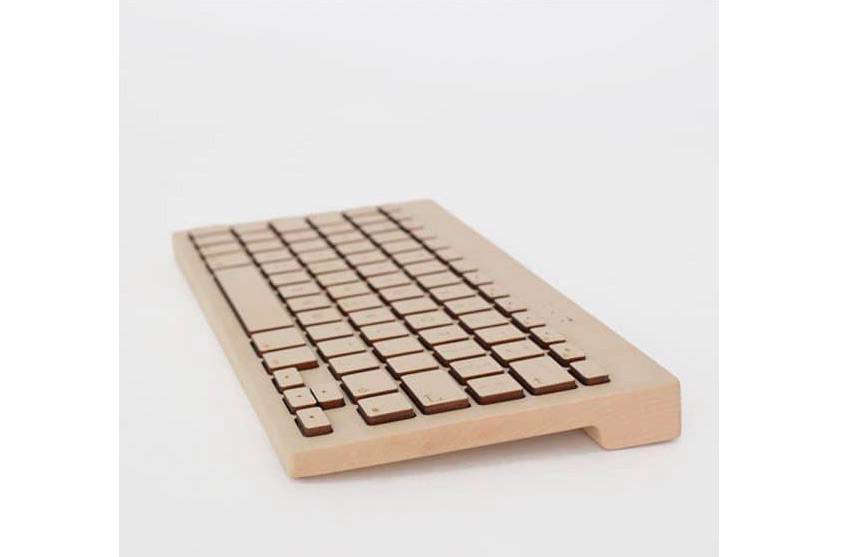
The Bare. Essential Keyboard is best understood as a minimalist, design-forward wooden keyboard inspired by the Orée Board Essential. Unlike a typical plastic keyboard, the Orée-style board is known for being handcrafted from a single piece of wood, often maple or walnut, with keys and case designed to preserve the natural grain. Some versions have been described as compatible with Mac, iOS, Windows, and Bluetooth-enabled devices, while offering both wireless Bluetooth use and wired USB operation.
That combination matters. A keyboard is one of the few tools many people touch for hours every day. We obsess over monitors, desks, office chairs, and laptops, but the keyboard is where the actual work happens. It is the handshake between brain and machine. If that handshake feels cheap, cramped, loud, or awkward, the whole desk experience suffers. A keyboard like the Bare Essential is trying to fix that not by adding more features, but by removing the visual noise.
Why Minimalist Keyboards Are Having a Moment
Minimalist keyboards are not just a design trend; they are a reaction. Over the past decade, the keyboard market has split into two very loud camps. On one side, gaming keyboards compete on polling rates, RGB zones, macro keys, magnetic switches, and software ecosystems. On the other side, productivity keyboards focus on quiet typing, multi-device pairing, slim profiles, and desk-friendly aesthetics. Somewhere in the middle sits a growing audience asking a simple question: “Can my keyboard just be excellent without looking like a nightclub cash register?”
The Bare. Essential Keyboard speaks to that audience. It favors texture over theatrics. Natural wood makes every unit feel slightly different, because grain patterns do not come from a factory template. That is part of the charm. A plastic keyboard can be perfectly consistent; a wooden keyboard can be personal. It ages differently, photographs beautifully, and softens the sterile look of a home office.
There is also a psychological benefit. A cleaner desk often encourages a cleaner workflow. That does not mean a wooden keyboard will magically finish your inbox, pay your taxes, or stop you from opening 37 browser tabs. Sadly, no switch type has yet solved procrastination. But a simplified workspace can reduce friction. When your keyboard feels intentional, your desk begins to feel less like a dumping ground and more like a place where actual thinking happens.
Design: The Beauty of Doing Less
The most obvious selling point of the Bare Essential Keyboard is its design. The wooden body gives it warmth, while the low visual profile keeps it from dominating the desk. Many versions of Orée-style boards offer engraved legends rather than printed keycaps, which helps maintain the natural material language. Instead of a loud logo or aggressive industrial shell, the keyboard relies on proportion, grain, spacing, and finish.
That is good minimalism. Bad minimalism is when a product removes useful things and calls the inconvenience “purity.” Good minimalism removes distractions while preserving function. The Bare. Essential Keyboard still needs to be a keyboard first. It must connect reliably, sit comfortably, register keystrokes accurately, and survive daily use. The wood is the headline, but typing is the plot.
Maple vs. Walnut: Two Desk Personalities
Maple and walnut create two different moods. Maple is lighter, brighter, and more modern. It works well with white desks, silver laptops, pale walls, and anyone who has ever described a room as “airy.” Walnut is darker, richer, and more traditional. It pairs beautifully with leather desk mats, black monitors, brass lamps, and people who own notebooks they are afraid to write in because the paper is too nice.
Neither choice is objectively better. Maple says “fresh studio.” Walnut says “quiet library.” Both say “I thought about my keyboard for more than eight seconds,” which is already a design victory.
Typing Feel: What to Expect
A wooden keyboard is not automatically a mechanical keyboard in the enthusiast sense. Mechanical keyboard fans usually discuss switch types, actuation force, travel distance, hot-swappable sockets, gasket mounting, stabilizer tuning, foam layers, and keycap profiles. That world is fascinating, but it can also turn a simple purchase into a three-month research project with vocabulary words that sound like medieval professions: luber, filmer, thocker.
The Bare Essential Keyboard focuses more on the complete tactile experience than on switch experimentation. Reviews and product descriptions of Orée-style boards often emphasize craftsmanship, key spacing, natural feel, and a distinctive typing sensation. The wood changes the emotional experience of typing. It feels less disposable. It also changes the sound profile, generally making the board feel more organic and less plasticky.
However, buyers should be realistic. If you want deep switch customization, hot-swappable sockets, per-key RGB, rapid trigger gaming features, or open-source firmware tinkering through QMK or VIA, a modern custom mechanical keyboard may be a better fit. If you want a beautiful writing keyboard that looks like a design object and performs everyday typing with elegance, the Bare. Essential Keyboard concept makes much more sense.
Connectivity: Bluetooth, USB, and the Joy of Fewer Cables
One of the strongest practical features of the Orée Board Essential family is connectivity. Bluetooth allows the keyboard to pair with laptops, tablets, and other compatible devices, while USB support gives users a dependable wired option. That flexibility matters for people who move between a desk setup and a tablet setup, or for anyone who distrusts Bluetooth at the exact moment a deadline appears.
Wireless keyboards have improved dramatically, but the basics still matter. Battery life, connection stability, device compatibility, and wake-from-sleep behavior can make or break daily use. A keyboard that looks gorgeous but drops keystrokes is not minimalist; it is a decorative anxiety machine. For writers, editors, designers, and office workers, reliability is more important than futuristic features.
How It Compares With Modern Mechanical Keyboards
Modern mechanical keyboards have become impressively advanced. Many popular models now offer hot-swappable switches, double-shot PBT keycaps, multiple connection modes, sound-dampening foam, aluminum cases, programmable layers, and layouts ranging from full-size to 75%, 65%, 60%, and even tiny 40% boards. Gaming-focused keyboards may include Hall effect or optical switches, adjustable actuation, rapid trigger, and high polling rates.
The Bare. Essential Keyboard takes a different path. It does not try to be the fastest, flashiest, or most configurable. It tries to be the most human. That sounds poetic, but it is also practical. Not everyone needs a board designed for competitive esports. Many users need a keyboard that feels pleasant, looks beautiful, and supports focused work. If your daily routine is writing emails, drafting documents, editing photos, managing a business, or outlining creative ideas, the best keyboard may be the one that makes you want to sit down and start.
Bare Essential vs. Barebones Mechanical Keyboard
Do not confuse “Bare. Essential Keyboard” with a “barebones keyboard kit.” A barebones mechanical keyboard usually includes the case, PCB, plate, and stabilizers, but excludes switches and keycaps. It is built for people who want to choose every component themselves. The Bare Essential concept is different. It is not about unfinished assembly; it is about a finished product with a stripped-back design philosophy.
In other words, a barebones keyboard says, “Please complete me.” A Bare. Essential Keyboard says, “I am complete because I resisted becoming ridiculous.” Both are valid. One is for the hobbyist. The other is for the user who wants refinement without a parts spreadsheet.
Ergonomics: Beautiful Should Still Be Comfortable
Any keyboard review should talk about ergonomics, because wrists are not replaceable accessories. A keyboard can be beautiful and still wrong for your body if it forces your hands into awkward angles. Ergonomic guidance from workplace health experts consistently emphasizes neutral wrist posture, relaxed shoulders, forearms roughly in line with the keyboard, and a mouse placed close enough to avoid reaching.
The Bare. Essential Keyboard is visually calm, but users should still pay attention to desk height, keyboard angle, and typing posture. If the board sits too high, a wrist rest may help during pauses, though you generally do not want to press your wrists heavily into a surface while actively typing. If the board has tilt feet or a naturally raised back edge, test whether that improves or worsens wrist extension. Comfort is personal, and your hands are allowed to disagree with your interior design preferences.
Who Will Love This Keyboard?
The Bare. Essential Keyboard is ideal for users who value aesthetics, natural materials, and a distraction-free desk. Writers, architects, designers, photographers, editors, consultants, and home-office workers may appreciate it most. It also makes sense for people who use an iPad or laptop as a writing station and want a keyboard that feels more intentional than a generic Bluetooth slab.
It is also a strong gift idea for someone who cares about design. A wooden keyboard feels personal in a way most tech accessories do not. It says, “I noticed your desk vibe,” which is much better than “I bought you another black plastic rectangle because society demanded it.”
Who Should Skip It?
Gamers may want to look elsewhere, especially if they need ultra-low latency, rapid trigger, programmable actuation, onboard profiles, or dedicated gaming software. Mechanical keyboard enthusiasts who love swapping switches, changing keycaps, tuning stabilizers, and flashing firmware may also find the Bare Essential approach too closed or too design-led.
Budget buyers should also compare carefully. Handcrafted wooden keyboards often cost more than mainstream productivity keyboards. That premium pays for materials, craft, and designnot necessarily more features. If you simply need a keyboard for spreadsheets, schoolwork, and occasional emails, a less expensive wireless keyboard may be enough. If you want a tool that doubles as a desk centerpiece, the value proposition becomes more persuasive.
Buying Checklist: What to Look For Before You Commit
Before buying a Bare. Essential Keyboard or a similar minimalist wooden keyboard, check the exact layout first. Mac and Windows layouts differ, especially around modifier keys and function shortcuts. Make sure the language layout matches your typing needs, whether that is US QWERTY, UK, or another regional configuration.
Next, confirm connectivity. Bluetooth is convenient, but USB backup is valuable. Look for clear information about battery type, charging method, supported operating systems, and how many devices the keyboard can pair with. If you plan to use it with an iPad, MacBook, Windows desktop, or tablet, verify compatibility before falling in love with the grain pattern.
Also consider maintenance. Wood is durable, but it is still a natural material. A protective finish helps guard against finger oils and minor spills, but the keyboard should not be treated like a waterproof gadget. Keep coffee at a respectful distance. Your keyboard may look like it came from a tree, but it does not want to be watered.
Care and Maintenance for a Wooden Keyboard
A wooden keyboard rewards gentle care. Dust it regularly with a soft cloth, avoid harsh cleaning chemicals, and keep liquids away from the keys. If the manufacturer provides specific care instructions, follow them. Natural materials can respond to humidity, sunlight, and temperature changes, so do not leave the keyboard in extreme conditions. A stable indoor desk environment is best.
For daily use, clean hands are your secret weapon. Wood can develop character over time, but there is a difference between patina and snack residue. If you eat chips while typing, the keyboard will eventually know, and it will judge you quietly through the crumbs.
Productivity Benefits of a Bare Essential Setup
A Bare. Essential Keyboard works best as part of a broader minimalist desk setup. Pair it with a clean monitor arrangement, a comfortable chair, a good desk light, and only the tools you actually use. The goal is not to create a sterile showroom. The goal is to reduce friction. When your tools are accessible, attractive, and comfortable, starting work feels easier.
There is also something satisfying about using a keyboard that does one job well. Modern devices often compete for attention. They blink, ping, sync, glow, and update. A simple keyboard does not care about your notifications. It waits. You type. That relationship is refreshingly drama-free.
Real-World Experience: Living With the Bare. Essential Keyboard Idea
Using a keyboard like the Bare. Essential Keyboard changes the way a desk feels before it changes the way typing feels. The first experience is visual. You sit down, see the wood grain, and immediately the workspace feels warmer. Even a plain desk starts to look curated. The keyboard does not disappear, but it also does not scream. It becomes the quiet center of the setup, like a good dining table or a well-made pen.
The second experience is tactile. Plastic keyboards often feel anonymous; one could be swapped for another and your fingers might barely notice. A wooden keyboard makes touch part of the ritual. The surface has a natural quality that feels less industrial. The engraved key legends, when present, add subtle texture. Typing becomes less like tapping on office equipment and more like working with a crafted tool. That does not mean every user will type faster. In fact, speed is not the point. The value is in how the tool invites attention.
For writing, this matters. A pleasing keyboard can make long sessions feel more deliberate. The soft visual tone of maple or walnut can reduce the sense that you are trapped in a tech cave. When writing articles, emails, proposals, scripts, or research notes, that small environmental shift can help. It is not magic; it is mood. And mood matters more than productivity gurus like to admit, probably because “buy a keyboard that makes you feel like a calm forest scholar” does not fit neatly into a spreadsheet.
In a home office, the Bare Essential style also helps separate work from chaos. Many people use the same room for work, bills, hobbies, video calls, and occasionally folding laundry while pretending it is “temporary.” A beautiful keyboard becomes a signal: this is the writing space, the planning space, the place where ideas get shaped. That signal can be useful. The brain likes cues, especially when the couch is nearby and streaming platforms are whispering.
There are trade-offs. A wooden keyboard may not be the best choice for messy desks, heavy gaming, travel abuse, or users who want endless customization. It can also make you strangely protective. You may find yourself moving mugs farther away, wiping dust more often, and giving side-eye to anyone who approaches with sticky fingers. Congratulations: you have become a keyboard parent.
Still, the daily experience can be deeply satisfying. The keyboard feels personal without being flashy. It adds beauty without stealing focus. It reminds you that technology does not always need to look futuristic to feel advanced. Sometimes the most modern thing on a desk is the object that refuses to look disposable.
Conclusion: Essential, Not Empty
The Bare. Essential Keyboard is not for everyone, and that is exactly why it is interesting. It is not trying to win a spec-sheet battle against gaming boards, hot-swappable customs, or productivity keyboards packed with shortcut keys. Its appeal is quieter: natural materials, intentional design, reliable everyday function, and a calmer relationship with the tool you use to write, work, and communicate.
If you want maximum customization, choose a modern mechanical keyboard. If you want the lowest latency for competitive gaming, choose a dedicated gaming board. But if you want a keyboard that makes your desk feel more human, more focused, and a little less like a plastic accessory warehouse, the Bare. Essential Keyboard deserves attention. It is proof that “essential” does not have to mean boring. Sometimes it means removing everything unnecessary until what remains feels just right.
Note: This article is written for web publication and synthesizes real product information, keyboard review guidance, minimalist desk design principles, and ergonomic best practices. Verify current specifications and availability before purchase.