Changing your Steam region sounds simple until Steam starts acting like a stern airport agent asking for documents, payment proof, and your life story. Okay, maybe not your life story, but close. If you recently moved to another country, are studying abroad, or are traveling for a long stretch, you may need to update your Steam store country so your prices, currency, and payment options match where you actually are.
This guide explains how to change Steam region the right way, what Steam allows, what it does not allow, and how to avoid the common mistakes that leave gamers staring at the checkout page like it personally insulted them. You will also learn the difference between your Steam store country and your download region, because those two settings are related in name only and cause confusion on a near-daily basis.
What “Steam Region” Actually Means
Before you do anything, it helps to know that people use the word “region” to describe three different things on Steam. That is where the chaos begins.
1. Steam Store Country
This is the big one. Your store country controls the currency you see, the payment methods Steam expects, and sometimes the products or offers available in your market. If you moved from one country to another, this is the setting you may need to update.
2. Download Region
Your download region affects which content server Steam uses for downloads. It is mainly about speed and reliability, not prices or billing. If your games are downloading like it is 2007 and your internet is powered by hope, changing the download region may help.
3. Region Restrictions on Games or Gifts
Some games, keys, or gifts may have region restrictions. That does not mean your account is broken. It usually means the item itself has availability limits, publisher rules, or market restrictions attached to it.
In other words, if you want to know how to change Steam region, you first need to ask: do you mean store country or download region? Most users mean store country, so that is where we will focus first.
Can You Change Your Steam Region?
Yes, but only in a legitimate way. Steam does allow users to change their store country when they actually relocate or are living in a different country. This is not supposed to be a bargain-hunting loophole for scoring cheaper prices in another market while sitting on your couch at home in sweatpants.
That last part matters. Steam expects your location and payment method to match the country you are switching to. So if you genuinely moved, great. If you are trying to hop regions just to chase lower prices, that is exactly the kind of behavior that can trigger problems.
Think of Steam like a cashier with a very good memory. If your IP, billing information, and payment method all tell different stories, Steam may decide your account is auditioning for a fraud documentary.
Who Usually Needs to Change Steam Region?
You may need to update your Steam store country if any of these situations sound familiar:
- You moved permanently to another country.
- You are studying abroad for a semester or longer.
- You relocated for work.
- You are living in another country and need local pricing and payment support.
- Your old payment method no longer works with your current store country.
You probably do not need to change it if you are just taking a short trip, on vacation, or trying to see whether a game is cheaper somewhere else. In many cases, temporary travel does not require a full account-country change.
How to Change Steam Region the Right Way
Here is the quick and easy guide, minus the shady shortcuts and plus the part where your account survives the experience.
Step 1: Sign in to Steam on the Web or Client
Open Steam and sign in to the account you want to update. Make sure your account is secure before doing anything else. If you have not enabled Steam Guard yet, this is a good time to stop living dangerously.
Step 2: Go to Account Details
Head to your account details page. This is where Steam shows your current store country, wallet information, and purchase history. If Steam detects that your current location differs from your existing store country, it may present an option to update it.
Step 3: Start a Purchase in the Country Where You Are Actually Located
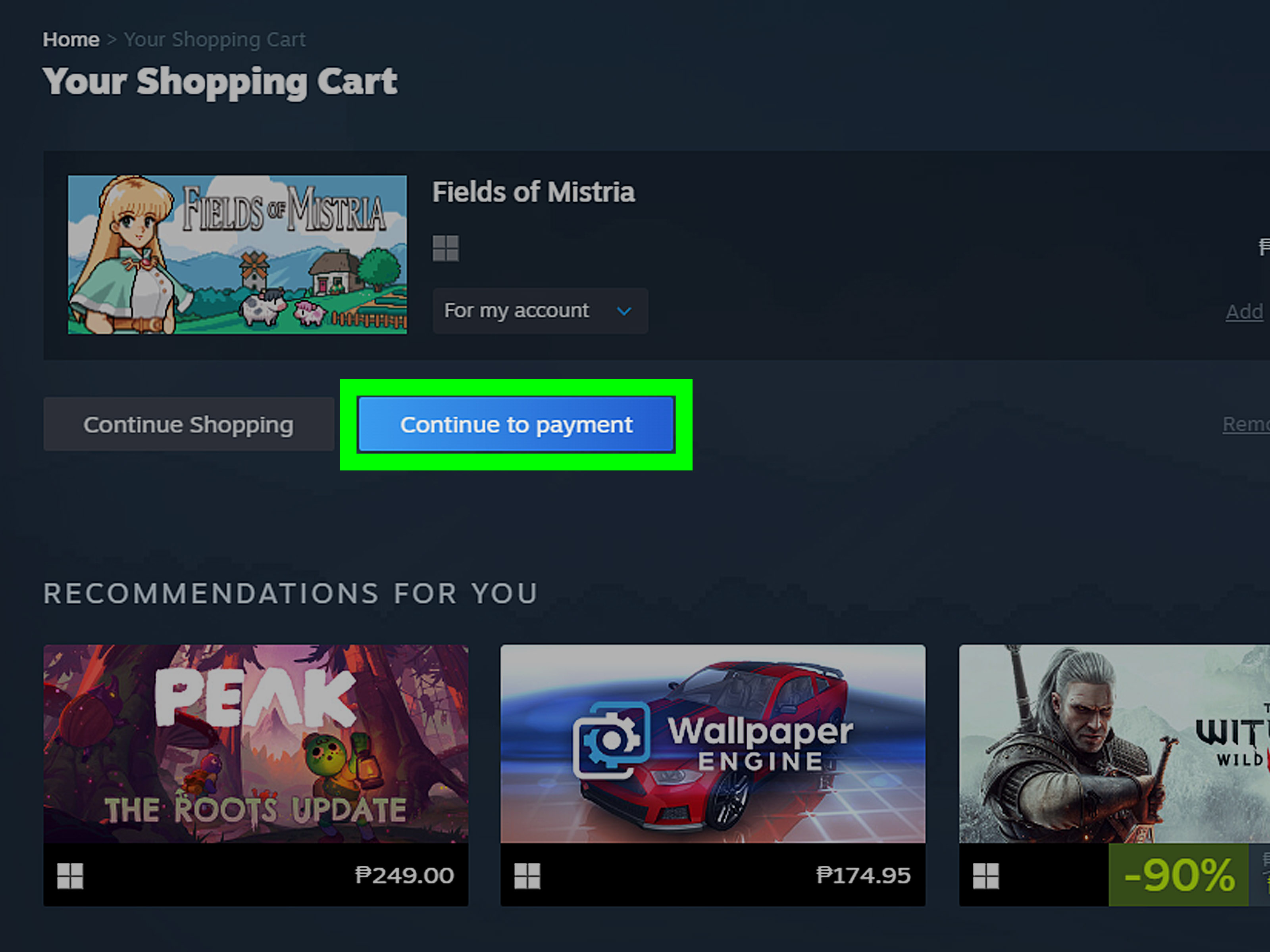
This is the part many guides skip or explain badly. Steam region changes are usually tied to making a purchase while physically located in the new country. You may need to add an item to your cart and begin checkout so Steam can recognize the local storefront and offer the country update option.
In plain English: Steam usually wants to see that you are really there, not just clicking around and manifesting a new currency with wishful thinking.
Step 4: Choose the New Store Country if Prompted
If Steam recognizes your new location, you should see the option to update your store country. Select the correct country. Do not get creative here. This is not the time to pretend you have suddenly become a resident of somewhere you have never visited.
Step 5: Use a Payment Method Issued in That Country
To complete the change, Steam generally expects a local payment method that matches the new country. This is one of the biggest reasons region changes fail. A card from your old country often will not confirm a new store country properly.
Examples of valid situations include using a local debit card after a move, a payment method tied to your new residence, or another supported local payment option available in that market.
Step 6: Complete the Purchase
Once the payment goes through, Steam should update your store country and show prices in the new local currency. Congratulations. Your account has caught up with your passport, your wallet, and reality.
Step 7: Wait Before Changing Again
Steam does not let users flip store countries constantly. If you are the type who changes their mind every six minutes, bad news: Steam is not built for that lifestyle.
Why Your Steam Region Change Is Not Working
If Steam refuses to cooperate, there is usually a clear reason behind it. Here are the most common ones.
Your Payment Method Does Not Match the New Country
This is the number one problem. You may be physically in the new country, but if your card or billing info still belongs to the old one, Steam may reject the change.
You Are Confusing Store Country With Download Region
If your only issue is slow downloads, changing your store country is the wrong fix. You probably need to change the download region instead.
You Recently Changed Countries Already
Steam is not a revolving door. If you updated your store country recently, you may need to wait before doing it again.
You Are Only Traveling Temporarily
If you are traveling for a short time, Steam may not treat that as a reason to permanently change your store country.
Your Account Activity Looks Inconsistent
If the location, payment method, and account behavior all point to different places, Steam may decide something is off. This is why consistency matters.
What Not to Do
Let us save you from the bad advice floating around online like a boss fight you did not ask for.
Do Not Use a VPN to Fake Your Country
Using a VPN or proxy to disguise your residence for regional pricing or geographic restrictions is a terrible idea. Even if a random forum post says, “Bro, it worked for me,” that is not exactly legal advice, technical support, or wisdom.
Do Not Enter a Fake Billing Address
Using incorrect billing details can cause payment failure, account flags, or worse. Steam wants the account details to reflect your real location.
Do Not Borrow Someone Else’s Card in Another Country
That might seem clever for about five minutes. Then it starts looking like account misuse, payment abuse, or suspicious activity. Steam is unlikely to find that charming.
Do Not Assume Gift Cards Solve Everything
Gift cards and wallet codes can be useful, but they are not a magic wand for changing your store country. They do not replace the need for a legitimate store-country update, and some gifts or items may still be region-restricted.
How to Change Steam Download Region
If your real goal is faster downloads, this is the setting you want.
- Open the Steam client.
- Go to Steam > Settings.
- Select Downloads.
- Find Download Region.
- Choose a server region close to your current location.
- Test your download speed and switch again if needed.
This setting does not change your store currency, billing country, or regional pricing. It only affects the server used for content delivery. So yes, you can change it easily. No, it will not magically turn your U.S. store into an Argentina store. Steam is many things, but it is not a wizard.
Tips for a Smooth Steam Region Change
- Use a real local payment method from your new country.
- Make sure your billing information is accurate.
- Update only when you have actually relocated.
- Check your wallet balance and purchase method before checkout.
- Contact Steam Support if you moved and the system still will not update correctly.
Also, keep your expectations realistic. Not every game, gift, or payment workflow behaves exactly the same in every country. Publishers, taxes, and local regulations can all affect what you see.
Frequently Asked Questions
Can I change my Steam region to get cheaper games?
That is not what the feature is for. Steam region changes are meant for real relocation or living in a different country, not for gaming the price system.
Can I change Steam region without a local payment method?
Usually, no. A local payment method is commonly required to confirm the new store country.
Does changing download region change store prices?
No. Download region only affects which server you use for downloading games and updates.
Will my Steam library disappear if I change store country?
Usually, your library stays with your account. The main changes involve storefront pricing, currency, payment options, and item availability.
What if I moved and Steam still shows my old country?
Try making a purchase with a payment method from your new country. If that still fails, contact Steam Support and explain your situation clearly.
Real-World Experiences and Lessons Learned
One of the most common experiences with changing Steam region comes from students and workers who move abroad and assume the switch will happen automatically. It usually does not. A student who moves from the United States to Germany, for example, may sign in, see prices in dollars, and think Steam just needs a few minutes to “figure it out.” Steam, however, is not reading your lease agreement in the background. Until the account, location, and payment method line up, the old store country can remain in place.
Another very normal experience goes like this: a user moves to a new country, tries to buy a game with an old card, and gets blocked. The first reaction is usually confusion, followed by annoyance, followed by the classic internet move of searching for questionable workarounds. But in real life, the boring solution is usually the correct one. Once the user gets a local payment method and tries again, the purchase often works and the store country updates properly. It is not glamorous, but neither is paying rent, and yet both are somehow required for adult life.
Travelers often run into a different kind of confusion. They are only abroad for a few weeks, see a different local environment around them, and think their Steam account should also switch countries on command. In many cases, that is unnecessary. If you are not relocating in a meaningful way, changing the store country may create more problems than it solves. Temporary travel is one of those situations where the smartest move is often to leave your store country alone, avoid needless checkout experiments, and just play the games you already own.
There is also the famous “friend in another country” idea, which sounds clever right up until it does not. People sometimes think they can ask a friend to help with a local card or billing setup. That tends to create account inconsistency fast. Even when the intention is innocent, the result can look suspicious because the account holder, residence, payment source, and purchase geography do not match. It is the digital equivalent of showing up at the bank wearing a fake mustache and saying, “I swear this is normal.”
Then there are users who never needed to change store country at all. Their actual problem was slow downloads. They were trying to solve a server-speed issue with a billing-country fix, which is like changing your house key because the Wi-Fi is weak. Once they switch the download region in Steam settings, speeds improve, and suddenly the world makes sense again.
The biggest lesson from real user experiences is simple: Steam region changes work best when your situation is genuine, your payment method is local, and your expectations are realistic. Most horror stories start when someone tries to outsmart the system. Most success stories start when someone follows the rules, uses accurate account information, and treats Steam like a storefront instead of a geography puzzle. It may not be the most exciting advice on the internet, but it is the kind that keeps your account alive and your backlog growing.
Final Thoughts
If you are wondering how to change Steam region, the safest answer is also the most practical one: update your Steam store country only when you have genuinely moved or are living in a different country, and use a matching local payment method to complete the change. If you only want better download speeds, change your download region in settings instead.
The quick and easy guide is not complicated once you know the rules. The hard part is ignoring bad advice from random corners of the internet that treat account risk like a side quest. Stick with the legitimate process, keep your billing details honest, and let Steam see the real version of your location. Your future self, your wallet, and your game library will all sleep better.