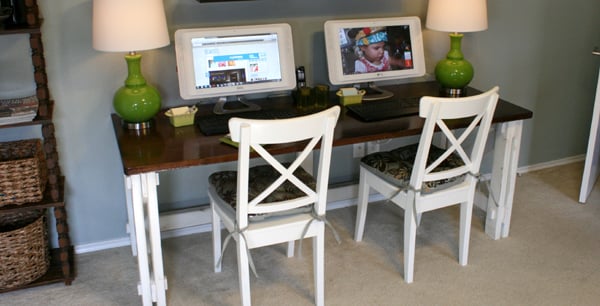
A computer desk reveal sounds simple until you realize it is secretly a lifestyle audit with screws, cables, dust bunnies, and one suspiciously heavy monitor arm. A desk is not just a flat surface where laptops go to overheat. It is the control center for work, study, gaming, planning, video calls, creative projects, online shopping “research,” and the occasional snack that absolutely should not be beside a keyboard.
This computer desk reveal is all about transforming a regular workstation into a space that looks good, works hard, and does not make your shoulders feel like they have been carrying a backpack full of bricks. The goal is not to build a showroom-perfect setup that nobody is allowed to touch. The goal is better: a practical, stylish, comfortable desk setup that supports real life.
Whether you are planning a home office makeover, refreshing a gaming desk, organizing a student workspace, or finally admitting that the cable monster under your desk has become sentient, this guide walks through the reveal from layout to lighting, ergonomics, storage, décor, and daily use.
Why a Computer Desk Reveal Matters
A great computer desk setup can change how a room feels and how you feel while using it. A cluttered desk often creates visual noise before you even open your laptop. A thoughtful desk, on the other hand, gives your brain a gentle nudge: “We are organized now. Please act accordingly.”
The best desk reveals combine three things: comfort, function, and personality. Comfort keeps your neck, wrists, eyes, and back from filing formal complaints. Function helps everything have a place, from chargers to notebooks. Personality keeps the space from looking like a corporate supply closet with Wi-Fi.
A computer desk reveal is also a smart home upgrade because it works for many lifestyles. Remote workers need focus. Students need a place that makes studying slightly less tragic. Gamers need space for equipment and long sessions. Creators need room for screens, tablets, cameras, microphones, lights, and a dramatic cup of coffee. A good desk setup serves all of that without turning into a storage shelf with a keyboard.
The Before: What Was Not Working
Before the reveal, the desk had the classic symptoms of a workspace that had “just evolved” over time. The monitor was too low, the chair was not aligned properly, the keyboard was pushed too far back, and cables were hanging underneath like electronic spaghetti. There were pens in three places, sticky notes in five places, and one drawer that had become a museum of forgotten USB drives.
The biggest issue was not ugliness. It was friction. Every small task required a tiny battle. Plugging in a device meant crawling under the desk. Finding a notebook meant moving a stack of papers. Cleaning the surface meant relocating half the room. Even sitting down felt slightly wrong because the setup did not fit the body or the workflow.
That is the real lesson of any computer desk makeover: if your setup annoys you twenty times a day, it is not “just a desk problem.” It is a productivity leak with a chair.
The Reveal: A Cleaner, Smarter Computer Desk Setup
The finished desk is clean but not empty, polished but not precious. The monitor sits at a comfortable height, the keyboard and mouse are centered, and the most-used items are within easy reach. The desktop has breathing room. The cables are tucked away. The lighting is warm and useful. The accessories look intentional instead of randomly adopted.
The new setup includes a wide desk surface, an adjustable chair, a raised monitor, a compact keyboard, a comfortable mouse, a desk lamp, a small plant, a charging station, drawer organizers, and an under-desk cable management tray. Nothing is overly complicated, which is exactly why it works.
The Desk Surface
The desk itself is the foundation. A computer desk should be large enough to hold your main equipment without forcing your arms into awkward positions. A wide work surface also allows zones: one area for typing, one for writing, one for charging, and one for small décor. If everything is piled in the center, the desk starts acting less like a workstation and more like a tiny landfill with ambition.
For this reveal, the desktop stays mostly clear. The monitor, keyboard, mouse, lamp, and one small decorative piece are the visible essentials. Everything else earns its place in storage. That single decision makes the entire desk feel calmer.
The Chair and Sitting Position
A beautiful desk with a terrible chair is like buying premium tires for a shopping cart. The chair needs to support the lower back, allow the feet to rest flat on the floor or on a footrest, and let the elbows stay close to the body while typing. Armrests should support the arms gently without forcing the shoulders upward.
In the reveal, the chair height is adjusted so the thighs are roughly parallel to the floor and the wrists are not bent sharply while typing. This is not glamorous, but neither is neck pain. Ergonomics may not sparkle, but it is the part of the makeover your future self will thank you for.
The Monitor Placement
The monitor is placed directly in front of the keyboard, about an arm’s length away. The top of the screen sits at or slightly below eye level, which helps reduce the habit of craning the neck forward like a curious turtle. If you use a laptop every day, a laptop stand with a separate keyboard and mouse can make a huge difference.
For dual monitors, the primary screen should sit directly in front of you, while the secondary screen can angle slightly to the side. This prevents constant twisting. The ideal computer desk setup should make your work feel smooth, not like you are watching a tennis match from the front row.
Cable Management: The Unsung Hero of the Reveal
Cable management is where a desk makeover becomes emotionally satisfying. Before the reveal, cords were visible everywhere: power cable, monitor cable, keyboard cable, phone charger, lamp cord, and one mysterious cable that may have belonged to a printer from 2017. After the reveal, the cables are routed through the back of the desk and gathered in an under-desk tray.
The easiest cable management system uses simple tools: Velcro ties, adhesive clips, a cable tray, a labeled power strip, and a few reusable cord wraps. The power strip is mounted or placed off the floor when possible, which keeps the area cleaner and makes vacuuming less like defusing a bomb.
A good cable system also makes tech easier to maintain. When each cable has a route and a label, replacing a monitor or unplugging a charger no longer requires a flashlight, yoga flexibility, and emotional support.
Desk Organization That Actually Works
Organization should match behavior. If you use something every hour, it belongs within easy reach. If you use something once a week, it can live in a drawer. If you have not used it in six months and cannot identify it, congratulations: you have met clutter.
Primary Zone
The primary zone includes the keyboard, mouse, notebook, pen, and daily charger. These are the items that should be reachable without stretching. Keeping the primary zone simple makes the desk feel efficient and prevents the classic “where did I put my pen?” crisis, which somehow happens even when you own 47 pens.
Secondary Zone
The secondary zone includes items used occasionally, such as headphones, external drives, sticky notes, and reference books. These can sit on a shelf, in a side drawer, or on a small desktop organizer. The goal is access without crowding.
Hidden Storage
Drawer dividers are the secret weapon. Instead of one chaotic drawer, create sections for cables, pens, adapters, paper clips, cleaning cloths, and small tech accessories. Clear bins and labeled pouches help prevent the drawer from returning to its natural state: chaos with handles.
Lighting: The Glow-Up in the Desk Reveal
Lighting changes everything. A desk placed under harsh overhead light can make a workspace feel cold and tiring. A desk with only a monitor glow can make you feel like a detective in a cybercrime drama. The sweet spot is layered lighting: natural light when available, a desk lamp for focused tasks, and soft ambient light for evening use.
The desk lamp in this reveal is tall enough to cast light across the workspace without shining directly into the eyes. The monitor is positioned to reduce glare from windows and bright fixtures. This matters because screen glare, poor lighting, and improper viewing distance can contribute to eye strain during long sessions.
A small lighting upgrade can make the desk feel warmer, more expensive, and more inviting. It also helps your video calls look better, which is important if you prefer not to appear as a mysterious silhouette named “User.”
Style Choices: Making the Desk Look Finished
A computer desk reveal should look personal, not sterile. The trick is choosing a few items that add warmth without stealing useful space. For this desk, the finishing touches include a small plant, framed art above the desk, a textured desk mat, and a simple pen cup.
The color palette stays neutral with warm wood, black tech accessories, and soft accent pieces. This makes the setup easy to update later. A desk mat visually anchors the keyboard and mouse, while the plant adds life without demanding a full gardening degree.
Wall space is also useful. A small shelf, corkboard, pegboard, or calendar can keep the desktop clear while still adding personality. If the desk is small, vertical storage is your best friend. It is like giving the room a second floor, but without permits.
Safety and Practical Details
A desk reveal should not ignore safety. Heavy furniture, shelves, and large monitors need stable placement. Tall storage units should be anchored when appropriate, especially in homes with children or pets. Power strips should not be overloaded, and cables should not run across walkways where they can become ankle traps with electricity.
Energy use is another practical detail. Sleep settings, switched power strips, and unplugging unused chargers can reduce wasted standby power. It is a small habit, but it keeps the setup cleaner and more efficient.
Cleaning also becomes easier after the reveal. A microfiber cloth, screen-safe cleaner, and small dust brush are stored nearby. Once a week, the desktop gets cleared, wiped, and reset. This five-minute ritual keeps the reveal from slowly turning back into the “before” photo.
Small Computer Desk Ideas for Tight Spaces
Not every computer desk reveal happens in a dedicated home office. Many people work from bedrooms, living rooms, studio apartments, dining corners, and spaces that were never meant to host a monitor. The good news is that small spaces can still work beautifully.
Choose a desk with drawers or a slim profile. Use a wall shelf above the desk for books and supplies. Mount a monitor arm to free up surface area. Pick a chair that tucks in fully. Use a vertical file holder instead of paper stacks. Keep the color palette simple so the workspace blends into the room instead of shouting, “I live here now.”
For very compact setups, consider a floating desk, ladder desk, or fold-down wall desk. The key is to protect the work zone. Even if the desk is small, it should feel intentional.
What Made the Biggest Difference?
The biggest improvement was not one expensive item. It was alignment. Once the chair, monitor, keyboard, mouse, lighting, and storage all worked together, the desk felt completely different. The reveal looked better because it functioned better.
The second biggest improvement was removing visual clutter. A clean desktop creates the illusion that you are a calm, responsible adult who definitely knows where the tax documents are. Even if that is only partly true, the desk is doing its best.
The third biggest improvement was cable management. Hidden cords instantly made the workstation look more professional. It also made the area easier to clean and less stressful to look at. A computer desk reveal without cable management is still possible, but it is like wearing a great outfit with tangled shoelaces.
Computer Desk Reveal Checklist
Before calling your desk makeover finished, walk through this simple checklist:
- Is the monitor directly in front of you and at a comfortable height?
- Can your feet rest flat on the floor or on a footrest?
- Are your keyboard and mouse close enough to use without reaching?
- Are the most-used items within easy reach?
- Are cables routed, tied, and lifted off the floor?
- Is there enough lighting without screen glare?
- Does every item on the desk have a reason to be there?
- Can you clean the surface in less than five minutes?
If the answer is yes to most of these, you have a desk setup that is not just pretty for photos but useful for everyday life.
Experiences Related to the Computer Desk Reveal
The most surprising experience during this computer desk reveal was how emotional the process became. At first, it looked like a simple project: move the monitor, hide the cables, organize the drawers, and maybe add a lamp. Easy. But once everything came off the desk, it became obvious that the old setup had been quietly shaping the whole day. The clutter made starting work harder. The low monitor encouraged bad posture. The messy wires made the room feel unfinished. Even the old lamp made evening work feel gloomy, as if every email needed to be answered from inside a cave.
Clearing the desk was the first big moment. Removing every item created a blank surface, and that blank surface felt strangely powerful. It forced a decision about each object. Did it help the workday? Did it belong somewhere else? Was it useful, beautiful, or just present because nobody had told it to leave? A surprising number of items fell into the third category.
The second memorable experience was setting up the monitor correctly. It seemed like a tiny adjustment, but raising the screen changed the whole posture of the desk. Suddenly, sitting down felt more natural. The head stayed level, the shoulders relaxed, and the keyboard no longer felt like it was hiding at the far edge of the world. It was the kind of improvement that made me wonder why I had accepted the old setup for so long. Humans are funny creatures. We will tolerate daily discomfort for months, then fix it in eight minutes and act shocked.
Cable management was the most satisfying part. There is something deeply pleasing about gathering messy cords, routing them neatly, and making them disappear. It is not glamorous work, but it delivers instant visual peace. The space under the desk went from “tech jungle” to “adult lives here.” Labeling the cords also helped. Now, unplugging one device does not involve guessing which black cable controls which expensive rectangle.
The final styling stage made the desk feel personal. A plant softened the technology. A framed print added height and color. A desk mat tied the keyboard and mouse together visually. The lamp made the setup feel warm in the evening. None of these details were complicated, but together they made the workspace feel finished.
The best part of the reveal happened the next morning. Sitting down at the new desk felt different. There was no pile to move, no cable to fight, no awkward screen angle to tolerate. The desk simply invited work. That is the real success of a computer desk reveal. It is not about creating a perfect photo. It is about building a space that makes daily tasks feel easier, calmer, and maybe even a little more enjoyable. And if the desk also looks good enough to make you casually walk past it twice just to admire it, that is not vanity. That is quality control.
Conclusion
A computer desk reveal is more than a decorating project. It is a practical upgrade that improves comfort, organization, productivity, and the overall mood of a room. The best results come from combining ergonomic basics with smart storage, clean cable management, good lighting, and a few personal touches.
You do not need the most expensive desk or the trendiest accessories to create a better workspace. You need a setup that fits your body, supports your routine, and makes the tools you use every day easier to reach. Start with the essentials: chair, monitor, keyboard, mouse, lighting, storage, and cables. Then add style in small, intentional layers.
The finished desk should feel like a place where work can happen without drama. It should be comfortable enough for long sessions, organized enough to reduce distractions, and attractive enough that you enjoy spending time there. That is the beauty of a good computer desk reveal: it turns an ordinary surface into a workspace that quietly helps you do better work.