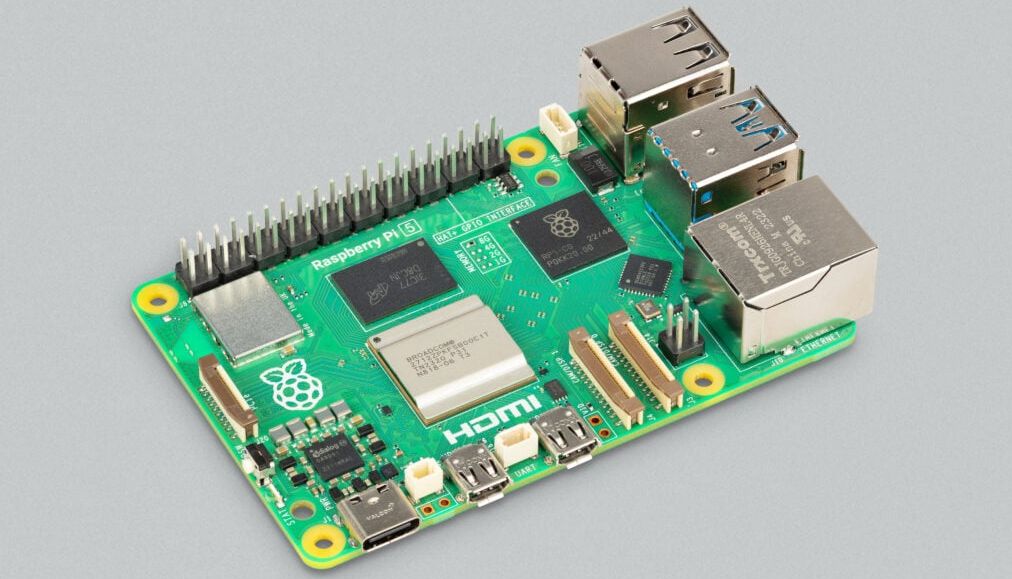
If you own a Raspberry Pi 5, here is the good news: your tiny board might be hiding extra performance without asking you to buy a shiny new add-on, sacrifice your lunch budget, or whisper dark magic into a terminal at midnight. The Pi 5 is already a major jump over earlier models, but the most interesting part is this: some of the best gains come from software, firmware, memory tuning, and smart setup choices rather than expensive hardware upgrades.
That is why the phrase “a free speed boost for your Pi 5” is more than clickbait with a cute haircut. It is a real story about how Raspberry Pi performance is not only about raw CPU clocks. It is also about memory behavior, thermal management, operating system choices, and avoiding the classic maker mistake of building a race car and then making it drive through peanut butter.
In this guide, we will break down what the Pi 5 speed boost really means, where the free gains come from, which tweaks are actually worth your time, and when you should stop tweaking and simply enjoy your faster board like the responsible nerd you are.
Why the Raspberry Pi 5 Already Starts Ahead
The Raspberry Pi 5 arrived with serious advantages baked in. Compared with the Pi 4, it brought a faster Arm Cortex-A76 CPU at 2.4GHz, a stronger graphics core, better I/O, PCIe support, faster SD card behavior, and a design that feels much more comfortable doing “small computer” jobs instead of only “tiny project board” jobs. In plain English, it is the first Pi that often feels like it wants to be used as a light desktop, dev box, retro-gaming machine, home server, or all of the above after one too many coffees.
That stronger baseline matters because optimization stacked on top of a capable board is far more satisfying than optimization stacked on top of a potato. The Pi 5 is not a miracle workstation, but it is finally quick enough that modest improvements are noticeable in daily use. Open a browser, install packages, compile code, spin up Docker containers, run emulators, or process images, and you can actually feel the difference.
So What Is the “Free Speed Boost”?
The headline-worthy part of the story is that engineers and testers found extra performance through improved SDRAM timing and firmware-level tuning. That means the board can get better results without a giant manual overclock and without turning your desk into a wind tunnel. In some testing, the gain landed in the neighborhood of 10% to 20% at the Pi 5’s stock 2.4GHz clock, with even bigger gains showing up when those memory improvements were paired with manual overclocking.
That might sound like a tiny technical footnote, but it is actually a big deal. People often obsess over CPU frequency because a higher number looks dramatic in screenshots. Memory tuning, by contrast, sounds like something only a person with twelve browser tabs open to DRAM diagrams would care about. But memory speed and latency can shape real responsiveness. If the CPU is the engine, memory is the road surface. You can absolutely go faster when both stop fighting each other.
In practical terms, that means some Pi 5 workloads feel snappier without you doing anything heroic. Desktop interactions can tighten up. Certain benchmarks rise. Compiles, content loading, emulation, and heavier multitasking can benefit. It is the kind of performance story that does not scream, but quietly stops wasting your time.
Why This Matters More Than a Fancy Benchmark Graph
A benchmark screenshot is fun for about nine seconds. Real speed is what happens after that. If your Pi boots faster, opens applications with less hesitation, scrolls a little more smoothly, or finishes jobs before you wander off to make a sandwich, that is the win. The Pi 5’s free speed boost matters because it improves the board you already own, not because it wins a social media argument against someone else’s single-board computer at 1:13 a.m.
The Best No-Cost Ways to Make Your Pi 5 Faster
1) Update Raspberry Pi OS, packages, and bootloader
This is the least glamorous step and the one most likely to be ignored by people who would rather overclock first and read later. Do not be that person. If performance gains are arriving through firmware, bootloader, and software-level improvements, an outdated Pi 5 is basically leaving free horsepower parked in the driveway.
Those commands are not wizardry. They are housekeeping. But good housekeeping on the Pi 5 can genuinely pay off. If your board has not been updated in a while, this is the first thing to do before changing clocks, voltages, or anything else that makes your future self sigh heavily.
2) Use 64-bit Raspberry Pi OS
If you are still running a 32-bit install on a Pi 5, the board is being polite about it, but it is disappointed. For years, 64-bit Raspberry Pi OS has shown a performance advantage in many workloads, and the Pi 5 is exactly the kind of machine that benefits from that extra breathing room. Modern software stacks, browsers, development tools, emulators, and heavier server jobs tend to feel more at home here.
Does that mean a 32-bit system is unusable? Not at all. But if the whole point of this article is free speed, using the operating system that more fully matches the hardware is one of the easiest wins on the table.
3) Keep the Pi 5 cool enough to avoid losing speed
The cruel joke of computing is that your device can technically be fast and still behave slowly if heat gets in the way. The Pi 5 is more powerful than earlier Pis, and with that comes more thermal pressure. Once temperatures rise high enough, the board begins to throttle to protect itself. Translation: your “fast” board starts acting like it remembered an earlier appointment.
Even if you are chasing a free speed boost, cooling matters. The fastest tweak in the world is useless if the board cooks itself into slower sustained performance. The official Active Cooler has become a common recommendation for exactly this reason. Better sustained clocks beat prettier theory every time.
4) Trim background clutter
This is not the sexiest optimization tip, but it is real. Disable services you never use. Keep startup lean. Avoid opening ten browser tabs full of JavaScript circus acts and then blaming the board for modern web nonsense. The Pi 5 is capable, but it is still a small ARM computer, not a desktop beast with a grudge and 64GB of RAM.
When you give the board a sane workload, the free performance improvements become easier to feel. When you bury it under unnecessary processes, even a tuned system starts to drag.
Manual Free Tuning: Should You Overclock?
Now we arrive at the part of the conversation where every Pi enthusiast leans forward a little. Yes, the Pi 5 can be overclocked. Yes, the process is fairly straightforward. And yes, this can produce a real performance bump. But there is one important reality check: not every Pi 5 will hit the same numbers.
That is the silicon lottery doing its usual comedy routine. One board may reach 3.0GHz or beyond with the right cooling. Another may behave beautifully at 2.8GHz and then throw a dramatic tantrum the moment you ask for more. The smart approach is to treat overclocking as optional frosting, not mandatory nutrition.
On Raspberry Pi OS Bookworm and newer setups, the relevant config file lives in /boot/firmware/config.txt. A commonly discussed starting point looks like this:
This is where restraint becomes attractive. Just because you can paste those lines does not mean you should instantly declare victory. Test stability. Watch temperatures. Use the board for the work you actually do. A Pi that survives five minutes of excitement and then crashes halfway through a package build is not “fast.” It is just enthusiastic.
What Overclocking Is Good For
Overclocking can help with bursty desktop use, compiles, emulation, game loading, media tasks, and workloads where every extra bit of CPU or GPU speed matters. It can be satisfying, educational, and surprisingly effective on the right board.
What Overclocking Is Not Good For
It is not guaranteed. It is not the most efficient state for every Pi 5. And it is not a replacement for proper cooling, updated firmware, or realistic expectations. If your board spends most of its time as a low-power server or home automation box, the most elegant performance move may be leaving the clock alone and enjoying the newer firmware-level gains instead.
Storage Still Changes the Feel of the System
This article is about free speed, so let’s be honest: moving to NVMe is not free. But it is important to mention because storage is one of the biggest differences between a Pi that feels “pretty good” and one that feels suspiciously grown-up.
The Pi 5 supports PCIe and NVMe boot, which means faster storage can dramatically improve boot times, application launches, package installs, and general desktop responsiveness. If you later decide to spend a little money, storage is one of the best places to do it. But even before you buy anything, it helps to understand a basic truth: firmware and memory tuning make the Pi 5 faster, but storage determines how quickly that speed reaches your fingertips.
So the best mindset is this: take the free gains first, then consider storage later if your workload needs it. That way, you are building on a better system instead of trying to buy your way out of a neglected setup.
What a Faster Pi 5 Feels Like in Real Use
Here is where the story gets fun. A properly updated and well-cooled Pi 5 often feels better in ways that are more charming than dramatic. Menus snap open with less hesitation. Web browsing is less awkward. Terminal work feels immediate. Lightweight coding and test builds stop dragging their feet. Retro gaming becomes smoother. Media-center duty feels less like a compromise and more like a legitimate use case.
For makers, the gains can show up in project iteration time. If you are rebooting into new builds, testing scripts, recompiling services, processing camera input, or running a local dashboard, shaving even a little friction off each cycle adds up. Over the course of a week, a “small” speed boost feels less small. It turns waiting into working, which is a pretty good trade.
For desktop users, the Pi 5 still has limits. Heavy websites remain heavy websites. Giant spreadsheets are still giant spreadsheets. But the board has crossed an important line: with the right setup, it spends far less time feeling like a noble experiment and far more time feeling like an actual tiny computer that knows what it is doing.
Common Mistakes That Cancel Out Your Free Speed Boost
Ignoring updates
If you read about a firmware-based speed improvement and never update your board, you have essentially bought a gym membership for your Pi and then left it on the couch.
Using weak power
The Pi 5 likes proper power. Starving it with an inadequate supply can cause instability, USB limitations, and weird behavior that makes troubleshooting much more annoying than it needs to be.
Running hot and calling it “fine”
Thermal throttling is performance tax collected in silence. You may not notice it immediately, but your sustained speed absolutely will.
Confusing “booted successfully” with “stable”
A Pi that boots after an overclock is not automatically stable. Real stability is surviving your actual workload, not just making it to the desktop and posing heroically.
Real-World Experiences: Living With a Faster Pi 5
After the novelty wears off, the most interesting thing about a faster Pi 5 is how normal it starts to feel. That may sound strange, but it is a compliment. The best upgrade is often the one that disappears into your routine. You stop thinking about the tweak and just notice that your machine feels less stubborn.
Imagine sitting down with a Pi 5 that has been fully updated, switched to a 64-bit build, and given enough cooling to stay out of trouble. You plug it into a display, open a browser, launch a few terminal windows, and start doing ordinary things. Not dramatic benchmark things. Ordinary things. The kind of tasks that reveal whether a small computer is enjoyable or merely tolerated.
You update packages, clone a repository, edit a few files, and run a build. On an older Pi, that rhythm often included tiny pauses that added up like sneaky parking fees. The board was usable, but it always seemed to be clearing its throat before the next task. On a tuned Pi 5, those moments shrink. The machine feels more willing. The desktop is not pretending to be a workstation, but it also is not apologizing for existing.
The same thing happens with home lab jobs. A Pi 5 running containers, lightweight services, a dashboard, some automation, maybe a small database, can feel much calmer when the board is not fighting outdated firmware or poor thermal behavior. The speed boost does not suddenly transform it into enterprise hardware, but it does make the experience cleaner. Pages load with less hesitation. Service restarts feel snappier. Reboots become less annoying. In home lab life, that is practically romance.
There is also a subtle confidence boost that comes from knowing the board is performing closer to its potential without living on the edge. Not everyone wants an extreme overclock. Plenty of people simply want their Pi 5 to feel like the best version of itself. Updated memory tuning, better software, and smart configuration do exactly that. It is optimization without melodrama.
And for retro gaming or media projects, the improvement often shows up as reduced friction rather than fireworks. Menus respond faster. Scraping assets is less tedious. Emulator front ends feel cleaner. Small delays that once felt “normal for a Pi” start to feel unnecessary. That is the real charm of the free speed boost: it lowers the number of moments where you shrug and say, “Well, I guess that is just how a tiny board behaves.”
Of course, it is not magic. If you open a bloated modern website full of autoplaying nonsense and enough scripts to launch a moon mission, the Pi 5 may still roll its eyes. If you ask it to be a gaming PC, it will politely remind you that it is still a Raspberry Pi. But in the sweet spot where many people actually use these boards, the experience becomes noticeably better.
That is why this topic matters. The speed boost is not just about headline percentages. It is about how the Pi 5 feels after a week of real use. Faster updates. Smoother browsing. Better project iteration. Fewer annoying pauses. Less thermal drama. More confidence. In the end, that is what people actually want from performance: not a bragging-rights number, but a computer that gets out of the way and lets them build, test, play, and explore.
Conclusion
The Raspberry Pi 5 does not need a miracle to become faster. It just needs a little respect. Keep the software current, take advantage of firmware and memory-timing improvements, use 64-bit Raspberry Pi OS, give the board enough cooling, and treat manual overclocking like a bonus instead of a requirement. The result is a Pi 5 that feels sharper, more responsive, and much more pleasant in daily use.
That is the beauty of a free speed boost. It is not about turning the Pi 5 into something it is not. It is about removing bottlenecks so the board can do its job with less friction. And honestly, in the world of tiny computers, that is a pretty sweet deal for the grand total of zero dollars and one terminal session.