Note: This guide is based on current TikTok app guidance, platform updates, and reputable technology reporting. Menus can vary slightly by region, device, account type, and app version, so update TikTok first if you do not see the same options.
Your TikTok For You Page can feel magical when it works. One minute you are watching a smart cooking hack, the next you are learning how to fold fitted sheets without summoning household demons. But when the algorithm goes off the rails, it can feel like your phone has been possessed by a confused raccoon with Wi-Fi. Suddenly your feed is all celebrity drama, gym bros yelling into tripods, conspiracy soup, or 19 videos in a row about something you accidentally watched once at 1:13 a.m.
Good news: you are not stuck with a weird For You Page forever. TikTok gives users several tools to reset, refresh, and retrain recommendations. The most direct option is called Refresh your For You feed, which lets you restart your For You recommendations as if you had just signed up. You can also fine-tune your TikTok algorithm by using “Not interested,” managing topics, filtering keywords, clearing cache, changing your engagement habits, and following creators who actually match your current interests.
This in-depth guide explains how to reset your TikTok algorithm, what the For You Page refresh actually does, what it does not do, and how to train your new feed so it does not immediately wander back into the digital swamp.
What Is the TikTok Algorithm, Really?
The TikTok algorithm is the recommendation system behind your For You Page, often called the FYP. Instead of simply showing posts from accounts you follow, TikTok watches how you interact with videos and uses those signals to predict what you might want to see next. That includes obvious actions like likes, follows, comments, shares, favorites, and searches. It also includes quieter signals, such as how long you watch a video, whether you rewatch it, whether you skip quickly, and whether you linger on similar topics.
In plain English, TikTok is constantly asking: “Did this person enjoy that video, or did they merely stare at it in confused horror?” Unfortunately, the algorithm is not a mind reader. If you hate-watch drama clips, pause on rage-bait, or open five cleaning videos because one had a cute dog in the background, TikTok may decide you are now deeply passionate about mess, arguments, and emotionally complicated mops.
The For You Page is powerful because it adapts quickly. That is also why it can become repetitive. A few strong signals can create a loop: you watch one topic, TikTok gives you more, you watch because it keeps appearing, and soon your feed thinks you have moved into that niche permanently.
When Should You Reset Your TikTok For You Page?
You do not need to reset your TikTok algorithm every time you see one bad video. One strange post does not mean your feed has betrayed you. But a For You Page refresh may be useful when your recommendations feel consistently wrong, stale, stressful, or disconnected from your real interests.
Signs Your TikTok Algorithm Needs a Refresh
Consider resetting or retraining your TikTok feed if you notice these patterns:
- Your For You Page keeps showing topics you no longer care about.
- You accidentally trained TikTok on a temporary interest, like a TV scandal, breakup advice, or one extremely specific kitchen gadget.
- Your feed feels repetitive and lacks variety.
- You are seeing too much negative, sensational, or emotionally draining content.
- You want a cleaner feed for a new season of life, hobby, job, fitness goal, study plan, or creative project.
- You share your device with someone else and their interests have invaded your recommendations like tiny algorithmic ants.
Refreshing your For You feed is the “big reset” option. Smaller fixes, such as tapping “Not interested” or filtering keywords, work better when the problem is limited to one topic, creator, trend, phrase, or hashtag.
How To Reset Your TikTok Algorithm With For You Page Refresh
The fastest way to reset your TikTok algorithm is to use TikTok’s built-in refresh tool. This feature makes your For You feed behave more like a new account’s feed. After that, TikTok starts rebuilding recommendations based on your new interactions.
Step-by-Step: Refresh Your For You Feed From Settings
- Open the TikTok app.
- Tap Profile at the bottom of the screen.
- Tap the Menu icon, usually shown as three lines in the top-right corner.
- Select Settings and privacy.
- Tap Content preferences.
- Choose Refresh your For You feed.
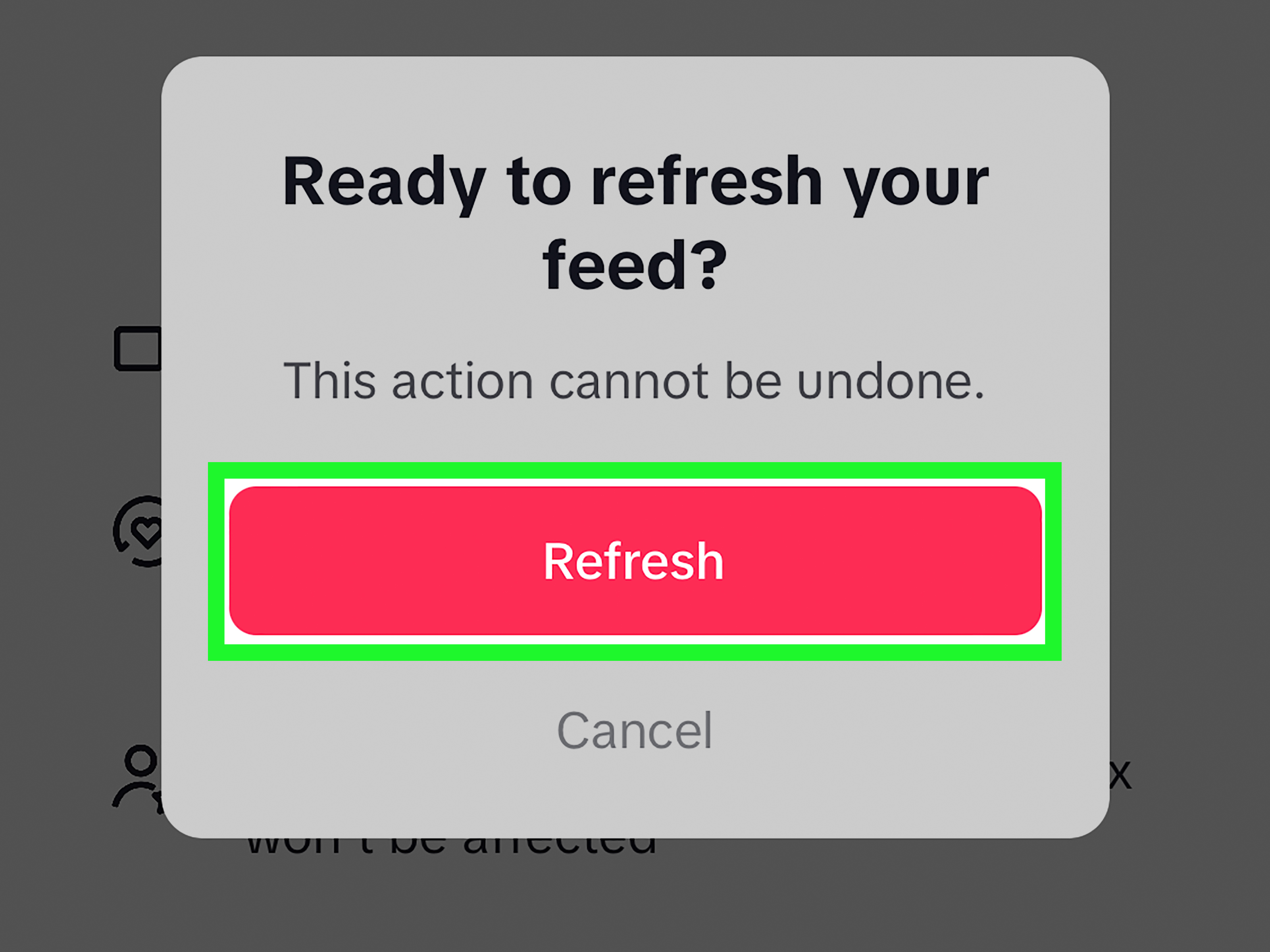
- Follow the on-screen prompts to confirm.
Before you tap the final confirmation, pause for one dramatic movie-trailer second. TikTok warns that once you refresh your For You feed, the action cannot be undone. It is not quite launching a rocket, but it is still worth knowing what button you are pressing.
Alternative Method: Refresh From the For You Feed
In some regions or app versions, you may also be able to access refresh tools directly from the For You feed:
- Go to your For You feed.
- Press and hold a video, or tap the Share button.
- Tap Why this video.
- Select Adjust your For You.
- Tap Refresh your For You feed and follow the prompts.
If you do not see this shortcut, use the Settings method instead. TikTok often rolls out features gradually, so two people sitting on the same couch can have slightly different menus. Social media apps enjoy keeping everyone humble.
What Happens After You Refresh Your For You Feed?
After the reset, your For You Page should show broader, more general content. Think of it as TikTok saying, “Nice to meet you again. Do you like dogs, cooking, basketball, makeup, finance tips, woodworking, comedy, or people quietly restoring rusty objects?” The app will begin learning from your fresh behavior.
This means your first few sessions after the refresh are extremely important. If you want your new algorithm to improve, you need to interact intentionally. Watch videos you truly enjoy. Like and save useful content. Follow creators who match your current taste. Search for topics you want more of. Skip quickly when something is wrong. Use “Not interested” when a topic is really off.
The refresh does not delete your account, remove your profile, erase your inbox, unfollow creators, or change your Following feed. It mainly affects the recommendations in your For You feed. Your previous likes, comments, posted videos, messages, profile information, and followed accounts remain in place.
What the For You Page Refresh Does Not Do
A TikTok algorithm reset is useful, but it is not a magic wand wrapped in glitter. It does not make TikTok forget every single thing about your account across every product surface. It also does not guarantee that you will never see an unwanted topic again.
It Does Not Reset Your Following Feed
Your Following feed is based on accounts you follow. If you follow creators who post content you no longer want, refreshing the For You Page will not change that. You need to unfollow, mute, or adjust those accounts separately.
It Does Not Clear Your Profile Activity
Your posted videos, likes, favorites, comments, and profile details are not erased by refreshing your For You feed. If you want to manage old activity, you must do that manually in the relevant sections of your account.
It Does Not Fix Bad Habits Automatically
If you refresh your FYP and immediately spend 45 minutes watching the exact same chaotic topic you were trying to escape, the algorithm may rebuild the same pattern. The reset gives you a clean start, but your next actions write the new story.
How To Retrain Your TikTok Algorithm After a Reset
The refresh is only step one. Step two is training your new For You Page with better signals. Imagine your algorithm as a puppy. A very fast puppy. A puppy with access to billions of videos and no understanding of emotional nuance. You must reward the behavior you want.
1. Search for Topics You Want More Often
TikTok search is one of the clearest ways to tell the app what you care about. If you want more healthy meal prep, search for “easy high-protein lunches.” If you want more book recommendations, search for “best fantasy books for beginners.” If you want woodworking content, search for “DIY shelves for small spaces.” Watch several quality videos from the results and engage with the best ones.
2. Like, Save, and Share With Purpose
Likes are useful, but favorites and shares can be even stronger signals of real interest. When a video genuinely matches the kind of content you want, save it. Send it to a friend. Follow the creator. These actions tell TikTok, “More like this, please, but maybe not 900 copies by dinner.”
3. Skip Fast When a Video Is Wrong
Watch time matters. If you let a video play all the way through, even because you are annoyed, confused, or waiting for the point, TikTok may treat that as interest. When a video is not for you, swipe away quickly. Do not feed the goblin.
4. Use “Not Interested” Aggressively but Thoughtfully
When a topic keeps coming back, long-press the video and tap Not interested. In some cases, TikTok may let you give more specific feedback, such as reducing similar content or content from that creator. This tool is especially helpful for repetitive trends, topics you dislike, or videos that feel emotionally exhausting.
5. Follow Better Creators
Following is not just for the Following feed. It also helps define your interests. If your current follow list is full of accounts you liked three years ago, do a small cleanup. Follow creators who reflect your current hobbies, goals, humor, values, and learning interests.
Use Manage Topics To Fine-Tune Your Feed
TikTok has added more feed-control tools over time, including topic management. Depending on your app version and region, you may see a Manage topics option under Content preferences. This lets you adjust how often broad categories appear in your For You feed.
For example, you may be able to increase or decrease categories such as sports, travel, humor, current affairs, dance, food, beauty, fitness, creative arts, or similar themes. Topic controls may take time to influence your feed, so do not expect the entire app to transform after one slider move. Algorithms are fast, but they are not always polite.
How To Manage Topics on TikTok
- Open TikTok and go to Profile.
- Tap the Menu icon.
- Choose Settings and privacy.
- Tap Content preferences.
- Select Manage topics, if available.
- Adjust the topic levels based on what you want to see more or less often.
This is a great option if your For You Page is almost right but needs a steering wheel. Use refresh when the whole feed feels broken. Use Manage topics when you simply need to turn down one category and turn up another.
Filter Keywords and Hashtags You Do Not Want
If your problem is specific, keyword filters can help. TikTok allows users to filter certain words, phrases, variations, and hashtags from feeds such as For You, Following, Friends, LIVE, and other feed surfaces depending on availability. This is especially helpful for spoilers, stressful news topics, diet content, celebrity drama, sports results, or trends you are completely tired of seeing.
Examples of Useful TikTok Keyword Filters
- TV show names when you want to avoid spoilers.
- Names of public figures you do not want in your feed.
- Terms linked to stressful topics.
- Hashtags for trends you find annoying.
- Product names if your feed has become one long commercial with jump cuts.
Keyword filtering is not perfect. Creators use slang, misspellings, emojis, captions, and visual references that may slip through. Still, it can reduce unwanted content and help your refreshed TikTok algorithm stay cleaner.
Clear Cache: Helpful, But Not a Full Algorithm Reset
Many people search for “clear TikTok cache to reset algorithm.” Clearing cache can help with app performance, storage, loading problems, and temporary glitches. However, it is not the same as refreshing your For You feed. Cache is mostly local app data stored on your device. Your recommendation profile is based on account-level behavior and platform signals, not just cached files sitting on your phone.
To clear cache, go to Settings and privacy, find Free up space, and clear cache from there. Do it if TikTok feels slow or buggy. Just do not expect it to magically erase three months of late-night raccoon rescue videos.
How To Use “Why This Video” To Understand Your Feed
The “Why this video” feature can help you understand why a post appeared in your For You feed. TikTok may explain that the video was recommended because of your interactions, accounts you follow, content popular in your region, recently watched videos, or similar signals.
This feature is useful because it turns vague frustration into a clue. If TikTok says a video appeared because you watched similar content, you know to skip that topic faster or tap “Not interested.” If it appears because you follow certain accounts, you may need to review your follow list. If it appears because it is popular in your area, you may not be able to eliminate it completely, but you can still train the feed over time.
Should You Delete and Reinstall TikTok?
Deleting and reinstalling TikTok may fix app bugs, but it is not the best way to reset your algorithm. Once you log back into the same account, TikTok still has your account history and interaction patterns. If your goal is a true For You Page reset, use Refresh your For You feed. If your app is crashing, freezing, or behaving strangely, then reinstalling can be part of troubleshooting.
Creating a brand-new account is more extreme. It may give you a cleaner start, but you lose your existing follower relationships, posted content, saved items, username history, and account momentum. For most users, refreshing the For You feed and retraining it is easier.
How To Avoid Ruining Your Fresh TikTok Algorithm Again
After refreshing your For You Page, your behavior matters more than ever. The first few sessions are like setting the GPS. If you start by watching videos that match your real interests, TikTok has better directions. If you immediately tap into drama, outrage, or random curiosity, the algorithm may confidently drive you back into the same ditch.
Create a 3-Day Feed Training Plan
For the first three days after a reset, try this simple plan:
- Day 1: Search for five topics you genuinely want. Watch, like, and save the best videos.
- Day 2: Follow 10 to 20 creators who match your preferred feed. Tap “Not interested” on anything that feels wrong.
- Day 3: Review your feed. Keep engaging with useful videos and skip unwanted ones quickly.
This approach works because it combines active signals, such as search and follows, with passive signals, such as watch time and skips. The algorithm learns faster when your behavior is consistent.
Common Mistakes People Make When Resetting TikTok
Mistake 1: Refreshing Too Often
Refreshing your For You feed is meant for a meaningful reset, not a daily cleaning ritual. If you refresh constantly, you never give the algorithm enough stable information to improve. Use smaller tools first unless your feed is truly out of shape.
Mistake 2: Hate-Watching Content
Hate-watching is still watching. If you spend a full minute on a video just to be annoyed, your feed may assume you are interested. TikTok cannot always tell the difference between fascination and fury. Swipe away.
Mistake 3: Ignoring the Following Feed
Your Following feed can be a calmer alternative when the For You Page is too noisy. Spend time with creators you intentionally follow. It helps you enjoy TikTok without relying entirely on algorithmic discovery.
Mistake 4: Forgetting About Keywords
If one term keeps dragging your feed in the wrong direction, use keyword filters. Do not fight the same battle one video at a time when you can block the topic at the phrase or hashtag level.
Real-World Examples: Resetting Different Types of TikTok Feeds
The “Too Much Drama” Feed
Suppose your FYP is full of creator feuds, breakup stories, and people recording apology videos in cars. Refresh your For You feed, then search for calmer topics like home organization, comedy sketches, language learning, cooking, or travel planning. Tap “Not interested” on drama clips immediately. Avoid reading comments on messy videos because comment activity can also signal interest.
The “I Watched One Fitness Video and Now I Live at the Gym” Feed
If your feed suddenly believes you are training for the Olympics because you watched one squat tutorial, use Manage topics to reduce fitness if available. Search for other hobbies and follow creators outside that niche. If extreme fitness content keeps appearing, use keyword filters and “Not interested.”
The “Shopping Took Over My Life” Feed
If every other video is a product recommendation, stop clicking product links unless you truly care. Tap “Not interested” on repetitive shopping clips. Search for non-shopping interests, such as tutorials, education, comedy, recipes, or local events. The algorithm needs proof that your personality is more than “person who may buy a mini vacuum.”
Experience Section: What It Feels Like To Reset Your TikTok Algorithm
Resetting your TikTok algorithm can feel oddly refreshing, like cleaning out a closet and discovering that half of it was filled with emotional support cables you no longer need. The first time you refresh your For You Page, the feed may feel a little generic. You might see popular comedy clips, broad lifestyle videos, trending sounds, pets, simple recipes, dance clips, sports moments, or creators TikTok thinks many people enjoy. That is normal. The app is rebuilding its understanding of you.
The biggest experience-related lesson is this: your fresh feed is sensitive. In the first hour after a reset, every action feels louder. If you watch three gardening videos all the way through, your feed may begin testing more plant content. If you save a few productivity videos, you may see more planning, desk setup, and “wake up at 5 a.m.” routines. If you accidentally fall into a celebrity controversy thread, the algorithm may bring you more popcorn whether you ordered it or not.
A practical experience-based approach is to treat the first few sessions like training a playlist. Do not casually scroll with your brain on airplane mode. Choose a few content lanes you actually want: maybe healthy recipes, small business tips, language learning, parenting humor, home improvement, personal finance basics, skincare education, book recommendations, or relaxing animal videos. Search for them directly. Watch high-quality examples. Like the ones that truly fit. Save the ones you want to revisit. Follow creators who consistently post the kind of material you want in your daily digital diet.
Another thing users often notice is that “Not interested” works best when used repeatedly and early. Do not wait until TikTok has shown you 27 versions of the same trend. The moment something feels wrong, long-press and mark it. If you keep watching unwanted videos to “see where this goes,” you are basically giving the algorithm a tiny standing ovation. It does not know you are judging silently from the couch.
Keyword filters also make a big difference for mental comfort. For example, if you are avoiding spoilers for a show, add the show title, major character names, and common hashtags. If a news topic is stressing you out, filter the phrase and related terms. If a trend is making your eye twitch, block the hashtag. The experience is not always perfect, because creators get creative with spelling and slang, but it can significantly reduce repeated exposure.
One of the most useful habits after a reset is alternating between the For You feed and the Following feed. The For You Page is discovery mode. The Following feed is intentional mode. When your FYP starts feeling too chaotic, spend time with creators you chose on purpose. This helps keep TikTok enjoyable instead of letting the app become a slot machine of moods.
Finally, give the reset time. A refreshed TikTok algorithm may improve quickly, but it still needs consistent signals. After two or three days of intentional watching, searching, liking, saving, skipping, filtering, and following, your feed usually starts to feel more aligned. The goal is not to create a perfect For You Page. That may be impossible unless your phone can also read your soul and make coffee. The goal is to create a feed that feels useful, entertaining, balanced, and less like a haunted attic of your worst accidental clicks.
Conclusion: Take Back Your TikTok For You Page
Learning how to reset your TikTok algorithm is really about learning how to communicate with the For You Page. The refresh tool gives you a clean starting point, but your behavior afterward shapes what happens next. Use TikTok’s built-in Refresh your For You feed option when your recommendations feel completely off. Use “Not interested,” Manage topics, keyword filters, fast skips, intentional searches, and better follows to keep your feed moving in the right direction.
The TikTok algorithm is powerful, but it is not the boss of you. Treat your attention like a vote. Every watch, skip, like, search, follow, and save teaches the app what to bring back. Train it carefully, and your For You Page can become less “why am I seeing this?” and more “okay, that was actually useful.” A modern miracle, reallyright up there with finding the end of a roll of tape on the first try.