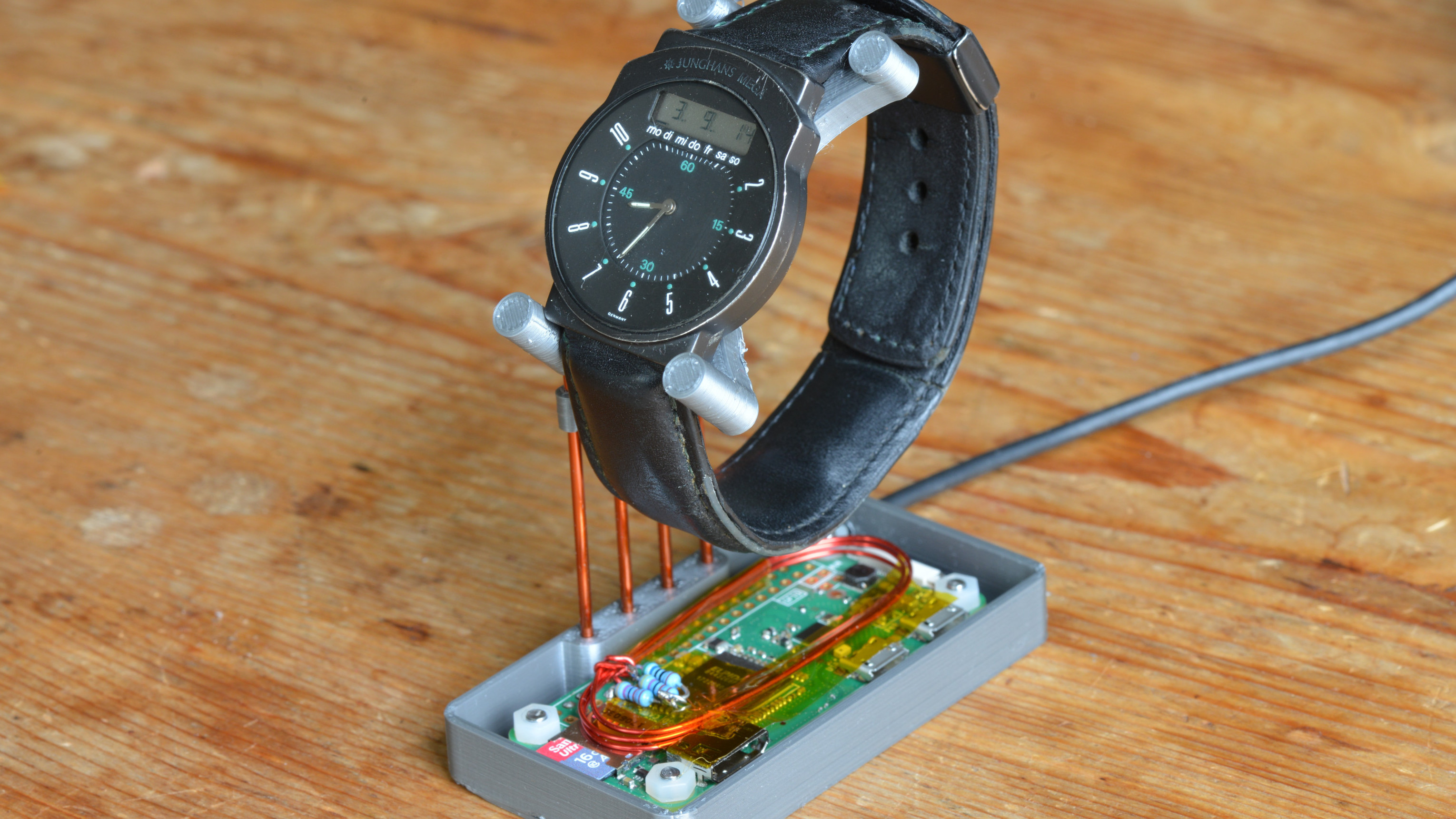
A radio-controlled watch is one of those tiny miracles that feels almost smug when it works. You leave it by the window overnight, it listens to a distant time station, and in the morning it knows the exact time without you poking a single button. Very civilized. Very “the future is here.” Then you travel, move into a concrete apartment, live too far from the transmitter, or discover that your favorite watch has the radio sensitivity of a potato wrapped in foil. Suddenly, the watch that promised atomic-clock accuracy is blinking at you like it has lost all confidence in civilization.
The good news is that weak reception does not always mean your watch is broken. In many cases, the problem is simply distance, building interference, electrical noise, poor orientation, or the fact that low-frequency time signals behave like shy nocturnal animals: they are often easier to catch at night. And for hobbyists, there is an even more entertaining solution: create a tiny local time-signal transmitter that your watch can hear from a few inches away.
This article explains how radio-controlled watches work, why they sometimes fail to sync, what a homemade transmitter actually does, and how to approach the idea safely, legally, and realistically. We are not building a neighborhood radio station, launching a secret time empire, or annoying the FCC. We are talking about a very low-power, near-field educational setup designed to whisper the correct time to a watch sitting nearby.
What Is a Radio-Controlled Watch?
A radio-controlled watch is a quartz watch with a built-in receiver that listens for a standard time broadcast. In North America, many watches and clocks receive WWVB, the 60 kHz time signal operated by the National Institute of Standards and Technology near Fort Collins, Colorado. In other parts of the world, watches may use DCF77 in Germany, MSF in the United Kingdom, JJY in Japan, or BPC in China. Casio’s Multi Band 6 watches, many Citizen Eco-Drive radio-controlled models, and several Seiko radio-sync watches use these stations to update the time and calendar automatically.
The idea is elegant. Your watch has a normal quartz movement for everyday timekeeping, but once a day, usually during the quiet hours after midnight, it tries to receive a coded radio signal. If reception is successful, the watch corrects itself. That correction may include seconds, minutes, hours, date, day of the week, leap year information, and daylight saving time status depending on the model and signal format.
Why Your Watch Says “No Signal”
Low-frequency time signals travel long distances, but they are not magic. A watch’s antenna is tiny, the transmitter may be hundreds or thousands of miles away, and modern homes are filled with electronic noise. Chargers, routers, monitors, LED lamps, metal window coatings, elevators, steel-framed buildings, and reinforced concrete can all make reception worse. Your watch may be perfectly healthy and still fail to receive anything useful.
Common Causes of Failed Reception
The most common cause is location. A watch buried in a drawer will usually perform worse than one placed near a window. Orientation also matters because the antenna inside the watch is directional. Many manufacturers recommend leaving the watch still during reception and pointing the antenna side toward the transmitter. On some models, the best direction may be the 12 o’clock side; on others, it may be closer to 9 o’clock. Your user manual is more useful here than your instincts, although your instincts may look more dramatic.
Time of day matters too. Nighttime reception is usually better because longwave signals often propagate more favorably after dark and because household electrical noise may be lower. That is why many radio-controlled watches attempt automatic reception around 2 a.m., 3 a.m., or 4 a.m. If you are trying to force a manual sync at noon next to a laptop, a phone charger, and a Wi-Fi router, your watch may quietly judge your optimism.
Before Making a Transmitter, Try the Easy Fixes
A homemade transmitter is fun, but it should not be your first move. Start with the simple fixes. Set the correct home city or time zone. A radio-controlled watch can receive the right signal and still display the wrong time if its city setting is wrong. Check daylight saving time settings. Charge the watch fully if it is solar-powered. Move it away from electronics. Try a different window. Leave it untouched overnight. Rotate it a few degrees each night and observe whether the reception indicator improves.
A surprisingly effective trick is to make a “sync spot.” Choose one window, one surface, one orientation, and one time of night. Keep notes for a few days. If the watch succeeds three nights in a row on the bedroom windowsill but fails on the desk, congratulations: you have discovered your home’s tiny time-signal weather map.
So, What Does a DIY Watch Transmitter Do?
A DIY radio-controlled watch transmitter does not create time from thin air. It takes time from a reliable source, such as NTP over the internet or a GPS receiver, converts that time into the same style of coded signal your watch expects, and radiates it at extremely low power through a small coil or loop antenna. The watch receives the local signal as if it came from a national time station, then updates itself.
Maker projects have demonstrated this idea using Raspberry Pi boards, Arduino-compatible microcontrollers, ESP32 boards, STM32 boards, and even phone-based audio tricks for certain watch types. Some projects emulate WWVB for North American watches, while others emulate DCF77, MSF, JJY, or BPC. The technical heart of the project is not the board itself; it is the correct time code, the carrier frequency, the modulation pattern, and keeping the transmitted range very short.
Understanding WWVB in Plain English
WWVB broadcasts a 60 kHz carrier signal. The time information is encoded slowly, at one bit per second, with a complete time frame sent once per minute. That sounds hilariously slow compared with modern internet speeds, but for a watch, it is plenty. Your watch does not need cat videos. It needs the minute, hour, date, and calendar data.
Older and many common receivers use amplitude-based decoding, where the signal strength changes at precise moments to represent zeros, ones, and markers. Newer systems may also use phase modulation for improved performance. From the watch’s point of view, it is listening for a very specific pattern. If your homemade signal imitates that pattern closely enough at close range, the watch may accept it.
The Practical Parts of a Tiny Time Transmitter
A basic educational setup usually has four building blocks. First, it needs a time source. NTP is convenient because a Raspberry Pi or ESP32 can fetch accurate internet time. GPS is excellent because GPS signals include precise timing data, but it adds hardware and may need a clear view of the sky. Second, the project needs code that generates the correct time-code format for the watch’s region. Third, it needs a way to create the low-frequency carrier. Fourth, it needs a small antenna system that works only at very short range.
The antenna is where expectations need a friendly reality check. A national time station uses serious engineering and huge antennas. Your desk project uses a small loop, coil, ferrite rod, or short wire arrangement intended to work across inches, not across the city. That is a feature, not a failure. The goal is to let your own watch sync, not to become the mysterious time wizard of the apartment complex.
Legal and Safety Notes: Keep It Tiny, Local, and Sensible
Any device that intentionally radiates radio-frequency energy can fall under regulations. In the United States, low-power unlicensed devices are generally governed by FCC Part 15 rules, and those rules include limits on emissions. The safest mindset is simple: use the smallest possible signal, couple it only over a very short distance, avoid outdoor antennas, avoid amplifiers, and do not operate anything that interferes with licensed services or other equipment.
If you are experimenting, treat the transmitter as a near-field coupler, not a broadcast station. Place the watch directly on or next to the coil. Use the project briefly to set the watch, then turn it off. If you are not comfortable understanding local RF regulations, do not build or operate a transmitter. Use normal reception methods, a commercial clock-sync device where legally sold, a phone-based emulator if suitable for your model, or manual time setting.
Which Watches Are Good Candidates?
The best candidates are watches that already support radio-controlled timekeeping and allow manual reception. Casio Multi Band 6 models are popular among hobbyists because they support several global time stations. Citizen radio-controlled Eco-Drive watches and Seiko radio-sync models may also work, depending on region, module, and signal compatibility. The key question is not “Is the watch expensive?” It is “Which time signal does this watch expect to receive?”
A Japanese-market watch may prefer JJY. A European watch may expect DCF77 or MSF. A North American watch may use WWVB. Some multi-band models can receive several station types, but only when the watch’s home city or region is set correctly. If the watch is set to Tokyo while you are trying to feed it WWVB, the result may be confusion with a very nice bracelet attached.
Raspberry Pi, Arduino, ESP32, or Phone App?
Raspberry Pi
A Raspberry Pi is a flexible choice because it can connect to Wi-Fi, synchronize its system clock over NTP, and generate timing signals with software. Some maker projects use a GPIO pin to create a low-frequency carrier and another pin or software method to modulate the time code. The Pi is convenient if you want a small Linux-based time station that can be updated and monitored easily.
Arduino or ATtiny
Arduino-style projects are appealing because they are simple, inexpensive, and easy to dedicate to one job. Pairing a microcontroller with a GPS module can create a compact time-code generator that does not depend on Wi-Fi. The downside is that accurate low-frequency generation and timing require careful coding and hardware choices. A casual “close enough” clock may not be close enough for a picky watch.
ESP32
ESP32 boards are attractive because they combine Wi-Fi, low cost, and enough processing power for timing projects. An ESP32 can fetch internet time, generate a signal pattern, and drive a small coil or ferrite antenna arrangement. Many hobbyists like this route because it feels modern, compact, and less fussy than running a full Raspberry Pi for a one-minute sync task.
Phone-Based Emulation
Some phone apps attempt to synchronize radio-controlled watches by using the phone speaker, headphone output, or nearby electromagnetic coupling tricks. These can be surprisingly convenient when they work, but compatibility varies. A phone solution may be perfect for a traveler who wants a quick sync in a hotel room, but it is not universal and should not be treated as guaranteed magic.
How to Think About Accuracy
Radio-controlled watches are not laboratory instruments, but they are impressively accurate for daily life. If your homemade transmitter gets its time from NTP, the practical accuracy may be more than enough for a wristwatch. If it gets time from GPS, the timing source can be excellent, though the rest of the system still needs to generate the watch signal correctly. Remember that the watch usually corrects itself to the received minute and second boundary, not to a nanosecond-grade scientific reference.
The real challenge is not merely “having the right time.” It is making the signal look right to the watch. The modulation must be understandable, the frame must be aligned, the date fields must be correct, and the signal must be strong enough nearby without becoming unnecessarily radiative. In other words, the watch is not asking, “Do you know what time it is?” It is asking, “Can you say it in my very specific radio dialect?”
A Sensible DIY Workflow
A good workflow begins with research. Identify your watch model, supported time signals, manual reception method, antenna orientation, and home city settings. Next, choose whether your project will emulate WWVB, DCF77, MSF, JJY, or another format. Then choose a time source: NTP for convenience, GPS for independence. After that, study existing open-source projects to understand the signal format and hardware approach.
When testing, keep everything small. Put the watch very close to the coil. Start with short sessions. Watch for successful reception indicators. Do not increase power just because the first attempt fails. Most failures come from wrong time-zone settings, wrong signal format, bad orientation, noisy power supplies, weak timing accuracy, or misunderstanding how the watch enters reception mode. More power is rarely the elegant answer; it is often just the louder mistake.
Real Example: The Traveler With a Multi-Band Watch
Imagine someone buys a beautiful radio-controlled G-Shock in the United States, then travels to a region where WWVB reception is impossible. The watch still works as a normal quartz watch, but the automatic sync feature becomes decorative. A tiny WWVB emulator can solve that problem by generating a local 60 kHz-style time signal. The watch is placed next to the coil, manual reception is started, and after a minute or several minutes, the watch updates.
This is not about replacing WWVB. It is about giving one watch a local copy of the expected signal when the official broadcast is unavailable. Think of it as reading the newspaper aloud to someone sitting next to you, not printing your own national newspaper and dropping it by helicopter.
Real Example: The Apartment With Terrible Reception
Another common case is the city apartment. The official signal exists, but your watch cannot hear it through reinforced concrete, neighboring electronics, elevators, and the general electromagnetic soup of modern life. You may get successful syncs only once every few weeks. A near-field transmitter can be used occasionally as a maintenance tool. Once a month, you place the watch beside the device, let it sync, then put both away.
For most people, that is more than enough. Radio-controlled watches have good quartz movements, so they usually do not drift wildly between syncs. A monthly correction can keep the watch satisfyingly accurate without turning your desk into a permanent radio experiment.
What Can Go Wrong?
Plenty, which is part of the fun if you like electronics and part of the irritation if you expected a five-minute miracle. The watch may not support the signal you are generating. The home city may be wrong. The antenna may be oriented poorly. The coil may be too far away. The carrier frequency may be off. The time-code frame may be malformed. The microcontroller clock may drift. Your power supply may create noise. Your watch may refuse manual reception because the battery is low. Or, in classic hobbyist fashion, the project may work once and then behave like it has joined a witness protection program.
The best troubleshooting method is boring but effective: change one thing at a time. Confirm the watch can enter reception mode. Confirm the correct protocol. Confirm the time source. Confirm the output with appropriate test equipment if you have it. Reduce noise. Move the watch closer. Try a different orientation. Keep notes. The notebook is the most underrated tool in electronics, mostly because it does not blink, overheat, or require firmware updates.
Why This Project Is So Satisfying
A DIY time-signal transmitter sits at a wonderful intersection of horology, radio, embedded programming, and practical stubbornness. It teaches you that “atomic watch” is a marketing shortcut, not a literal atomic clock on your wrist. It shows how national time standards reach everyday objects. It reveals how slow, low-frequency signals can still be incredibly useful. And it gives you the deeply nerdy joy of watching a wristwatch obey a signal you generated on your own bench.
There is also something charming about the contrast. The watch looks like a consumer product. The transmitter looks like a science fair project that escaped from a drawer. Yet when the second hand snaps into the right place and the reception indicator confirms success, the whole setup feels like a tiny victory over distance, concrete, and the chaos of modern electronics.
Field Notes: Experiences From Living With a Weak-Signal Radio-Controlled Watch
The first experience most owners have with a weak-signal watch is denial. You put the watch by the window, press the receive button, and stare at it like your concentration can improve radio propagation. The watch thinks for a while, maybe moves a hand to a “receiving” position, then returns with a failed result. Naturally, you try the same thing again immediately, because humans are optimistic creatures and watches are apparently motivated by peer pressure. It fails again.
After a few nights, patterns appear. One side of the house works better. A certain windowsill is better than the desk. The watch syncs more often when it is away from chargers and monitors. In one room, reception fails every time; in another, it works at 3 a.m. but almost never during the day. You begin to treat the watch like a small radio telescope. You rotate it, reposition it, and eventually discover that the most accurate-looking spot in the house is also the least convenient: a narrow ledge near a cold window behind a curtain.
This is where a tiny transmitter becomes appealing. The first successful local sync feels almost ridiculous. The watch that ignored a national time signal suddenly listens when placed close to a small coil on the desk. The reception process is still slow because the signal protocol itself is slow. You do not get instant gratification. You get a quiet minute of suspense while the watch decides whether your homemade time whisper is convincing. When it works, the result is oddly satisfying: a consumer watch accepting time from a device you understand, control, and can improve.
The biggest lesson is that low power is enough when the distance is tiny. Beginners often assume a stronger transmitter is better, but for this use case, closeness beats power. A small coil placed near the watch is usually the right mental model. You are coupling energy into the watch’s receiver at arm’s length or less. The goal is not range; the goal is clarity. A clean local signal can outperform a distant official signal inside a noisy building.
Another lesson is that the watch settings matter as much as the electronics. A wrong home city, wrong daylight saving setting, or unsupported signal type can waste an entire evening. Many radio-controlled watches are designed to be simple for ordinary users, which means their internal logic can feel mysterious during experiments. The manual becomes your best friend, even if it was clearly designed by someone who believes all humans enjoy flowcharts the size of restaurant menus.
Finally, the project teaches patience. You learn to test at night, keep the watch still, check the battery level, control variables, and avoid blaming the hardware too quickly. You also learn when not to overbuild. For most owners, a DIY time transmitter does not need a polished case, a touchscreen, cloud dashboard, or dramatic blinking LEDs. It needs to generate the right signal, at the right time, at very short range, and then politely shut up. In a world where everything wants to be smart, connected, and subscription-based, there is something refreshing about a gadget whose entire mission is: “Tell the watch what time it is.”
Final Thoughts
If your radio-controlled watch cannot find a signal, do not panic. Start with the basics: correct time zone, full battery, nighttime reception, window placement, and antenna orientation. If those fail and you enjoy electronics, a tiny local time-signal transmitter can be a fascinating project. It turns an everyday watch into a doorway into radio propagation, time standards, embedded systems, and regulatory common sense.
The best version of this project is modest. It is low power, short range, educational, and respectful of the radio spectrum. It helps one watch sync from a few inches away and then goes quiet. That may not sound dramatic, but when your stubborn watch finally displays the correct time, it feels like you have convinced a tiny machine to stop arguing with the universe. And really, isn’t that what good tinkering is all about?