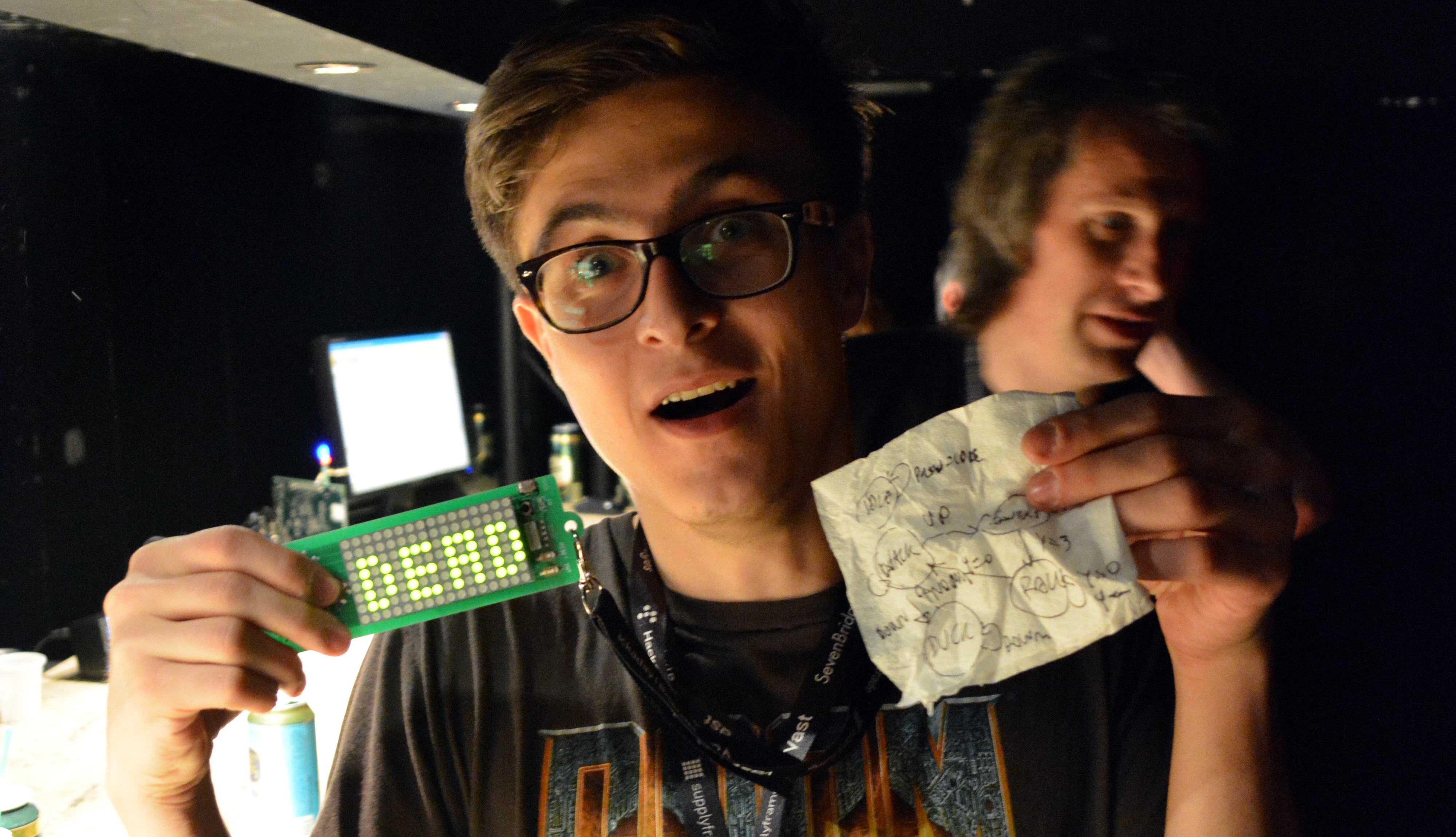
Give a room full of makers an 8-by-16 LED display, five buttons, infrared communication, and a few hours before a demo deadline. What happens next? Someone makes Pong. Someone else makes a maze. A third person turns blinking pixels into a tiny digital campfire, while another person discovers that a badge can become a chiptune machine with enough determination and one moderately suspicious-looking capacitor.
That is the magic of a tightly limited hardware challenge. With only 128 LEDs, five buttons, and an IR transmitter and receiver, the device is not trying to be a smartphone, a laptop, or a gaming console. It is trying to be a spark. And sparks are dangerous in the best possible creative sense: they make people build things.
This kind of LED badge challenge proves that great interactive hardware projects do not begin with unlimited features. They begin with a clear canvas, a few interesting constraints, and an audience willing to cheer when a pixel bounces off another pixel.
A Tiny Hardware Platform With Surprisingly Large Possibilities
The original setup was beautifully simple: a 128-LED matrix arranged in an 8-by-16 grid, four directional controls, one user button, and infrared communication. On paper, that specification sounds like the world’s least impressive tablet. In practice, it is a compact playground for game design, animation, embedded programming, interaction design, and wireless communication.
The LED matrix acts like a miniature stage. Every pixel has to earn its place because there is no room for unnecessary decoration. A blinking dot can become a spaceship. A column of lights can become a paddle. A handful of patterns can become rain, fire, a countdown, an equalizer, a maze, or a tiny creature trying very hard not to crash into a wall.
The five buttons create another useful limitation. You cannot build a 47-command role-playing game with five buttons unless you enjoy writing menus that feel like tax paperwork. But you can build fast, understandable interactions: move, select, jump, fire, pause, reset, or switch modes. The limited controls force creators to think carefully about what the player should do every second.
Then comes infrared communication. Suddenly, the project is no longer trapped inside one badge. Two devices can exchange data, compete, cooperate, synchronize animations, trade messages, or turn a room into a low-tech multiplayer arena. Infrared is not magic Wi-Fi dust. It usually needs alignment, reasonable range, and a little patience. But those limitations can become part of the game itself.
What Makers Actually Built With This Kind of Badge
The best proof of a creative platform is not the specification sheet. It is the strange, charming, occasionally chaotic collection of projects people make with it.
One standout idea was two-player Pong using infrared communication. Each player controlled a paddle on a separate badge, while the ball moved between devices. That concept is deceptively ambitious. It requires two systems to agree on timing, ball position, direction, scoring, and the awkward social choreography of keeping the devices pointed at one another. Yet it also demonstrates a powerful lesson: multiplayer games do not need giant screens or cloud servers to feel alive.
Other projects explored classic arcade ideas, including maze games, snake-style gameplay, retro space shooters, and a running game inspired by the browser dinosaur game. These projects worked because the LED matrix naturally supports simple game rules. Players can understand movement, collision, boundaries, and score feedback almost instantly.
Some creators leaned into visuals instead of gameplay. A grayscale display experiment showed how brightness control can make a basic LED grid feel more expressive. A flame effect turned a tiny rectangle of lights into a moving field of heat and motion. Another demo used blob-like graphics inspired by old-school demoscene effects, proving that a small monochrome display can still look oddly hypnotic.
Then there were the projects that refused to stay inside the normal boundaries of a badge. One hardware modification turned the platform into a simple chiptune audio device. That is the maker mindset in a nutshell: see a board covered in LEDs and immediately wonder whether it can make noise instead.
Why Hardware Constraints Make Better Creative Challenges
Unlimited tools can be surprisingly paralyzing. Give someone a powerful computer, a large display, a dozen sensors, a giant software library, and a weekend, and they may spend six hours choosing fonts. Give them 128 LEDs and a countdown timer, and they start drawing game sprites.
Constraints improve decision-making. The display is small, so visuals must be bold. The buttons are few, so controls must be intuitive. The infrared link is limited, so messages must be short and purposeful. The deadline is close, so the idea must become a prototype instead of a presentation deck with twelve slides titled “Future Possibilities.”
This approach is especially useful for maker workshops, classrooms, hackathons, and team-building events. Beginners can create something visible quickly, while experienced programmers can explore timing, animations, communication protocols, brightness control, state machines, or custom firmware. Everyone starts with the same hardware, but nobody has to end with the same project.
Eight Projects You Could Build With 128 LEDs and IR Communication
1. Multiplayer Pong With a Physical Twist
Two badges become two halves of the court. Each player moves a paddle, and the ball travels from one device to the other through infrared messages. Add a rule that the badges must face each other to keep the match alive. Suddenly, the communication limitation becomes a feature: players have to cooperate with the hardware while trying to defeat each other.
2. Infrared Tag
One badge begins as “it.” A player sends a tagged signal to another nearby badge, which changes its LED pattern and becomes the next active player. Use simple visual states: a flashing border for “it,” a steady icon for safe players, and a countdown after each successful tag. It is a social game disguised as a small electronics project.
3. Pixel Mailbox
Create a short-message system where players choose from preset icons, letters, or symbols using the five buttons. One badge can send a smiley face, a warning, a score challenge, or a tiny animated wave to another. Keeping messages short prevents the project from turning into a painfully slow text editor, which is a public service to everyone involved.
4. Five-Button Rhythm Game
Use the LED rows as falling notes. Players press directional buttons when a light reaches a target line. The fifth button can start a song, change difficulty, or activate a dramatic “turbo mode” that probably makes the game harder than intended. Even without sound, visual rhythm games can feel satisfying when timing and feedback are clear.
5. Cooperative Maze Escape
One badge displays a maze. The other badge holds a clue, map fragment, or moving obstacle pattern. Players must exchange signals through infrared to unlock doors or reveal safe routes. This project is ideal for teams because it turns communication into the actual game mechanic rather than a decorative add-on.
6. Tiny Weather Station for Imaginary Planets
Build an animated “alien weather forecast” that cycles through meteor showers, solar flares, purple rain, lava winds, and suspiciously enthusiastic moon dust. The buttons change locations, while infrared lets nearby badges synchronize into a shared galaxy display. It is silly, colorful, and a surprisingly good exercise in animation design.
7. Pocket Game of Life
Conway’s Game of Life is almost tailor-made for an LED matrix. The player can place cells, start the simulation, adjust speed, and reset the grid. The result is part science experiment, part digital aquarium, and part reminder that four simple rules can create behavior that looks much smarter than the code actually is.
8. The Badge That Starts a Conversation
Not every project needs a score counter. Create a social badge that displays a random question, challenge, or conversation prompt. Press a button to generate a new prompt, such as “Show your favorite bug,” “Describe your worst soldering mistake,” or “What would you automate if you had a robot assistant?” Infrared can exchange prompts between badges, making networking events less awkward and slightly more pixelated.
How to Turn a Fun Idea Into a Working Prototype
The fastest path to a finished LED badge project is not to build everything at once. Start with the smallest version that proves the idea works.
For a game, begin with one moving pixel. For an animation, begin with one frame. For infrared communication, send one tiny message such as “hello,” “ready,” or “ball moving right.” For button controls, make one button reliably do one thing before creating a five-button command center that behaves like a confused elevator panel.
A good development order looks like this:
- Make the LEDs display a simple static pattern.
- Read the buttons and confirm that each press produces the expected action.
- Add movement or animation.
- Create a basic game loop or interaction loop.
- Add infrared messages only after the single-device version works.
- Polish the feedback: score, restart behavior, sound if available, and clear visual cues.
This sequence matters because debugging becomes much easier. When a project fails after adding three new systems at once, it is difficult to know whether the problem is in the display code, the button input, the timing logic, or the communication layer. Small milestones are less glamorous, but they are how projects survive until demo time.
Technical Details That Separate Delightful From Chaotic
Make the LED Matrix Feel Smooth
LED matrices are often driven by rapidly scanning rows or columns. The device lights one portion of the matrix at a time so quickly that the human eye sees a stable image. Timing matters. If the refresh rate is too slow, the display may flicker. If the brightness is uneven, your beautiful spaceship can look like it is negotiating a power outage.
Brightness control can add depth. Even on a small display, dim pixels can become shadows, trails, fading explosions, or a soft background layer. Gamma correction can also make brightness changes look more natural because human vision does not perceive light intensity in a perfectly linear way.
Debounce Those Buttons
Mechanical buttons do not always produce one clean electronic signal. A single press can create tiny fluctuations that the microcontroller reads as multiple presses. This is called button bounce, and it can turn a perfectly reasonable game into a device that believes every player has eight fingers.
Software debouncing solves the problem by checking whether the button state remains stable for a short moment before accepting it as a real press. It is a small detail, but it dramatically improves the feel of menus, games, and interactive art.
Use a State Machine for Games and Menus
A state machine is simply a clear way to organize what the program is doing. A game may have states such as title screen, playing, paused, game over, and high score. Instead of writing one giant pile of tangled conditions, each state gets its own logic and transitions.
This approach is especially useful when you only have five buttons. The same button can do different jobs depending on the current state. The center button might start the game from the title screen, pause during gameplay, and restart after a loss. That is not confusing when the LED display clearly communicates where the player is.
Keep Infrared Messages Small and Reliable
Infrared communication works best when messages are short, structured, and easy to verify. A multiplayer game does not need to transmit an entire screen every moment. It may only need to send player movement, ball position, direction, score changes, or a reset signal.
Use message identifiers so the receiving badge knows what it has received. Add simple checks, such as a start marker, device ID, or confirmation response, to reduce accidental reactions to noise or unrelated signals. Since infrared behaves like light, direct alignment and nearby reflections can affect performance. Test the project in the actual room where the demo will happen, not only at a desk where everything behaves suspiciously well.
Designing a Better Badge-Hacking Challenge
A successful hardware challenge should reward completion, experimentation, and weird ideas equally. The person who makes a polished game deserves applause. So does the person who makes one blinking pixel tell a joke. Public demos work best when participants feel safe showing unfinished projects, because unfinished projects often contain the most interesting ideas.
Set a simple theme, such as “make two badges talk,” “create a game with one button,” or “turn data into light.” Offer a few beginner examples, but leave plenty of room for surprises. Include categories like best game, best visual effect, cleverest use of infrared, most useful project, and “how did this even happen?”
The final category is important. History has repeatedly shown that “how did this even happen?” is where many excellent inventions begin.
Experiences From the LED Badge Bench: What a Few Hours Can Teach You
Working with a tiny LED badge teaches a different kind of confidence than building software on a large screen. On a laptop, it is easy to hide behind windows, tabs, libraries, and unfinished folders named something like final_project_really_final_v8. On an LED badge, the result is impossible to ignore. Either the pixel moves, the button works, the message arrives, or the device stares back at you in complete silence.
That direct feedback changes how people learn. The first successful animation feels huge because it is visible, physical, and immediate. A single dot moving across 128 LEDs may not sound impressive to someone who spends their day watching 4K video. But for the person who wrote the code, timed the update loop, and fixed the off-by-one error that sent the dot into another dimension, it is a small personal moon landing.
These projects also teach the value of purposeful imperfection. In a short challenge, you rarely have time to create every feature you imagined. The multiplayer game may only support one ball. The maze may have three levels instead of twenty. The animation may be more “flickering soup” than “highly advanced particle system.” None of that matters if the experience is understandable and fun.
One of the best moments comes when people begin testing together. A creator holds up a badge and asks someone nearby to point their device toward it. The LEDs blink, the infrared message lands, and suddenly two pieces of hardware are participating in the same tiny universe. That interaction creates a special kind of excitement because it is not just code running alone. It is code making people respond to each other.
There is also a healthy amount of failure. Buttons bounce. Displays flicker. Infrared signals disappear when someone turns slightly to the left. A player discovers that their game is impossible because the obstacle speed increases every frame instead of every second. These mistakes are not wasted time. They are the practical lessons that turn a person from someone who follows tutorials into someone who can diagnose a problem.
Most importantly, a fast hardware challenge reminds people that creativity is not reserved for experts with expensive labs. A small board, a few lights, a handful of inputs, and several hours can produce games, artwork, experiments, jokes, tools, and shared memories. The device may fit in your hand, but the experience can feel much larger.
That is why 128 LEDs, five buttons, and infrared communication are enough. They are not merely components. They are an invitation to make something visible, playable, imperfect, and unmistakably yours.
Conclusion: Small Hardware, Big Creative Energy
A 128-LED badge may look like a modest electronics project, but it contains the ingredients for serious creative exploration. The LED matrix supports animation and games. Five buttons encourage simple, elegant controls. Infrared communication opens the door to multiplayer interaction, shared art, and collaborative experiments.
The real lesson is not that every maker should build Pong, Snake, or a glowing alien weather station. The lesson is that useful creativity thrives under constraints. Give people a limited toolkit and a clear deadline, and they stop waiting for the perfect idea. They start making one.