Every Tesla owner eventually runs into one of three classic situations: a flatbed tow truck shows up, an automatic car wash starts swallowing cars like a conveyor-belt monster, or your vehicle decides that today is a wonderful day to become a very advanced sculpture. In all three cases, one question matters fast: how do you put a Tesla in Neutral?
The answer depends on which Tesla you drive and, just as importantly, which generation you own. Some newer Teslas use the touchscreen and a secondary gear selector. Older ones use a drive stalk. And if you need the car to keep rolling after you get out, plain Neutral usually is not enough. That is where Tow Mode comes in.
This guide breaks down exactly how to put a Tesla in Neutral on the Model S, Model 3, Model X, and Model Y, explains when to use Tow Mode instead, and clears up the confusion around Car Wash Mode, flatbed towing, and what to do when your Tesla has little or no power.
The Fast Answer
If you just need the quick version, here it is:
- Newer Model 3 and Model Y: Open Controls and press and hold the Neutral icon, or use the overhead console gear selector.
- Newer Model S and Model X: Use the drive mode strip on the touchscreen and hold Neutral, or use the center console selector.
- Older stalk-equipped Teslas: Use the drive stalk and move it to the first position for Neutral.
- If you need the car to stay free-rolling after you exit: Use Tow Mode from Controls > Service > Towing.
That is the whole song in one chorus. Now let’s do the verses properly.
Why Tesla Neutral Can Be Confusing
In a gas car, Neutral is often simple: move the shifter, done, move on with your life. Teslas are different because the software, safety systems, and parking brake all have opinions. The car is designed to prevent roll-away, which is smart most of the time and deeply annoying when a tow operator is standing there waiting.
That is why many Tesla drivers get tripped up by the difference between these three things:
- Neutral: lets the car roll freely while you are still managing it.
- Tow Mode: keeps the vehicle free-rolling for a short reposition or flatbed loading, even when you are not sitting there holding the situation together with vibes.
- Car Wash Mode with Free Roll: the best setup for a conveyor-style automatic car wash.
Miss that distinction, and your Tesla may quietly shift itself back into Park right when you need it not to. Very on-brand. Very futuristic. Very inconvenient.
How to Put a Tesla in Neutral by Model
Newer Tesla Model 3 and Model Y
On newer Model 3 and Model Y vehicles, Tesla uses the touchscreen and a secondary drive mode selector on the overhead console.
Method 1: Use the touchscreen
- Press the brake pedal.
- Open Controls.
- Press and hold the Neutral icon until the vehicle engages Neutral.
Method 2: Use the overhead console selector
- Press the brake pedal.
- Use the overhead console gear selector and choose N.
This is the right move if you need the car to roll briefly while you are in control. If you plan to open the door, step out, or load the car onto a flatbed, skip plain Neutral and go straight to Tow Mode.
Older Tesla Model 3 and Older Model Y With a Drive Stalk
If your Model 3 or Model Y still has a drive stalk, the Neutral process is more old-school and, honestly, a little easier once you know it.
- From Park: press the brake pedal and briefly push the drive stalk either up or down to the first position.
- From Drive: briefly push the stalk up to the first position.
- From Reverse: briefly push the stalk down to the first position.
This is one reason Tesla Neutral instructions can look completely different online. Two Model Ys can both be “real Teslas” and still ask you to use totally different hardware.
Newer Tesla Model S and Model X
Newer Model S and Model X use the touchscreen drive mode strip and a secondary selector on the center console.
Method 1: Use the touchscreen
- Press the brake pedal.
- Bring up the drive mode strip on the touchscreen.
- Press and hold Neutral until the car engages it.
Method 2: Use the center console selector
- Press the brake pedal.
- Press N on the center console drive mode selector.
If the touchscreen is unavailable, the center console selector becomes especially important. That backup option can save you from a whole lot of stress when the screen decides to be dramatic.
Older Tesla Model S and Older Model X With a Gear Stalk
Older Model S and Model X vehicles use a gear stalk, similar in concept to older Model 3 and Model Y setups.
- From Park: press the brake pedal and move the stalk to the first position to enter Neutral.
- From Drive: move the stalk up to the first position.
- From Reverse: move the stalk down to the first position.
Some older Tesla materials and third-party articles may use the term Transport Mode instead of Tow Mode. In practical terms, owners usually mean the same basic thing: a setting that keeps the vehicle free-rolling for short towing or repositioning.
When Neutral Is Not Enough: Use Tow Mode Instead
Here is the crucial part: plain Neutral is often temporary. Tesla vehicles are designed to protect against rolling away, so the car may shift back into Park when you open the door, unbuckle, or exit.
If you need the Tesla to remain free-rolling while loading onto a flatbed, moving it out of a tight parking space, or letting a tow operator do their job, use Tow Mode.
How to Activate Tow Mode on Tesla
- Make sure the vehicle is in Park.
- Confirm the car is not plugged into a charger.
- Make sure the vehicle detects a key, key card, phone key, or key fob, depending on the model.
- Press and hold the brake pedal.
- Go to Controls > Service > Towing.
- Tap and hold Enter Tow Mode.
Once activated, the car becomes free-rolling and can be moved slowly or winched onto a flatbed.
Important: Tow Mode is not for dragging the car across town like a parade float. It is intended for very short distances at very low speed, typically for flatbed loading or repositioning. If you exceed those limits, you risk damaging the vehicle and turning an annoying day into an expensive day.
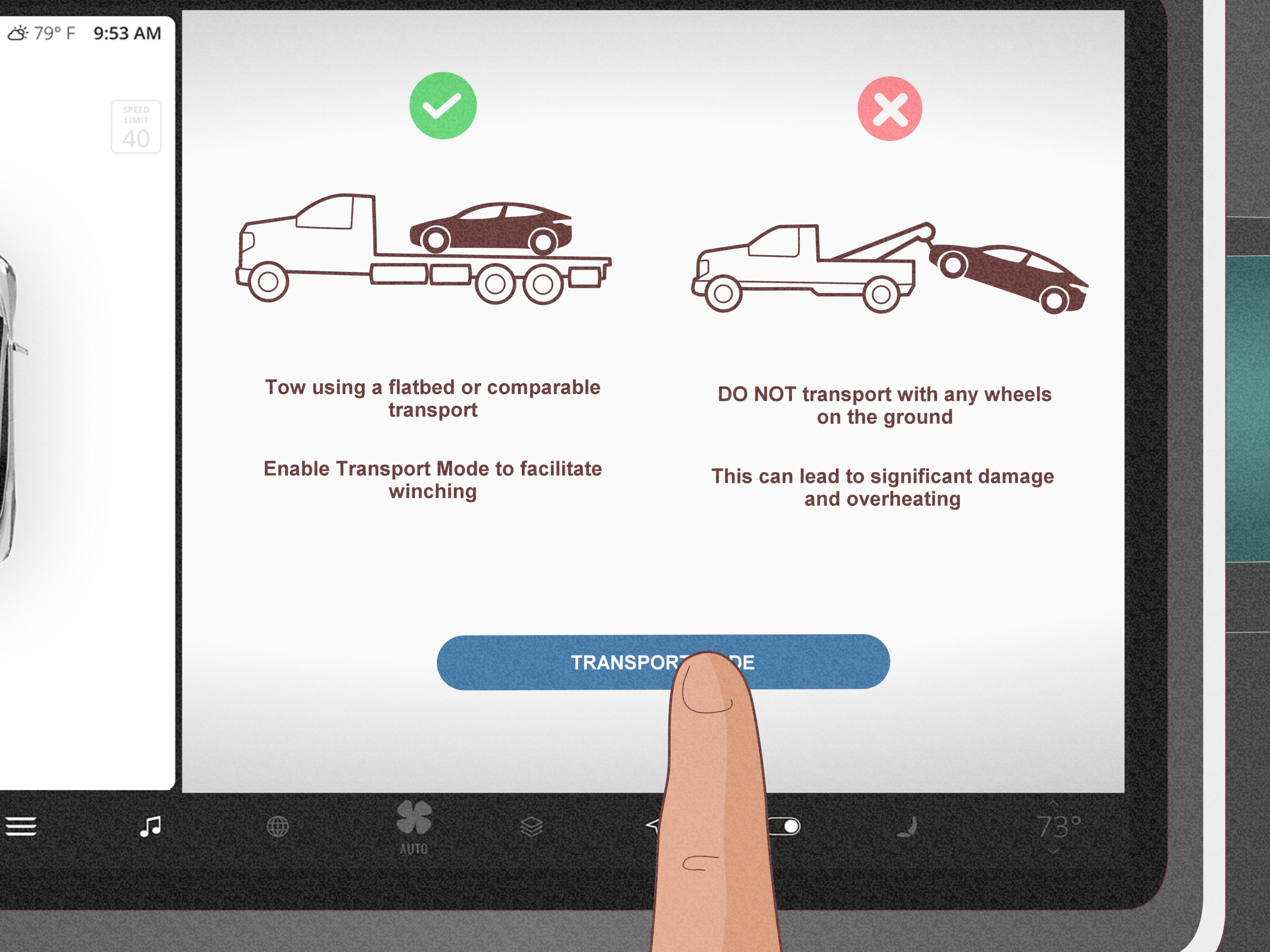
Flatbed Towing: The Rule Tesla Owners Should Not Ignore
If your Tesla needs transport, the safest headline to remember is this: use a flatbed truck and keep the wheels off the ground.
That matters because Tesla motors can generate power when the wheels spin. Letting the vehicle roll too far or towing it with the drive wheels on the ground can lead to overheating and serious damage. In plain English, your Tesla is not a wagon. It is a computer on wheels with strong feelings about being dragged.
So if you are talking to a tow operator, these are the practical rules:
- Ask for a flatbed.
- Use Tow Mode for loading.
- If Tow Mode is unavailable, dollies or tire skates may be required.
- Do not assume “Neutral” alone means the car can be towed any distance with wheels on the ground.
Car Wash Mode vs Neutral
If your goal is not towing but surviving an automatic car wash without creating a tiny public spectacle, use Car Wash Mode. Tesla designed it to close windows, lock the charge port, disable certain automatic features, and, with Enable Free Roll, keep the car in Neutral for the conveyor.
If you are using a conveyor-style wash:
- Go to Controls > Service > Car Wash Mode.
- Enable Free Roll.
- Follow the wash operator’s instructions and resist the urge to overcomplicate things.
This is generally a better option than manually shifting into Neutral and hoping the car does not decide to outsmart you halfway through the tunnel.
What if the Tesla Has No Power?
This is where things get spicy. Many Tesla towing and Neutral functions depend on the car having enough low-voltage power to wake up the touchscreen and electronics. Even if the main battery is low or empty, the low-voltage system is what often determines whether you can activate Tow Mode from the screen.
If the car has little or no power:
- You may need to support or jump-start the low-voltage battery first.
- If the screen is inaccessible and Tow Mode cannot be activated, the car may need dollies, skates, or specialized recovery.
- If you are in an unsafe location, contact Tesla Roadside Assistance or emergency services first.
That is also why experienced tow operators often ask whether the vehicle still has screen power before they start touching anything. It is not curiosity. It is triage.
Common Mistakes Tesla Owners Make
1. Using Neutral When They Really Need Tow Mode
This is the biggest one. If you step out of the car, open the door, or unbuckle at the wrong moment, the vehicle may shift back into Park. That is why Tow Mode exists.
2. Trying While the Car Is Still Plugged In
If the charge cable is connected, Tesla may refuse Tow Mode. Unplug first. The car is not being stubborn for sport. It is following safety logic.
3. Assuming Every Model Uses the Same Controls
A newer Model 3 does not behave exactly like an older one. A refreshed Model S does not match a pre-refresh S. If you are using a borrowed car, a rental, or a friend’s Tesla, do not assume muscle memory will save you.
4. Letting the Car Roll Too Far
Tow Mode is for short, slow movements. It is not a loophole that turns the vehicle into a traditional tow-behind car.
5. Forgetting the Key Situation
Some Tesla procedures require the vehicle to detect a valid key or phone key. If the tow operator is standing outside the car and your phone is 40 feet away in a coffee shop, congratulations, you have invented a delay.
A Simple Tesla Neutral Checklist
Before you move the car, run through this quick checklist:
- Do I just need Neutral, or do I need Tow Mode?
- Is this a newer touchscreen-based setup or an older stalk-based setup?
- Is the car plugged in?
- Does the car detect a key?
- Does the vehicle still have low-voltage power?
- Am I moving it only a short distance and at walking speed?
- Is the vehicle going onto a flatbed instead of being dragged with wheels on the ground?
That checklist can spare you the classic Tesla moment of confidently doing the wrong thing with premium electric precision.
Final Thoughts
Learning how to put a Tesla in Neutral is one of those oddly specific skills that feels unnecessary right up until the exact second it becomes essential. The biggest takeaway is simple: Neutral and Tow Mode are not the same thing. Neutral helps the car roll. Tow Mode helps it stay ready for controlled movement when you are loading it, repositioning it, or stepping away.
For newer Model S, 3, X, and Y vehicles, the touchscreen and secondary gear selectors do most of the work. For older Teslas, the drive stalk usually gets you there. And if the car is headed onto a tow truck, remember the golden rule: flatbed only, slow movement only, and Tow Mode when needed.
In other words, if your Tesla is being cooperative, Neutral is easy. If it is being dramatic, Tow Mode and preparation are your best friends.
Real-World Experiences: What This Looks Like Outside the Manual
The first time many people learn about Tesla Neutral is not in a calm driveway with a coffee in hand. It is usually during a mildly chaotic moment with other people waiting. A flat tire in a parking garage, a dead battery in a crowded lot, or an automatic car wash employee waving their arms like they are directing aircraft can turn a simple menu setting into a very memorable life event.
One common experience is the tow-truck surprise. A driver thinks, “No problem, I’ll just put the car in Neutral,” shifts it, opens the door, and the vehicle drops right back into Park. That is usually the moment when Tow Mode suddenly becomes the most important phrase in the English language. The lesson is not that the car is broken. The lesson is that Tesla is trying to prevent roll-away, and the owner has just discovered the difference between rolling now and staying ready to roll.
Another classic situation happens at the car wash. Drivers who are new to Tesla often assume Neutral is enough for a conveyor belt. Then the vehicle applies Park when they move wrong, open a door, or forget to activate Free Roll. The wash staff gets nervous, the line behind them grows, and suddenly everyone is participating in a live demonstration called Why Reading One Menu Would Have Helped. After that first awkward run, most owners never forget Car Wash Mode again.
There is also the low-power learning curve. Some drivers find out the hard way that a Tesla can have enough presence to light up your stress level but not enough low-voltage power to give you the screen access you need. In those moments, the conversation shifts quickly from “How do I put this Tesla in Neutral?” to “Who has a jump pack, and does anyone know what they’re doing?” It is not glamorous, but it is real. Experienced owners often keep roadside instructions saved on their phones for exactly this reason.
Valet stands and service lanes create another interesting set of experiences. Not every attendant knows every Tesla generation, and what works on a stalk-equipped Model Y will not perfectly match a newer one with overhead controls. Owners who know their specific setup tend to avoid confusion, while owners who say “It’s just like every other Tesla” sometimes discover that it is, in fact, not just like every other Tesla.
The good news is that once you have done it once or twice, the mystery disappears. Most owners end up with the same practical habit: learn where Neutral lives, learn where Tow Mode lives, and know whether your car uses a stalk, touchscreen strip, center console, or overhead selector. That tiny bit of prep turns a high-pressure moment into a routine one. And with Teslas, routine is underrated.