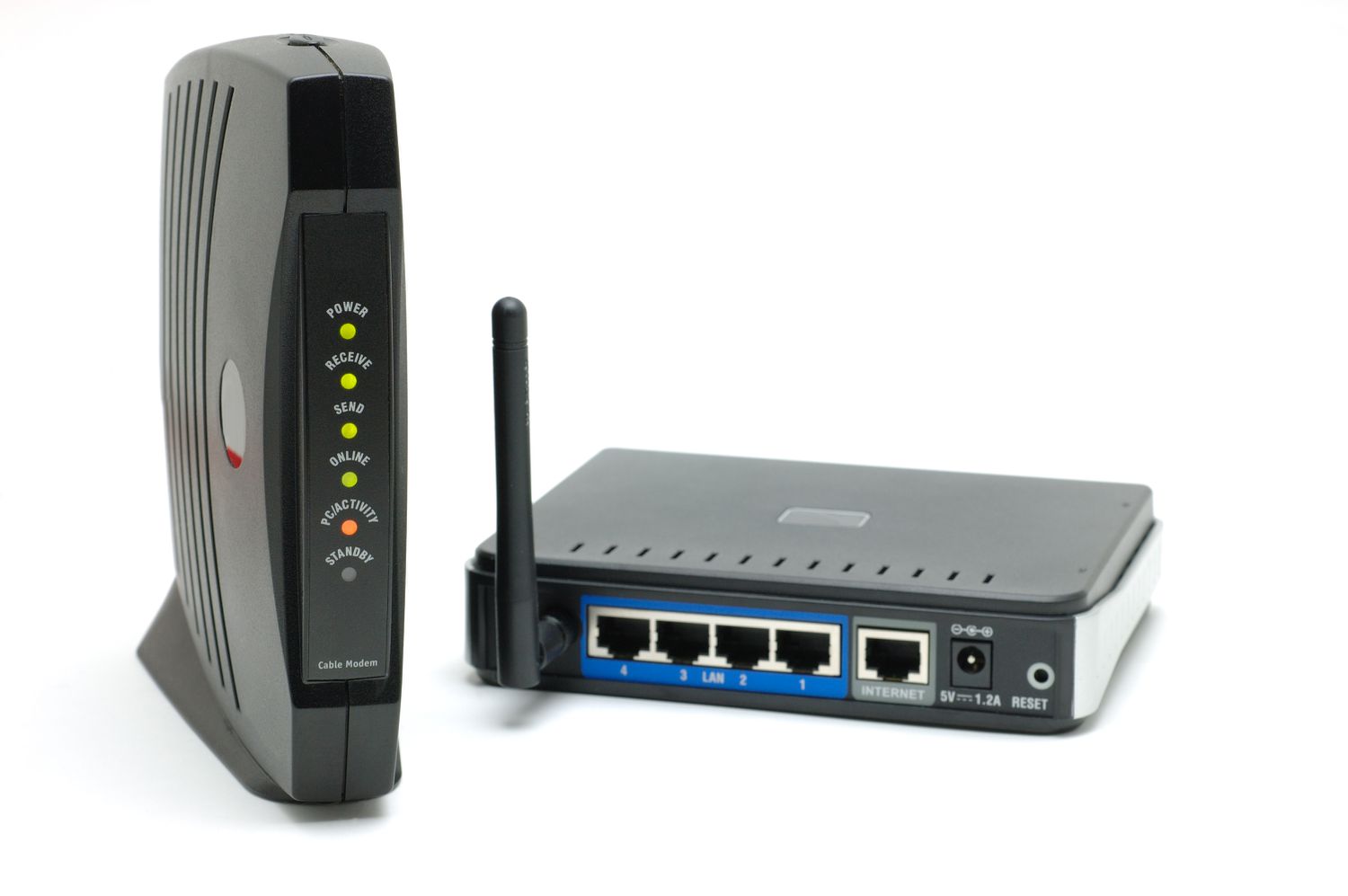
If you have ever stared at a pile of internet equipment and wondered whether your home network really needs two separate boxes, welcome to the club. It is one of the most common tech questions around, right up there with “Why is the Wi-Fi perfect in the kitchen but terrible in the bedroom?” and “Who changed the password again?”
The short answer is this: yes, most homes need both a modem function and a router function, but not always as two separate devices. In many homes, those jobs are bundled into one combo unit called a gateway. In others, especially with fiber internet, the setup may use an ONT and a router instead of what people traditionally call a modem.
That distinction matters because buying the wrong gear can waste money, create setup headaches, and leave you with slower speeds or weaker Wi-Fi than you paid for. This guide breaks down what each device does, when you need both, when one box is enough, and how to choose the right setup for your internet plan without turning your living room into a networking museum.
The Quick Answer
If your goal is to get internet throughout your home on multiple devices, you need:
- A modem or modem-like device to bring the internet connection into your home
- A router to share that connection with phones, laptops, TVs, game consoles, and smart home gadgets
Sometimes those are two separate pieces of equipment. Sometimes they are combined into one modem-router combo. So when people ask, “Do I need a modem and a router?” the most accurate answer is:
You need both functions, but not necessarily two separate boxes.
What Is the Difference Between a Modem and a Router?
What a modem does
A modem is the device that connects your home to your internet service provider. Think of it as the translator standing at your front door. Your ISP sends a signal into your house using cable, DSL, fiber, or another technology. The modem, or an equivalent device in fiber setups, makes that signal usable for your home network.
If you are on cable internet, the modem is usually the piece that connects to the coax cable coming from the wall. If you are on DSL, it connects to a phone-style line. If you are on fiber, the signal is often handled by an Optical Network Terminal, which performs the job people casually describe as “the modem part,” even though fiber customers may not have a classic cable modem at all.
What a router does
A router takes that internet connection and distributes it around your home. It creates your local network, assigns traffic to the right devices, and usually provides Wi-Fi. In plain English, the router is the traffic cop. It makes sure your smart TV gets Netflix, your laptop gets email, and your gaming console gets to yell at strangers online in real time.
A router also often adds useful features like:
- Wi-Fi for wireless devices
- Ethernet ports for wired devices
- Basic firewall and security features
- Guest network options
- Parental controls
- Device management through an app or web dashboard
So the modem gets the internet into your home, and the router spreads it around your home. One opens the door. The other directs traffic once everyone is inside.
When Do You Need Both?
Most households need both functions because most households want more than one device online. A single internet-connected home now often includes laptops, smartphones, TVs, tablets, printers, security cameras, speakers, and enough smart plugs to make a lamp feel overqualified.
Cable internet
If you have cable internet, you generally need a cable modem and a router. These may be separate devices, or they may be combined into a single gateway from your ISP or a retail brand. Either way, both jobs must be done.
If you buy your own cable equipment, you usually need to check your provider’s approved modem list. That is not just bureaucratic decoration. Compatibility matters, and some providers recommend or require newer standards such as DOCSIS 3.1 for better support with modern speed tiers.
DSL internet
DSL customers also need modem and router functionality, though DSL equipment often comes in combo units. If your ISP gave you a box years ago that has both a phone-line input and Wi-Fi, congratulations: you may already have the networking equivalent of a two-in-one shampoo.
Fiber internet
Fiber changes the wording a little. Many fiber homes do not use a traditional modem. Instead, the provider installs an ONT that converts the incoming fiber signal for your home network. You still need a router to create Wi-Fi and manage devices, but the “modem” role may be handled by the ONT or by an ISP gateway.
This is why some fiber customers get confused when they hear, “You do not need a modem.” What that usually means is, “You do not need a traditional cable modem.” You still need something to terminate the provider connection and something to route the connection inside the home.
5G or fixed wireless home internet
With 5G home internet and other fixed wireless services, the provider often gives you a gateway that acts as the receiver and router in one. Again, two functions, one box. The universe loves efficiency when it is not busy buffering.
Can You Use Just a Modem?
Technically, yes, but only in limited situations. If you connect a single wired device directly to a standalone modem, you may be able to get internet on that one device. That might work for a very simple setup, testing connection issues, or some specialized environments.
For normal home use, that is not enough. A modem alone usually does not give you whole-home Wi-Fi, device management, or convenient sharing across multiple gadgets. If your household includes a phone, laptop, smart TV, and one person who absolutely must update a console game at the worst possible moment, a router is not optional in practical terms.
Can You Use Just a Router?
Not by itself for most wired home internet services. A router cannot replace your ISP connection device. If you unplug the modem or ONT and expect your router to magically summon internet from the atmosphere, you will mainly summon disappointment.
That said, if your ISP provides a modem-router combo or gateway, you may only see one physical device. In that case, your router is not “working alone.” It is simply sharing a box with the modem function.
Separate Devices vs. a Combo Unit
This is where things get interesting. Once you understand that you need both functions, the next question is whether you want them in one device or two.
Why choose separate devices?
- More flexibility: You can upgrade the router without replacing the modem.
- Better performance options: Dedicated routers often offer stronger Wi-Fi, better range, and more features.
- Easier troubleshooting: It is simpler to identify whether the provider connection or the Wi-Fi side is causing problems.
- More control: Advanced users may prefer custom settings, mesh systems, or bridge mode configurations.
Why choose a combo modem-router?
- Simpler setup: One device, fewer cables, less clutter.
- Good for smaller homes: A combo unit may be perfectly fine for apartments or modest internet needs.
- Potential savings: Buying one box can cost less than buying two high-end separate devices.
- Easier for non-tech households: If your priority is “plug it in and let me watch TV,” a gateway is appealing.
There is no universal winner. It depends on your home size, your plan speed, your budget, and whether you enjoy tinkering with network settings or would rather never think about them again.
How to Know What You Already Have
If you are not sure whether your current device is a modem, router, or combo unit, check these clues:
Signs it is a modem
- It connects directly to a cable, DSL, or provider line
- It may have fewer Ethernet ports
- It may not broadcast Wi-Fi on its own
Signs it is a router
- It broadcasts your Wi-Fi network name
- It has multiple Ethernet ports for home devices
- It usually connects by Ethernet to another device upstream
Signs it is a combo gateway
- It connects directly to the ISP line and broadcasts Wi-Fi
- It handles internet access and local networking in one unit
- Your provider may describe it as a gateway rather than a modem or router
If you have fiber, you may also have an ONT mounted in a closet, garage, or utility area, plus a router elsewhere in the house. That is a common arrangement and does not mean your setup is weird. It means your internet arrived dressed for a more modern occasion.
How to Choose the Right Setup
1. Match the device to your internet type
A cable modem is for cable internet. A DSL modem is for DSL. A fiber home may use an ONT and a router. This is not a mix-and-match buffet. Start with what your ISP uses.
2. Check compatibility before you buy
Always confirm compatibility with your provider. Many ISPs publish approved modem lists or equipment requirements. Buying a random box because it has “ultra-mega-turbo” on the packaging is a great way to own a stylish paperweight.
3. Think about your speed tier
If you have a faster cable plan, a modern modem standard matters. For many cable customers, DOCSIS 3.1 is the safer long-term choice over older gear. On the router side, make sure your Wi-Fi capabilities are not bottlenecking the speed you are paying for.
4. Think about your home size
A small apartment may do fine with a single gateway. A multi-story home with thick walls may benefit from a stronger standalone router or a mesh Wi-Fi system. Good internet is not just about raw speed. Coverage matters, too.
5. Decide how much control you want
If you want simple setup and minimal fuss, a combo unit is often enough. If you want to optimize gaming, create guest networks, tune parental controls, or add mesh nodes, separate equipment often makes more sense.
Common Mistakes to Avoid
- Buying only a router for cable service and forgetting the modem piece entirely
- Keeping an outdated modem that cannot support your current plan
- Using ISP equipment without checking features if you need better coverage or advanced controls
- Placing the router in a terrible location such as behind a TV, in a cabinet, or next to a wall of metal objects
- Ignoring bridge mode when stacking your own router behind an ISP gateway and creating unnecessary network complications
That last one is especially common. Plenty of people buy a fancy router, plug it into an ISP gateway, and accidentally create a network setup with the temperament of a grumpy traffic circle. When in doubt, check whether your gateway should be switched to bridge mode.
Real-World Experiences and Practical Lessons
Across typical homes, the most useful lesson is that internet hardware problems are rarely about needing the “most powerful” device and more often about needing the right combination of devices. A renter in a one-bedroom apartment may be perfectly happy with a gateway from the ISP for years. Setup is quick, support is easy, and the Wi-Fi only needs to travel through a few rooms. In that situation, separate modem and router gear can be overkill unless the person wants lower rental costs or more control.
Now compare that with a family in a two-story house. The gateway may technically provide both modem and router functions, but the Wi-Fi signal can weaken upstairs or in the back bedroom. The result is a classic household drama: the streaming TV works downstairs, the work laptop struggles upstairs, and someone declares the whole internet “broken” when the actual issue is coverage. In that case, the family may keep the modem function from the provider but upgrade the router side to a stronger standalone router or a mesh system. Same internet plan, very different real-world experience.
Another common scenario is the gamer or remote worker who starts with a basic all-in-one unit and eventually wants better performance. Maybe video calls are choppy when multiple people are online. Maybe online gaming feels inconsistent at night. Maybe a home office needs more reliable wired connections, stronger QoS tools, or better control over device priorities. A separate modem and router setup can help here, not because two boxes are magically faster, but because dedicated routers often provide better features, stronger Wi-Fi management, and more upgrade flexibility.
Fiber customers often learn a different lesson: terminology can be the most confusing part of the whole process. Someone signs up for fiber, sees an ONT installed on the wall, and then wonders whether they still need a modem. The answer in practice is that the ONT handles the provider handoff, while the router handles the home network. So the person may not need a traditional modem purchase at all, but they absolutely still need a good router if they want strong wireless coverage. This matters especially in larger homes where the router location can make or break the experience.
There is also the budget lesson. Many people start by renting equipment because it is easy, and there is nothing wrong with that. Over time, though, monthly rental fees can add up. For some households, buying approved equipment becomes the better long-term value. The trick is not to buy blindly. A bargain modem that does not support your speed tier or a cheap router with weak coverage can cost more in frustration than it saves in dollars.
Then there is the setup lesson that surprises almost everyone at least once: the best router in the world cannot help much if it is placed in a terrible spot. Putting the router in a cabinet, behind a giant TV, or in the far corner of the house is like hiring a talented singer and asking them to perform from inside a closet. Central placement, open space, and thoughtful positioning often improve home Wi-Fi more than people expect.
In the end, real-world experience shows that the best answer is not “always buy separate devices” or “always use the ISP box.” It is to match the setup to your home. Small apartment, basic needs, easy support? A combo unit may be ideal. Bigger home, more devices, heavier streaming, gaming, or remote work? Separate equipment or mesh may be worth it. The smartest networking choice is usually the one that fits your internet type, your floor plan, and your patience level.
Final Verdict
So, do you need a modem and a router?
Yes, you need both functions for a normal home internet setup, but they do not have to be separate devices.
If you have cable or DSL, you will usually need a modem plus a router, whether they live in two boxes or one gateway. If you have fiber, the modem role may be handled by an ONT, but you still need a router for your home network. If your provider gave you one all-in-one box, then congratulations: you already have both functions in one piece of hardware.
The best setup depends on your service type, home size, speed plan, and how much control you want. Choose compatibility first, coverage second, and marketing hype somewhere near the bottom. Your Wi-Fi will thank you, your devices will behave a little better, and you can spend less time staring at blinking lights like they are trying to send a secret message.
Note: If you are shopping for new equipment, check your ISP’s approved devices and service type before buying. Cable, DSL, fiber, and fixed wireless setups do not all use the same hardware.