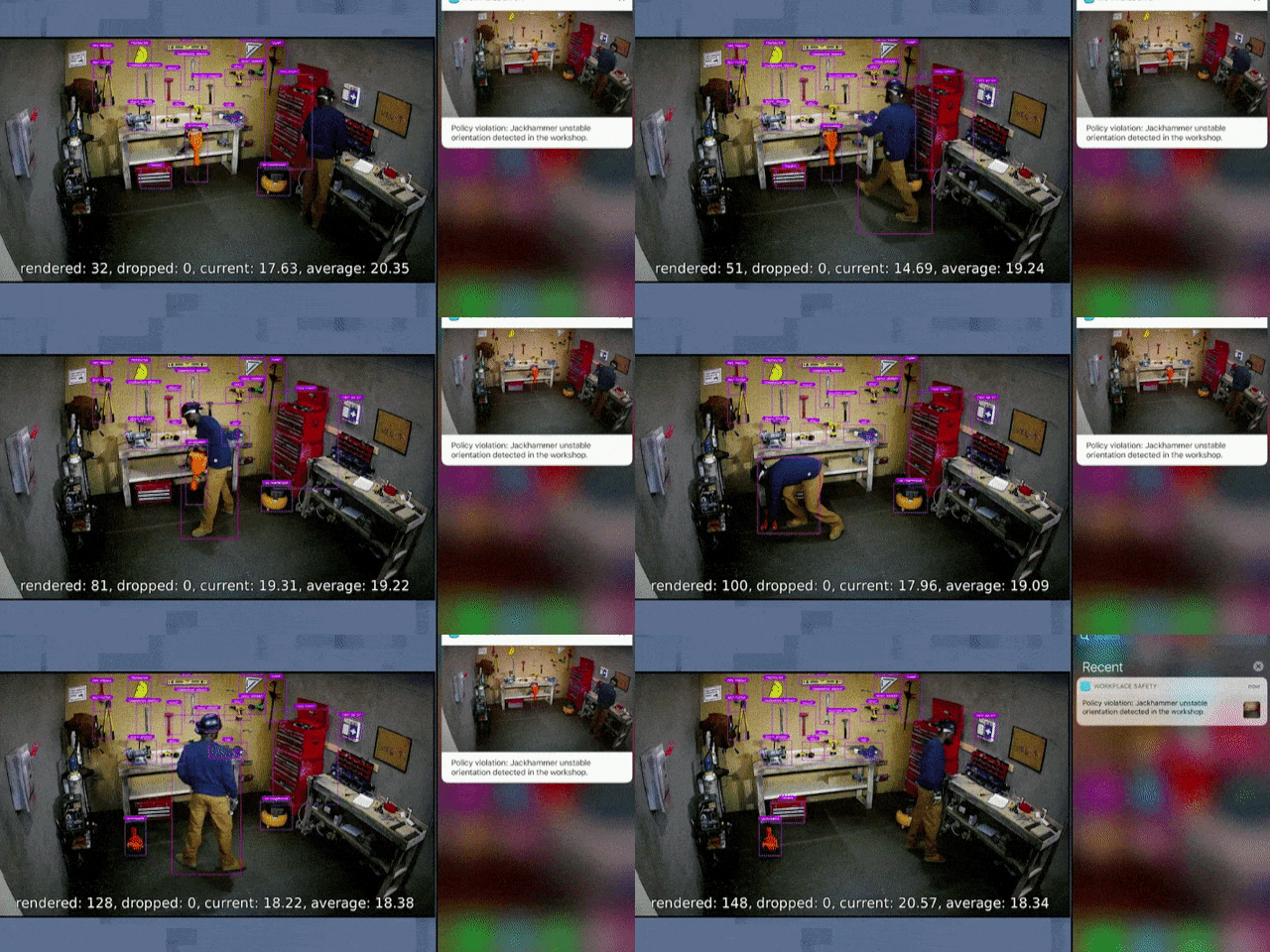
Imagine asking your computer, “Where is the jackhammer?” and instead of giving you a list of Home Depot ads, it looks through live camera feeds, identifies the tool, checks who is nearby, verifies who is allowed to touch it, and sends a message to the right person. That is not science fiction. That is the basic idea behind Microsoft’s real-world search engine: a blend of artificial intelligence, computer vision, cloud computing, edge devices, and search technology that can make physical spaces searchable.
It is incredible because it turns the messy real world into something machines can understand. It is horrifying because the same system that can find a misplaced tool can also identify a worker, detect behavior, record patterns, and trigger action before a human has had time to say, “Wait, why is the camera judging my lunch break?” Welcome to the age of AI vision, where search is no longer limited to webpages. Search can now look at rooms, screens, factories, hospitals, streets, documents, and possibly the embarrassing number of coffee cups on your desk.
What Is Microsoft’s Real-World Search Engine?
The phrase “real-world search engine” describes a powerful concept rather than one single consumer product with a neat logo and a cheerful launch video. Microsoft has spent years building technologies that allow software to recognize objects, people, actions, text, images, and context. Through tools such as Azure AI Vision, Cognitive Services, Custom Vision, Video Indexer, Copilot Vision, Windows Recall, Bing Visual Search, and AI-powered workplace systems, Microsoft is pushing search beyond the browser bar.
Traditional search engines index webpages. A real-world search engine indexes reality. It uses cameras, sensors, machine learning models, optical character recognition, and cloud or on-device processing to answer questions about what is happening in a physical or digital environment. Instead of searching “safety goggles policy PDF,” a system could notice that someone on a worksite is not wearing safety goggles. Instead of searching “where did I save that chart,” a personal AI feature could help you find the document you saw yesterday, even if you forgot its filename.
That is the magic trick. Microsoft’s AI does not merely retrieve information. It observes, interprets, labels, and recommends action. In the right setting, this could save time, prevent accidents, and make computers much more useful. In the wrong setting, it could become workplace surveillance wearing a productivity badge and a suspiciously friendly smile.
How the Technology Works Behind the Curtain
At the center of Microsoft’s real-world search idea is computer vision. Computer vision allows software to interpret visual data from images or video. Modern systems can detect objects, read text, identify scenes, follow movement, recognize patterns, and classify actions. Add cloud computing, and those detections can happen at serious scale. Add edge computing, and some processing can happen closer to the camera or device, reducing delay and improving privacy in certain cases.
In Microsoft’s workplace safety demonstrations, the AI system could analyze a camera feed, recognize people and tools, detect whether an object was stored properly, and send alerts. In a factory, that might mean noticing a spill. In a hospital, it might mean recognizing that equipment is out of place. In a warehouse, it could mean locating a machine part faster than a tired employee wandering around muttering, “I know I put it somewhere.”
From Web Search to World Search
The shift is huge. Web search asks, “Which page has the answer?” Real-world search asks, “What is happening here?” That requires much more than matching keywords. It needs visual recognition, spatial awareness, permissions, identity systems, context, and sometimes natural-language interaction. A user might ask a plain-English question, and the system must translate that question into a visual search task.
This is why Microsoft’s broader AI strategy matters. Copilot is not just a chatbot that writes emails with the confidence of a junior intern who drank three energy drinks. It is becoming an interface for search, productivity, vision, voice, and action. Copilot Vision can look at content on a screen and discuss it with the user. Windows Recall can help users retrace what they previously saw on their PC. Azure AI tools can analyze images and video for enterprise customers. Together, these pieces form a much larger vision: computers that understand what you are looking at, what you did, and what you might need next.
Why This Is Incredible
Microsoft’s real-world search engine is incredible because it solves a basic human problem: the world is full of information, but most of it is not neatly typed into a search box. A factory floor, a hospital room, a construction site, a classroom, a kitchen, a dashboard, or a computer screen can contain valuable information that people miss because humans are busy, distracted, or simply not equipped with 27 eyeballs.
It Can Make Workplaces Safer
In safety-sensitive environments, AI vision can be more than a convenience. It can detect hazards, flag missing protective equipment, notice unusual activity, and help supervisors respond faster. A system that sees a dangerous spill or a tool placed in a risky position could prevent injuries. Nobody wants workplace safety to depend on Gary noticing the problem after he finishes his sandwich.
The value is not only in detection. It is in speed and coordination. If the system can identify the closest trained employee, send an alert, and guide someone to the right location, it becomes a real-time operations assistant. In that setting, “search” becomes action.
It Can Reduce Information Overload
Anyone who has ever lost a file, reopened twenty browser tabs, or searched their inbox using the desperate keyword “thing from Tuesday” understands the appeal of AI memory. Windows Recall and similar features aim to solve the problem of finding information you have already seen. Instead of relying on folder names or browser history, the computer can create a searchable timeline of past activity.
That sounds genuinely useful. You could search for a product you compared last week, a chart from a meeting, a message you forgot to save, or a website you visited but cannot name. For students, researchers, writers, designers, analysts, and office workers, this could be a productivity boost. It is like giving your PC a photographic memory, except hopefully without the part where it remembers your worst tabs forever.
It Can Help People Interact With Technology Naturally
Search has always forced humans to adapt to machines. We learned keywords, filters, quotation marks, file paths, and advanced operators. Real-world AI search flips that relationship. You can ask questions in natural language: “What am I looking at?” “Where did I see that?” “Which item is missing?” “What step comes next?”
When paired with voice and vision, this becomes especially powerful. A person cooking from an old recipe, repairing an appliance, reviewing a spreadsheet, or comparing products could ask an AI assistant for contextual help. The assistant does not need a perfect written prompt because it can see the relevant material. That is a major leap toward computers that feel less like filing cabinets and more like collaborators.
Why This Is Horrifying
Now for the part where the cheerful demo music fades out and the privacy lawyer enters the room carrying a very thick folder. The same features that make real-world search useful also make it risky. To search reality, a system must observe reality. To understand context, it must collect context. To personalize responses, it must know something about you. That is where the hairs on the back of the neck begin doing their little jazz dance.
Observation Can Become Surveillance
A camera that detects hazards can also monitor workers. A tool that identifies unsafe behavior can also track productivity, bathroom breaks, facial expressions, conversations, and routines if deployed without strict limits. Even when the original purpose is safety, the temptation to expand usage is enormous. Today: “The system checks for safety goggles.” Tomorrow: “The system ranks employee efficiency based on movement patterns.” Next week: “Why did Janet stand near the coffee machine for four minutes?”
This is the core fear of AI-powered real-world search. It can turn public, professional, and private spaces into searchable data fields. Once spaces become searchable, they can also become measurable, reportable, and punishable. The technology may be neutral in theory, but its deployment is never neutral in practice.
Consent Gets Complicated Fast
Microsoft has emphasized privacy controls for features like Recall and Copilot Vision, including opt-in settings, local processing in some cases, authentication, filters, and the ability to pause or delete snapshots. Those controls matter. But consent is still complicated.
If you enable a feature that captures your screen, what about the privacy of people who message you? If a workplace installs AI cameras, can an employee truly say no? If a hospital uses vision systems to improve care, how are patients informed? If a device sees a webpage, a photo, or a document, who controls the resulting interpretation?
Privacy is not only about whether Microsoft can see your data. It is also about who else can access the data, how long it remains available, whether hackers could target it, whether employers can demand it, and whether users fully understand what is being captured. A feature can be optional and still create social pressure. After all, “optional” at work sometimes means “technically optional, spiritually mandatory.”
AI Can Misread the World
Computer vision is impressive, but it is not magic. AI systems can misidentify objects, misunderstand behavior, fail in unusual lighting, perform differently across environments, and produce confident errors. In a low-stakes situation, that means your assistant mistakes a muffin for a dog toy. In a workplace or medical environment, errors can have more serious consequences.
Real-world search depends on labeling reality. But reality is messy. A person holding a tool may be using it safely, storing it, moving it, borrowing it, or posing for a terrible company newsletter photo. Context matters. If AI systems trigger alerts or influence decisions, people need ways to challenge those interpretations. Otherwise, the machine does not merely observe reality; it starts becoming the referee of reality.
The Microsoft Recall Controversy Shows the Trust Problem
Windows Recall became one of the clearest examples of both the promise and panic surrounding AI memory. The idea is simple: your PC periodically saves snapshots of what you do so you can search your past activity. For productivity, this is extremely attractive. For privacy, it made many people immediately picture a tiny robot historian documenting every awkward moment on their desktop.
After criticism from security researchers, privacy advocates, and users, Microsoft changed the feature’s rollout and added stronger controls. Recall became opt-in, required Windows Hello authentication, stored data locally, added encryption protections, and allowed users to pause, delete, filter, or remove the feature. Those changes show that Microsoft understood the backlash was not just noise. People were asking a serious question: should a computer remember everything by default?
The broader lesson is that AI search tools need trust before they need cleverness. A feature can be technically brilliant and still fail if users feel watched. In fact, the more brilliant it is, the more terrifying it may feel. Nobody panics when Notepad forgets everything. People panic when an AI assistant says, “I remember what you looked at last month.”
Copilot Vision: Helpful Assistant or Screen-Snooping Sidekick?
Copilot Vision adds another layer to the discussion. Instead of simply answering typed questions, it can see what a user is viewing and help explain, compare, summarize, or guide. Microsoft has described Copilot Vision sessions as user-initiated and limited, with privacy guardrails. In the best case, it becomes a useful companion for browsing, shopping, learning, planning, and troubleshooting.
In the worst case, people worry it normalizes the idea that an AI should be allowed to look over your shoulder. That does not mean the feature is automatically dangerous. It means design choices matter. Clear activation, obvious indicators, limited retention, user control, and strong security are essential. The assistant should behave like a helpful guide, not like Clippy returned from the cloud with a law degree and night-vision goggles.
Who Benefits From Real-World AI Search?
The benefits are real, especially in industries where speed, safety, and coordination matter. Manufacturers can use AI vision for quality control, defect detection, and equipment monitoring. Hospitals can use visual systems to support patient safety and logistics. Retailers can analyze inventory and customer flow. Cities can use computer vision for traffic management and infrastructure planning. Office workers can use AI memory and visual search to retrieve digital information faster.
But the benefits are uneven unless rules are clear. Employers may gain efficiency while workers lose privacy. Companies may gain insights while customers lose control. Governments may gain visibility while citizens lose anonymity. The question is not whether the technology works. The question is who gets power from it, who carries the risk, and who gets to say no.
What Responsible Real-World Search Should Look Like
A responsible real-world search engine should follow several principles. First, it should be opt-in wherever possible. Second, it should minimize data collection. Third, it should process data locally when practical. Fourth, it should make recording or analysis obvious to affected people. Fifth, it should allow deletion, filtering, and auditing. Sixth, it should separate safety use from productivity policing. Seventh, it should include human review before important decisions are made.
These principles are not anti-innovation. They are what make innovation survivable. People will accept powerful AI tools when they feel respected. They will reject them when they feel trapped inside a searchable aquarium.
Specific Examples That Show the Double Edge
Consider a construction site. AI cameras detect a worker near a hazardous area without protective gear. The system sends an alert, and an accident is avoided. That is a win. Now consider the same cameras used to generate daily reports on which employees moved slowly, talked too long, or took “inefficient” paths. Same technology, very different moral smell.
Consider a student using an AI assistant to find a chart from last week’s research. Helpful. Now imagine the same system quietly capturing private messages, health information, or financial details because the user forgot to filter an app. Suddenly the helpful memory has become a digital attic full of things nobody wants discovered.
Consider a hospital using computer vision to locate equipment quickly during an emergency. That can save lives. Now imagine patients and visitors being tracked without clear notice or meaningful consent. Again, the line between assistance and intrusion depends on policy, transparency, and restraint.
Experience Section: Living With the Idea of a Searchable World
The strangest part of Microsoft’s real-world search vision is how quickly it starts to feel normal once you imagine using it. At first, the idea sounds invasive: cameras and AI models understanding physical spaces, personal screens, and past activity. Then you think about your own daily life. You remember the file you lost. The product review you forgot to bookmark. The note from a meeting that disappeared into the swamp of open tabs. The tool you swear was “right there a second ago.” Suddenly, a search engine for the real world sounds less like a dystopia and more like a very organized friend who never sleeps.
That is the emotional trap. Convenience has a way of walking into the room first, smiling politely, and letting privacy arrive twenty minutes late looking exhausted. A feature like Recall would be genuinely useful on a chaotic workday. Being able to ask, “Show me the slide about budget projections I looked at yesterday,” could save time and reduce frustration. Copilot Vision could help explain a complicated webpage, compare products, or guide someone through a task without forcing them to describe every visual detail. For people with accessibility needs, visual AI could be more than convenient; it could be empowering.
But the uneasy feeling does not disappear. It grows from the gap between personal use and institutional use. When I control the tool, pause it, delete its memory, and decide when it sees my screen, it feels like assistance. When a company, school, landlord, insurer, or platform controls it, the same technology feels different. It becomes less like a flashlight and more like a spotlight. Nobody wants to live under a spotlight, especially one connected to a spreadsheet.
The most realistic experience is probably mixed. People will love real-world search when it helps them recover lost information, understand visual content, navigate complex tasks, and avoid mistakes. They will hate it when it surprises them, records too much, or makes them feel evaluated. The future of this technology will not be decided only by accuracy. It will be decided by trust.
That means Microsoft and every company building similar systems must treat privacy as a product feature, not a press-release paragraph. Users need obvious controls, plain-language explanations, strong default protections, and proof that “temporary” really means temporary. Workers need policies that prevent safety systems from becoming secret performance-monitoring tools. Consumers need confidence that AI vision is not quietly feeding advertising, training pipelines, or data brokers. Developers need standards that prevent sensitive apps from being captured without permission.
Personally, the idea of searching the real world feels both thrilling and uncomfortable. I want the version that finds lost tools, helps tired nurses, spots dangerous spills, explains confusing screens, and rescues forgotten research. I do not want the version that makes every room, tab, conversation, and gesture feel like searchable evidence. The technology itself is not the villain. The villain is careless deployment, vague consent, and the old corporate habit of calling surveillance “insight.”
Microsoft’s real-world search engine is incredible because it shows how far AI has come. It is horrifying because it shows how easily helpful machines can become watchful machines. The future will depend on whether companies build these systems with boundaries strong enough to protect real people in the real world. A searchable world could be smarter, safer, and more accessible. It could also be creepier than a smart doorbell that knows your grocery habits. The difference is not technical. It is human.
Conclusion: The Future Is Searchable, but Should It Be?
Microsoft’s real-world search engine points toward a future where computers do not simply wait for typed keywords. They see, listen, remember, interpret, and act. That future is exciting because it can make work safer, information easier to retrieve, and technology more natural to use. It is also alarming because searchable spaces can become monitored spaces, and monitored spaces can become controlled spaces.
The best version of this future gives people powerful tools with clear consent, strong privacy, local processing, transparent limits, and meaningful control. The worst version turns daily life into a searchable database where everything is captured first and explained later. Microsoft has the engineering talent to make real-world AI search impressive. The harder job is making it trustworthy.
So yes, Microsoft’s new real-world search engine is incredible and horrifying. It can help us find what we need, protect people from danger, and reduce digital chaos. It can also make us wonder whether the machines are helping us live better or simply watching us live more efficiently. That tension is the story. And like all good technology stories, it comes with a lesson: the future does not just need smarter AI. It needs wiser humans holding the off switch.
Note: This original article synthesizes publicly available information from Microsoft documentation, technology reporting, privacy analysis, and AI industry coverage. It is written for web publication in standard American English without copied source text or citation placeholders.