Facebook is fantastic at many things: reconnecting with old friends, helping you remember that one coworker’s dog has a birthday party budget, and
loudly announcing your birthday to people you haven’t spoken to since the iPod Shuffle was trendy.
If you’d rather keep your birthday low-key (or you simply don’t want 47 “HBD!!! 🎉” posts from acquaintances you can’t place), you can absolutely
make your birthday private. The trick is knowing where Facebook tucked the control in the latest layout and what to set so friends don’t get
a reminder.
Below are two easy, step-by-step waysone for a computer (desktop web) and one for the mobile appplus a few practical privacy upgrades to keep the
celebration on your terms.
Before You Start: What “Hiding Your Birthday” Actually Means
On Facebook, you typically can’t delete your birthday entirely. Facebook uses it for age-related features and account integrity. What you can
control is who can see:
- Your birth date (month + day)
- Your birth year (the part that makes people do math at your reunion)
When you set your birthday visibility to Only me, your birthday disappears from your public profile viewand in most cases, friends
won’t get the usual “It’s their birthday today” nudge that triggers the wall-post avalanche.
Way 1: Hide Your Birthday on Facebook Using a Computer (Desktop Website)
This method is ideal if you prefer bigger screens, fewer accidental taps, and the satisfaction of clicking a tiny audience icon like you’re defusing a
social-media confetti bomb.
Step-by-step (Desktop Web)
- Go to your Facebook profile (click your name or profile picture).
- Click About, then open Contact and basic info (wording may vary slightly by layout).
-
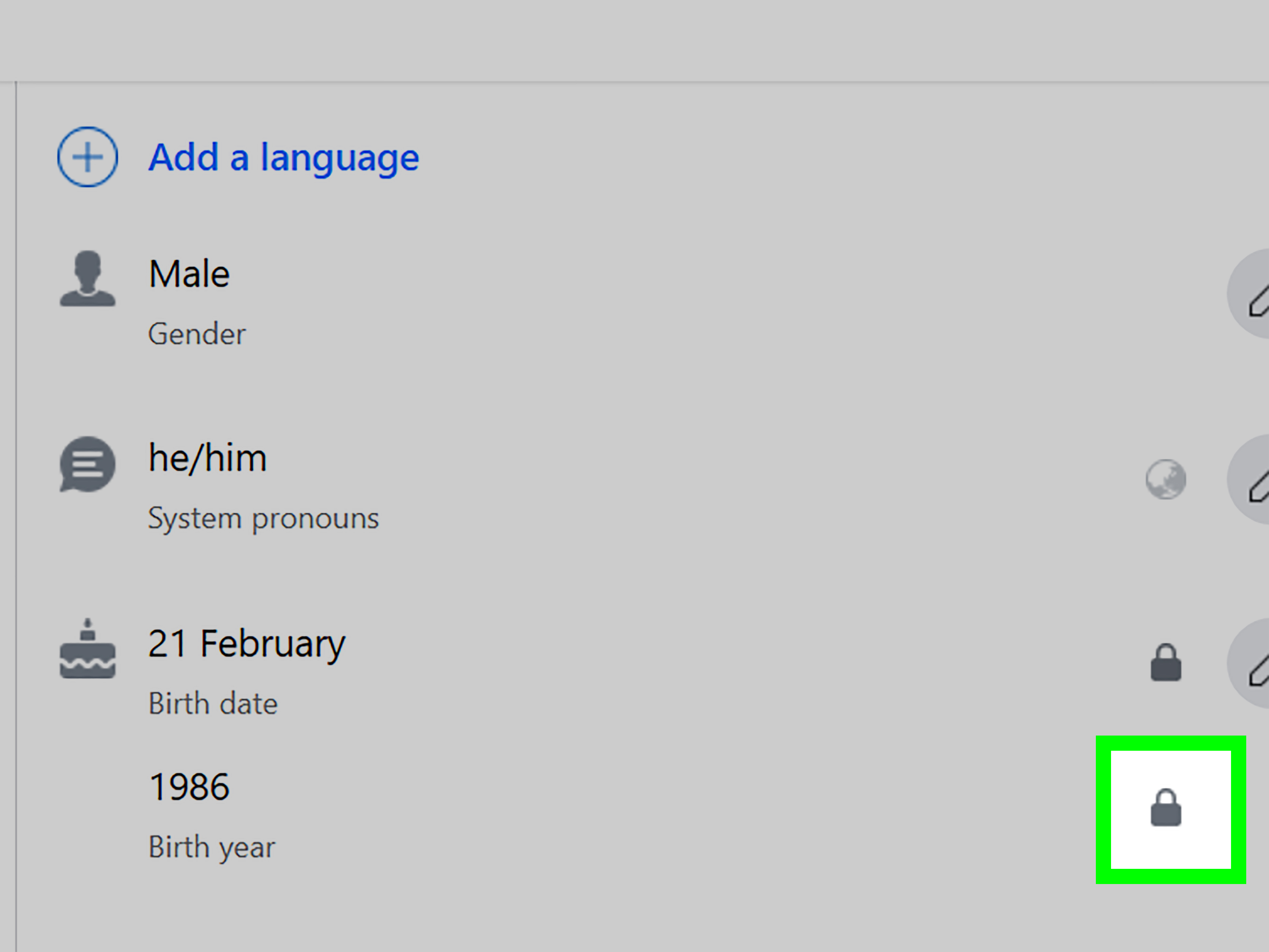
Find your Birthday under “Basic info.” You’ll see an audience selector (often a small icon like a globe, two heads,
or a gear). -
Set Who can see your birth date to:
- Only me (maximum privacy), or
- Friends / Friends except… / Specific friends (if you want selective sharing).
- Set Who can see your birth year separately. If you want to keep your age private, choose Only me here too.
- Click Save (and enjoy the sweet sound of silence from your notifications).
Quick privacy recommendation
If your goal is “no birthday attention,” set both the birth date and birth year to Only me. If you set the date
private but keep the year visible, you may still be sharing more than you intended.
Way 2: Hide Your Birthday on Facebook Using the Mobile App (iPhone or Android)
On mobile, the steps are similarjust more “scroll, scroll, scroll… oh, there it is.” Depending on your version, Facebook may route edits through
Accounts Center, especially if your Facebook is connected to Instagram or other Meta services.
Step-by-step (Facebook App)
- Open the Facebook app and go to your profile.
- Tap See your About info (or Edit profile, depending on your layout).
- Scroll to Basic info and tap Edit.
- Locate your Birthday. Next to it, tap the privacy/audience control.
-
Choose your visibility:
- Only me to fully hide your birthday, or
- Friends except… / Specific friends for a custom “VIP guest list.”
- Repeat for Birth year (if shown separately) and set it to Only me if you don’t want your age visible.
- Tap Save (sometimes at the bottom of the screen).
If you get bumped to Accounts Center
Don’t panicFacebook isn’t judging you; it’s just being… Facebook. If the app opens Accounts Center, look for:
Accounts Center → Personal details → Birthday, then adjust who can see your birthday and birth year, and save your changes.
Choose the Right Privacy Setting (Without Accidentally Starting a Family Group Chat)
Option A: “Only me” (the stealth mode)
Best if you want your birthday hidden from everyonefriends, strangers, and that one person who messages you once a year like it’s a scheduled software
update.
Option B: “Friends” (normal visibility)
Best if you’re fine with birthday posts, but want to keep strangers from seeing it. This setting can still lead to friend notifications and birthday
feed reminders.
Option C: “Friends except…” (the polite boundary)
Great if you want most friends to see it, but not coworkers, distant relatives, or anyone who might make your birthday about their essential oils.
Option D: “Specific friends” (the curated audience)
Perfect for sharing with your inner circle onlythink: family, best friends, and the people you’d actually invite to cake.
How to Double-Check That Your Birthday Is Really Hidden
Facebook settings can feel like you saved them, then they quietly wandered off for a snack. Here’s how to confirm your birthday privacy is actually set:
- View your profile as someone else: Use Facebook’s “View As” feature (on desktop) or ask a trusted friend to check your About section.
- Check both fields: Make sure birth date and birth year are set the way you want.
- Give it a minute: Some changes take a short moment to reflect across devices.
Common Problems (and Fixes) When You Can’t Hide Your Birthday
“I can’t find the Birthday section.”
Facebook rearranges menus like it’s playing a game of hide-and-seek with your patience. Look under About → Contact and basic info
on desktop, or See your About info / Edit profile on mobile.
“It won’t let me change anything.”
Facebook limits how often you can change your birthday details (especially the actual date). If you’re only changing visibility and it still won’t save,
try updating the app, switching Wi-Fi/cellular, or logging out and back in.
“My accounts are linked, and it keeps redirecting me.”
That’s the Accounts Center effect. If your Facebook and Instagram are connected, Facebook may manage personal details (including birthday) through Accounts Center.
Adjust the audience settings there and save.
Bonus Privacy Upgrades (So Your Birthday Stays Chill)
Hiding your birthday stops the biggest broadcast, but it won’t prevent everything. If you want a truly low-key day, consider these add-ons:
1) Limit who can post on your profile
Even if people don’t get a reminder, someone who knows your birthday might still post on your timeline. In Profile and tagging settings,
you can limit who can post on your profile or require review before posts appear.
2) Turn on timeline review
With review enabled, birthday posts won’t show up publicly unless you approve them. Think of it as a bouncer for your timelineclipboard not required.
3) Reduce public profile signals
If you’re tightening privacy, consider making other “identity puzzle pieces” less visible too (like hometown, phone number, and public friend list). It’s
harder for strangers to connect dots when you don’t leave the dots out on the table.
Why Hiding Your Birthday Is a Smart Privacy Move
Your birthday seems harmlessuntil it becomes one more data point used for guessing security questions, social engineering, or confirming someone’s identity.
Privacy is rarely about one detail; it’s about combinations of details.
Also: you get to decide how you celebrate. Maybe you love birthday posts. Maybe you’d rather not spend your day replying to 60 messages that start with
“Hey stranger!” Both are valid. The point is choice.
A quick real-world example
If your birthday is visible, a casual acquaintance might see it, message you, and then use that conversation to ask for more personal info (“Wait, are you
still in Chicago?” “What’s your middle name again?”). Even if the intent is harmless, oversharing makes it easier for bad actors to impersonate you later.
FAQ
Can I remove my birthday from Facebook completely?
Usually, no. Facebook generally requires a birthday on the account. What you can do is set the audience to Only me so it’s hidden from
everyone else.
Will hiding my birthday stop friends from getting birthday notifications?
In most situations, yessetting your birthday visibility to Only me prevents others from seeing it on your profile and reduces the typical
birthday reminders that prompt posts and notifications.
Can I hide the year but keep the day and month visible?
Yes. Facebook commonly lets you set different audiences for the birth date and the birth year. You can share the day/month with friends while keeping the
year set to Only me.
If I hide my birthday, can I turn it back on later?
Yesvisibility settings can be changed again. Just remember: Facebook may limit how often you can change the actual birthday date, but visibility changes are
typically more flexible.
Real Experiences: What It’s Like to Hide Your Birthday on Facebook (and Why People Keep It That Way)
Hiding your birthday on Facebook isn’t just a “settings tweak”it changes the feel of your day in surprisingly practical ways. A lot of people try it as a
small experiment: “Let’s see who remembers without the reminder.” What happens next is usually some mix of relief, clarity, and the sudden realization
that you don’t actually miss the notification flood.
The first thing many folks notice is the quiet. When your birthday is public, Facebook tends to turn it into a mini public holiday on
your timeline. People who haven’t interacted with you in years might post because the platform nudged them. That can be sweet, but it can also feel like
you’re hosting a party you never plannedone where you’re expected to greet everyone at the door with a smile and a reply.
When your birthday is set to Only me, the dynamic shifts. The messages you receive tend to come from people who either remembered on their
own or have the date saved somewhere else (texts, calendar reminders, family group chats that somehow never sleep). For a lot of users, that feels more
genuineless like an automated “engagement prompt” and more like an intentional moment.
There’s also a social energy benefit: you’re not compelled to spend your day responding to a long chain of “Happy birthday!” comments. Some people enjoy
replying to everyoneit feels festive. But others find it draining, especially if they’re busy, traveling, working, or simply not in the mood to be
publicly perceived. (Yes, that’s a real mood. No, you don’t have to justify it.)
Another common experience is realizing how much personal data circulates online without you noticing. Your birthday seems small, but it’s
part of a larger identity puzzle: name + location + school + job history + birthday can make it easier for strangers to confirm they found the right
person. People who hide their birthday often end up doing a wider “privacy sweep” afterwardmaking friend lists less visible, tightening who can message
them, and setting old posts to a narrower audience. It becomes a gateway habit: one smart setting leads to five more.
Finally, there’s an emotional side that surprises people: hiding your birthday can help you reclaim what you want the day to be. Maybe you want a low-key
dinner, not a public comment thread. Maybe you want to celebrate offline and not watch the red notification badge multiply like gremlins. Or maybe you
just don’t want your timeline to become a digital guestbook for people you barely know. All of that is valid. Your birthday is personalFacebook doesn’t
get to decide it’s a public event.
- Best outcome: fewer unwanted posts, more control, less noise.
- Unexpected perk: messages feel more intentional when they’re not prompted by a reminder.
- Privacy win: you reduce a key piece of personal info visible to strangers (and sometimes even acquaintances).
In other words: hiding your birthday isn’t anti-social. It’s pro-boundaries. And boundaries, unlike Facebook layouts, never go out of style.