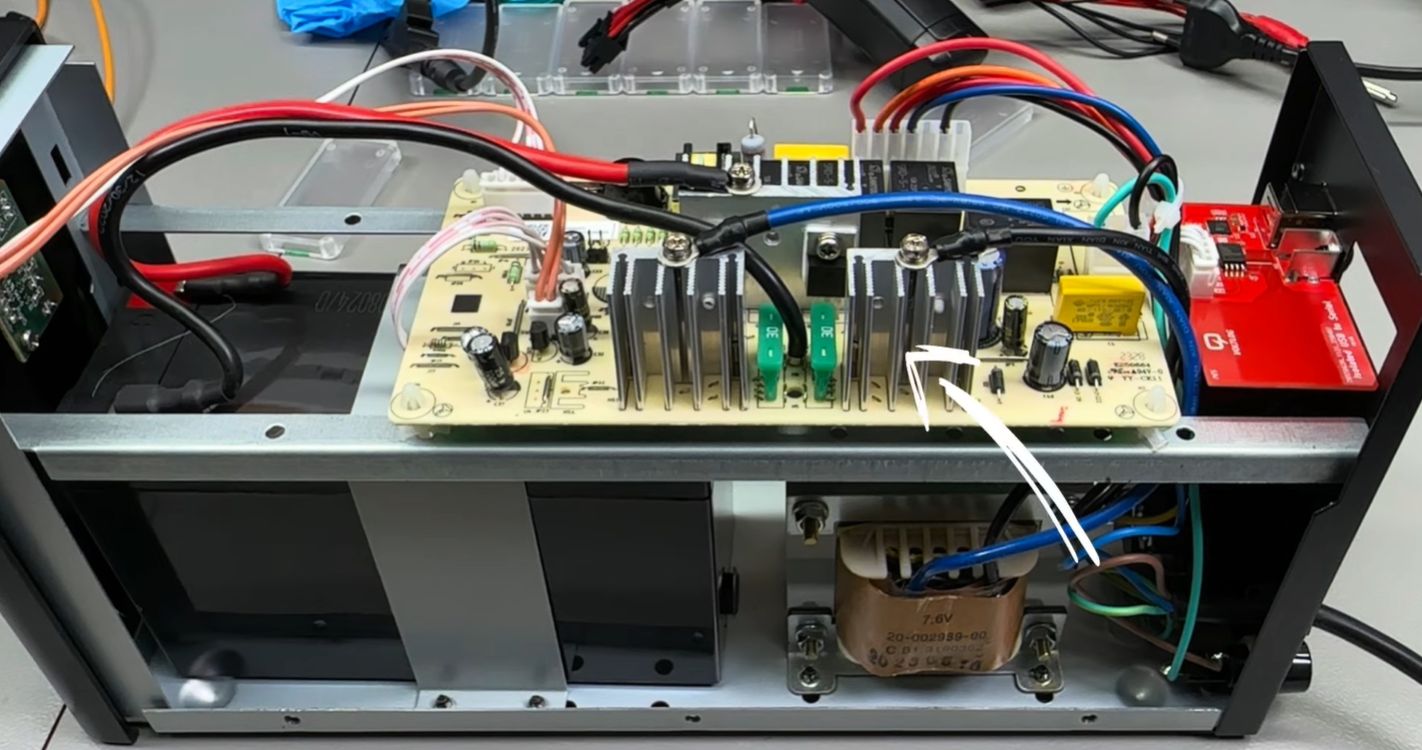
A cheap UPS looks like the responsible adult of the electronics shelf. It sits there in a black plastic box, silently promising to protect your router, NAS, smart home hub, mini server, gaming PC, security camera bridge, and that one mystery power brick nobody dares unplug. Then the lights flicker, your devices panic, Home Assistant loses its mind, and suddenly the “budget-friendly backup power solution” becomes a 10-hour troubleshooting marathon involving screwdrivers, USB drivers, serial adapters, and a replacement PCB.
That is the real lesson behind the wonderfully painful phrase: the cost of a cheap UPS is 10 hours and a replacement PCB. The sticker price may say $40, $50, or $70. The true price may include lost time, unreliable monitoring, weak power conditioning, questionable firmware, battery replacement, missing safety features, and the emotional damage of asking, “Why is my backup system the thing that needs backup?”
This article breaks down what cheap uninterruptible power supplies often get wrong, why UPS quality matters, how a tiny communication board can become a giant headache, and how to choose backup power without accidentally buying a weekend project in disguise.
What a UPS Is Supposed to Do
A UPS, or uninterruptible power supply, is designed to keep equipment running when utility power drops, surges, sags, or disappears entirely. In plain English, it is a battery backup with a brain. When the wall outlet stops behaving, the UPS steps in so your devices can keep running long enough to shut down safely or ride through a short outage.
For home users, a UPS commonly protects Wi-Fi routers, modems, desktop computers, network-attached storage, smart home controllers, point-of-sale systems, game consoles, and security equipment. For offices and server rooms, it can prevent data corruption, downtime, failed transactions, and hardware stress. Nobody wants a power blink to turn a spreadsheet into confetti.
The Three Common UPS Types
Most consumer and small-business UPS units fall into three categories: standby, line-interactive, and online double-conversion.
Standby UPS systems are usually the cheapest. They pass utility power through to your equipment until a problem is detected, then switch to battery. This is fine for basic loads, but the equipment still sees many of the incoming power imperfections.
Line-interactive UPS systems add automatic voltage regulation, often called AVR. That means the UPS can correct minor voltage dips and spikes without using the battery every time. This can extend battery life and provide steadier output for computers, routers, and small servers.
Online double-conversion UPS systems are the premium option. They convert incoming AC power to DC and then back to AC, continuously powering the load through the inverter. These units are typically used for mission-critical equipment because they offer excellent power conditioning and no transfer time when utility power fails.
Where Cheap UPS Units Start Cutting Corners
The cheapest UPS on the shelf is rarely cheap by magic. Manufacturers have to save money somewhere, and the cuts often happen in places the buyer cannot easily see: the inverter design, battery charger, USB interface, monitoring firmware, output waveform, internal wiring, heat management, and quality control.
On paper, a bargain UPS may advertise battery backup, surge protection, and USB communication. In real life, that can mean a tiny battery, a noisy relay, a simulated sine wave output, bare-minimum surge suppression, and a USB controller that behaves like it was programmed during a thunderstorm.
The Hidden Cost of a Bad USB Interface
The specific story behind this title involves a low-cost UPS purchased for smart home equipment. The power backup function was not necessarily the main villain. The real trouble came from the communication interface. The UPS appeared to work with Network UPS Tools and Home Assistant through a generic USB protocol, but the connection kept dropping. For a smart home setup, that is a big problem because monitoring is not a luxury feature. It is how the system knows when to shut down, alert the owner, or preserve critical services.
After teardown, the issue pointed toward a generic USB-to-serial implementation. Instead of enjoying peaceful backup power, the owner ended up designing and installing a replacement communication PCB using a more reliable USB-to-UART controller and digital isolation. The final joke was not very funny: a cheap UPS became 10 hours of work plus more money in parts than the original bargain suggested.
That is the first big lesson: when a UPS is part of an automated system, communication reliability matters almost as much as battery runtime. A UPS that cannot report its status consistently is like a smoke alarm that only screams when it feels emotionally ready.
Why Monitoring Matters More Than People Think
Many buyers focus on how long a UPS can keep devices alive. Runtime matters, but monitoring is what makes the UPS useful instead of merely hopeful. Good UPS monitoring tells connected systems the battery charge, load percentage, input voltage, output status, battery health, and whether utility power has failed.
For a desktop PC, that information allows graceful shutdown before the battery dies. For a NAS, it helps avoid data corruption. For a home lab, it can shut down servers in the right order. For smart home systems, it can keep critical automations alive while preventing battery abuse.
Open-source tools such as Network UPS Tools are popular because they create a common way to monitor many UPS models across different operating systems and platforms. Home Assistant users often rely on this kind of integration to track backup power from dashboards and automations. But bargain UPS models may use rebranded hardware, inconsistent protocols, weak firmware, or USB bridges that are technically present but practically annoying.
Generic Hardware Is Not Always Bad
Generic electronics can be perfectly fine when they are designed and implemented well. The problem is not that a device uses a common USB controller or a standard serial link. The problem is when the implementation is poorly documented, unstable, electrically noisy, or missing proper isolation.
A good communication board should survive normal electrical conditions, identify itself consistently, and avoid interfering with other USB devices. A weak one may disconnect randomly, share confusing device IDs, or require driver gymnastics. If your UPS monitoring depends on a board that behaves like a sleepy raccoon, your whole backup strategy becomes fragile.
Pure Sine Wave vs. Simulated Sine Wave
Another place cheap UPS units save money is output waveform. Many lower-cost units produce a simulated sine wave, also called a stepped approximation. For basic devices, this may work. For more sensitive equipment, especially power supplies with active power factor correction, a pure sine wave UPS is often the safer choice.
Modern computers, servers, networking equipment, and high-end electronics can be picky about power quality. Some active PFC power supplies may buzz, run inefficiently, shut down, or behave unpredictably when fed a rough simulated waveform during battery operation. That does not mean every device needs a premium UPS, but it does mean the cheapest unit should not automatically be trusted with expensive gear.
AVR Is a Feature Worth Paying For
Automatic Voltage Regulation helps correct low or high voltage without switching to battery. This is especially useful in areas with brownouts, unstable utility power, older wiring, or frequent storms. Without AVR, a standby UPS may switch to battery more often, draining and wearing the battery faster.
For a router and modem, a small standby UPS may be enough. For a workstation, NAS, mini server, or smart home hub, line-interactive AVR is usually a smarter baseline. For medical, industrial, or mission-critical systems, professional advice and higher-grade equipment are worth the money.
The Battery Is Not Forever
A UPS battery is a consumable part, not a sacred relic. Many consumer UPS systems use sealed lead-acid batteries, while some newer models use lithium-ion packs. Lead-acid batteries are proven and widely recyclable, but they age. Heat, deep discharges, cheap charging circuits, and long storage can shorten their life.
A common replacement window for many UPS batteries is around three to five years, depending on temperature and use. If a cheap UPS overcharges, undercharges, or poorly manages the battery, the battery may fail much sooner. Then the “cheap” UPS becomes a battery shopping trip, followed by the classic ritual of trying to slide a swollen battery out of a plastic case while saying words not approved for family websites.
Do Not Ignore Battery Safety
Batteries deserve respect. A damaged, swollen, leaking, or overheating UPS battery should not be ignored. Lead-acid batteries should be recycled properly, not tossed into household trash. Lithium-ion batteries require careful handling because damaged cells can create fire risks. If a UPS smells hot, clicks constantly, shows fault lights, or fails self-tests, unplug nonessential loads and investigate before trusting it again.
The Real Cost Equation
The real cost of a cheap UPS is not just the purchase price. A better formula looks like this:
True UPS cost = purchase price + setup time + troubleshooting time + replacement batteries + lost data risk + damaged equipment risk + frustration tax.
That frustration tax is not imaginary. It is the Saturday afternoon you planned to spend relaxing but instead spent reading driver logs. It is the $15 adapter, the $12 cable, the $30 replacement battery, and the $61 PCB that somehow arrives in anti-static packaging with the personality of a confession.
Cheap equipment can still be useful when expectations are realistic. A budget UPS under a Wi-Fi router may save the day during short power blips. A bargain UPS under a workstation, NAS, or smart home controller may be fine if it has stable monitoring, adequate wattage, replaceable batteries, and the right waveform. But when the device protects expensive hardware or critical services, the cheapest option can become the most expensive mistake.
How to Choose a UPS Without Regret
1. Calculate Watts, Not Just VA
UPS boxes often advertise VA ratings, but your devices consume watts. Check the watt rating and leave headroom. If your equipment uses 300 watts, do not buy a UPS rated for 300 watts and call it destiny. Add margin for startup draw, future devices, and battery aging.
2. Match the UPS Type to the Job
Use standby units for simple, low-risk loads. Choose line-interactive models with AVR for home offices, network gear, NAS devices, and small servers. Consider online double-conversion for sensitive or mission-critical systems where downtime or poor power quality is unacceptable.
3. Check the Output Waveform
If the load includes active PFC power supplies, servers, high-end PCs, audio gear, or sensitive electronics, look for pure sine wave output. It may cost more, but it reduces compatibility surprises when the UPS switches to battery.
4. Verify Monitoring Support
Before buying, check whether the model works well with your operating system, NAS, router, or home automation platform. Look for reliable USB or network management support. Compatibility with Network UPS Tools, vendor software, or standard HID UPS drivers can save hours later.
5. Look for Replaceable Batteries
A UPS with a replaceable battery is usually a better long-term purchase than a sealed mystery brick. Check the replacement battery model, price, and availability before buying the UPS. If the battery costs almost as much as the unit, that is useful information.
6. Respect Safety Certifications
Backup power equipment handles mains voltage, batteries, heat, and fault conditions. Look for recognized safety certification and buy from reputable sellers. A no-name UPS protecting a $2,000 workstation is not a bold financial strategy. It is a trust fall with electricity.
7. Test Before You Need It
Do not wait for a storm to discover that your UPS battery died during the previous presidential administration. Test the unit, confirm runtime, verify software shutdown, and check alerts. A UPS that has never been tested is not a plan. It is a decorative rectangle.
When Repairing a Cheap UPS Makes Sense
Repairing or modifying a cheap UPS can be worthwhile for hobbyists, engineers, and electronics enthusiasts who want to learn. A replacement PCB project can teach USB communication, serial protocols, isolation, firmware configuration, PCB design, and power safety. That knowledge has real value.
However, repair is not always the best choice for ordinary users. Opening a UPS can expose dangerous voltages even after it is unplugged. Batteries can deliver high current. Capacitors can hold charge. Mains wiring is unforgiving. If you are not trained to work safely around power electronics, replacement is often smarter than repair.
The 500-Word Experience Section: What This Teaches in Real Life
Anyone who has maintained a home lab, smart home, or small office network eventually learns that backup power is not glamorous until it fails. A UPS is one of those devices you buy hoping to never think about again. Unfortunately, cheap units sometimes demand attention like a toddler with a soldering iron.
The most common real-world mistake is buying based on price alone. You see a low-cost UPS, notice the word “backup,” and imagine your router peacefully surviving outages like a tiny digital lighthouse. Then you plug in a modem, router, Raspberry Pi, NAS, and smart home bridge. The first power flicker arrives, and the UPS either works for four heroic minutes or shuts everything down with the dramatic timing of a soap opera villain.
The second lesson is that monitoring turns backup power from a battery into a system. Without reliable status reporting, your devices cannot make smart decisions. A NAS needs to know when to shut down. A server needs to know whether the battery is almost empty. A smart home controller needs to know whether it should reduce load, send alerts, or preserve essential automations. When a cheap UPS randomly disconnects from USB, the equipment may still receive power, but the system loses awareness. That is like driving with headlights but no dashboard.
The third experience is the “small fix becomes big project” trap. At first, the problem looks simple: maybe a cable is bad. Then you try another cable. Then another USB port. Then a powered hub. Then a different driver. Then logs. Then forums. Then firmware guesses. Suddenly, the UPS is open on the bench, the original communication board is under suspicion, and you are pricing USB-to-UART chips at midnight. Congratulations: you did not buy a UPS; you adopted a curriculum.
There is also a humility lesson. Sometimes the expensive unit is not expensive because of branding alone. Better UPS models may offer cleaner output, AVR, stronger software support, quieter operation, replaceable batteries, clearer displays, better thermal design, and more predictable behavior. None of those features feel exciting at checkout. They feel exciting when the power fails and nothing crashes.
Still, the experience is not all bad. Repairing a flawed UPS can be deeply satisfying. Designing or installing a replacement PCB gives you a closer look at how backup systems communicate. You learn why isolation matters, why USB identifiers matter, why open-source monitoring tools are valuable, and why documentation saves sanity. The project may cost more than expected, but it can turn frustration into skill.
The practical takeaway is simple: buy cheap only when the risk is cheap. If the UPS protects a router, a budget model may be acceptable. If it protects business data, a NAS, a workstation, or a smart home brain, spend more for reliability, monitoring support, and battery quality. Ten hours of troubleshooting has a price. So does a replacement PCB. So does explaining to yourself why the “money-saving” purchase is now more expensive than the good one you skipped.
Conclusion
A cheap UPS is not automatically bad, but it should be treated as a calculated compromise. The lowest sticker price may hide weak monitoring, poor firmware, limited power conditioning, short battery life, simulated sine wave output, or questionable long-term support. When everything works, you saved money. When it does not, the bill may arrive in the form of 10 lost hours, replacement parts, and a new appreciation for buying the right tool the first time.
The smartest UPS purchase is not always the most expensive one. It is the one that matches the load, supports your software, provides the right waveform, includes replaceable batteries, and behaves predictably when the wall power quits. Backup power should reduce stress, not become the main character in your next repair saga.
Note: This article is based on publicly available information from UPS manufacturers, power-protection guidance, electronics safety standards, open-source UPS monitoring documentation, and real-world repair reporting.